
How to Use OpenClaw to Find and Organize Research Sources
Tired of wasting hours on research tasks? OpenClaw is an AI tool designed to simplify academic research by automating time-consuming tasks like finding papers, extracting key details, and organizing citations. It connects to databases like PubMed and arXiv, processes PDFs, and integrates with tools like Zotero, saving researchers up to 23 hours per week.
Key Features:
- Automated Literature Searches: Query multiple databases simultaneously with advanced filters.
- Effortless Citation Management: Generate and format references in seconds.
- Data Extraction: Summarize papers, extract findings, and map evidence into themes.
- Seamless Integration: Works with Slack, Telegram, Zotero, and more.
With OpenClaw, you can focus on research ideas instead of administrative work. Keep reading to learn how to set it up and streamline your workflow.
Getting Started with OpenClaw
Setting Up OpenClaw
OpenClaw is designed to run directly on your local machine, meaning there’s no need to sign up for a cloud service.
Before you begin, make sure your system meets these minimum requirements: 8 GB of RAM (though 16 GB is better), 10 GB of free disk space (20 GB recommended), and Node.js version 22 or later. If you’re on Windows, you’ll need to use WSL2, while macOS (12 and above) and Ubuntu (20.04 and above) allow direct installation.
To install OpenClaw, use npm with the following command:
npm install -g openclaw@latest
Once installed, run the onboarding wizard with:
openclaw onboard
This wizard walks you through setting up your AI model, communication channels, and workspace. After you finish onboarding, verify the setup by running:
openclaw doctor
If you prefer a managed hosting option, you can explore Blink Claw for $45/month or try ClawCloud, which offers $25 in free credits for new users.
For academic users, customization is key. Edit the configuration files located in ~/.openclaw/. Start with USER.md to include details about your research focus, such as "Literature review on AI ethics", and the tools you rely on, like Zotero or Notion. Then, adjust SOUL.md to set a tone that aligns with academic standards, like "direct and concise." To further enhance your setup, install the Academic Deep Research skill by running:
openclaw skill install academic-deep-research
Once OpenClaw is up and running, you’re ready to explore its interface and connect it to your research tools.
Understanding the OpenClaw Interface
OpenClaw doesn’t use a traditional dashboard. Instead, it integrates directly with the communication tools you already rely on. Whether it’s WebChat for file uploads and visual tasks, Slack for quick team collaboration, or iMessage for jotting down notes on the go, OpenClaw fits seamlessly into your workflow.
The system operates through a local WebSocket server on port 18789, which acts as a bridge between the AI and your chosen platforms. This setup lets you, for example, send a query from Slack at your desk and later review the response on your phone via iMessage.
All your settings, workspace data, and agent configurations are stored in ~/.openclaw/, specifically in the openclaw.json file. This includes API keys and model preferences. The MEMORY.md file ensures continuity by retaining context from previous research sessions. You can even create separate agents for different projects, such as "Work" and "Personal", each with its own dedicated workspace and memory.
To expand OpenClaw’s capabilities, visit ClawHub to find additional skills. Popular options include web-search, pdf-manager, zotero, and pubmed-search, which turn your assistant into a powerful research tool. For instance, the Canvas feature can help you create visual research maps or timelines, making it easier to identify patterns across studies.
sbb-itb-f7d34da
Finding and Collecting Research Sources
Using Search Filters to Find Sources
OpenClaw's browser.search() function gives you incredible flexibility when hunting for academic papers. By using advanced search operators, you can fine-tune your results. For instance, use filetype:pdf to locate full-text documents, site:arxiv.org to zero in on specific databases, or date constraints like after:2023-01-01 to focus on the most recent research. These filters work seamlessly across platforms like PubMed, arXiv, and Semantic Scholar.
If you're running large-scale searches, consider switching your search engine to Semantic Scholar by configuring browser.search.engine: s2. This avoids common issues like rate limits and CAPTCHA challenges that often plague Google Scholar. OpenClaw can also handle complex natural language queries. For example, you can ask for "the 30 most-cited papers on federated learning from 2023 to 2025", and it will automatically parse and execute the search logic. In fact, during a 2026 AgentPatch demo, this method processed dozens of papers in just minutes.
For more advanced research, install the CellCog skill. This tool refines searches iteratively by analyzing initial results, identifying gaps, adjusting queries, and even flagging inconsistencies. It also assigns confidence scores to findings, helping you gauge how well-supported each piece of information is. This approach ensures a balanced perspective by avoiding reliance on a single source.
Once you've filtered your results, OpenClaw's tools make it easy to save and organize your findings for future use.
Saving and Organizing Sources
After gathering your sources, OpenClaw simplifies the process of storing and categorizing them by automatically extracting metadata. This includes essential details like the title, authors, publication year, abstract, citation count, DOI, and open-access URLs. Use the memory.save task to store this data in a structured database such as SQLite or Redis. Organize entries into "namespaces" like namespace: papers and use DOIs as unique identifiers to avoid duplicates.
For file-based organization, OpenClaw supports multiple formats. Save metadata in JSON alongside downloaded PDFs, use BibTeX for LaTeX projects, or opt for RIS to ensure compatibility with popular reference managers. Logical folder structures, such as references/papers/ for documents and references/citations/ for bibliographic data, make retrieval straightforward. To streamline the entire workflow, you can chain tasks using the pipe operator - search-papers -> process-pdf -> extract-notes - allowing OpenClaw to handle everything from discovery to organization in one go.
"OpenClaw's memory is vectorized through PgVector or RedisVec... Saving chunks earlier already embedded them. The LLM receives the top-k relevant chunks with sources and synthesizes an answer." - Run Lobster
If you prefer working with external tools, OpenClaw can export data directly to Zotero using the Zotero web API or sync with platforms like Obsidian. You can even automate weekly updates with cron jobs. For example, setting a job like 0 10 * * 1 will automatically gather the latest papers every Monday at 10:00 AM. This kind of automation is a game-changer, especially considering that researchers spend up to 70% of their professional time - roughly 23 hours a week - on administrative tasks like data collection and document review.
Extracting and Organizing Information
Extracting Key Claims and Evidence
Once you've gathered your sources, OpenClaw simplifies the process of pulling out the exact details you need. Using pdf.js, it can parse academic papers to automatically extract structured text, outlines, and references. For longer documents - those exceeding 50 pages - OpenClaw employs the text.chunk helper to divide the content into overlapping 1,000-token segments, with a 200-token overlap to ensure continuity.
The tool’s llm.map function is particularly useful for pinpointing key components such as research questions, methodologies, sample sizes, main findings, and contradictions. For instance, you can direct the agent to extract details like "study design", "sample size", and "primary endpoint" into a structured markdown table, making it easier to compare findings across papers. OpenClaw also automates the tracing of citation graphs, enabling you to quickly identify pivotal works that shape specific research areas.
The time savings are impressive. Conducting manual data extraction for systematic reviews can take anywhere from 2 to 219 hours per review, with an average of 30.7 hours. In March 2026, the AgentPatch team showcased OpenClaw’s efficiency by analyzing 34 federated learning papers from arXiv. In just 5 minutes, the tool grouped the papers into five thematic clusters, identified the central research question for each cluster, and highlighted the most influential paper - a task that would typically take a human researcher nearly half a workday.
Categorizing and Mapping Evidence
After extraction, the next step is to categorize and map the evidence systematically. OpenClaw excels at this by grouping papers into thematic clusters based on shared methodologies, research questions, or niche sub-topics. Instead of simply organizing studies in chronological order, the tool detects patterns - for instance, separating research on privacy-preserving techniques from studies focusing on communication efficiency - and creates cohesive thematic clusters.
Extracted information is stored in vectorized databases like RedisVec or PgVector, allowing users to perform natural language queries that synthesize results from the most relevant content chunks. This means you can pose questions like, "What are the consensus findings on X?" and receive a synthesized summary. OpenClaw also compares sources to identify areas of agreement, contradictions, and gaps in the literature automatically.
"OpenClaw turns PDFs into queryable knowledge." - OpenClawForge
This integrated workflow ensures that discovery, extraction, and organization processes are not only faster but also more efficient.
Managing References and Creating Citations
Formatting Citations in Multiple Styles
OpenClaw takes the hassle out of citation formatting by automating the process for a variety of journal styles. It retrieves complete bibliographic metadata using identifiers like DOIs, titles, or arXiv IDs. Once the metadata is fetched, OpenClaw can generate citations in formats such as APA 7, MLA 9, Chicago 17, IEEE, ACM, Vancouver, and BibTeX.
"Switching between APA, MLA, Chicago, and Vancouver for different journals is pure overhead - no intellectual value, just formatting busywork." - Blink Team
The tool also creates in-text citations that align perfectly with your reference list, whether you need numbered citations or author-date styles. To ensure the most accurate metadata, it’s recommended to use DOIs instead of titles.
Next up: how to seamlessly export and manage these references.
Exporting and Managing References
OpenClaw doesn’t stop at formatting - it also simplifies exporting and managing references. You can save bibliographies in formats like Markdown, CSV, or BibTeX, or directly integrate them into LaTeX and Word templates. For added convenience, OpenClaw connects to Zotero using the Composio framework, enabling you to sync processed papers and their metadata into specific Zotero collections.
In February 2026, a researcher shared their workflow using OpenClaw 0.48.2 to automate literature reviews. By linking OpenClaw to Zotero through Composio, they downloaded PDFs from arXiv, extracted metadata using a worker pool of 4-8 parsers, and automatically organized journal entries into a "litreview" collection. This setup generated 2-3 page summaries with numbered references that matched Zotero keys.
"Good summaries are useless if you can't cite later. I hooked Zotero because its web API is sane and free." - Run Lobster
For even more efficiency, OpenClaw allows you to schedule weekly literature sweeps. You can have citation libraries sent directly to your inbox or messaging platforms like Telegram or Slack. This automation lets you stay focused on your research while keeping your reference library organized and up-to-date without wasting time on manual citation tasks.
OpenClaw COMPLETE Tutorial - All 12 Concepts You Need To Know (Memory, Cron vs Heartbeat, Workspace)
Workflow and Tips for Using OpenClaw
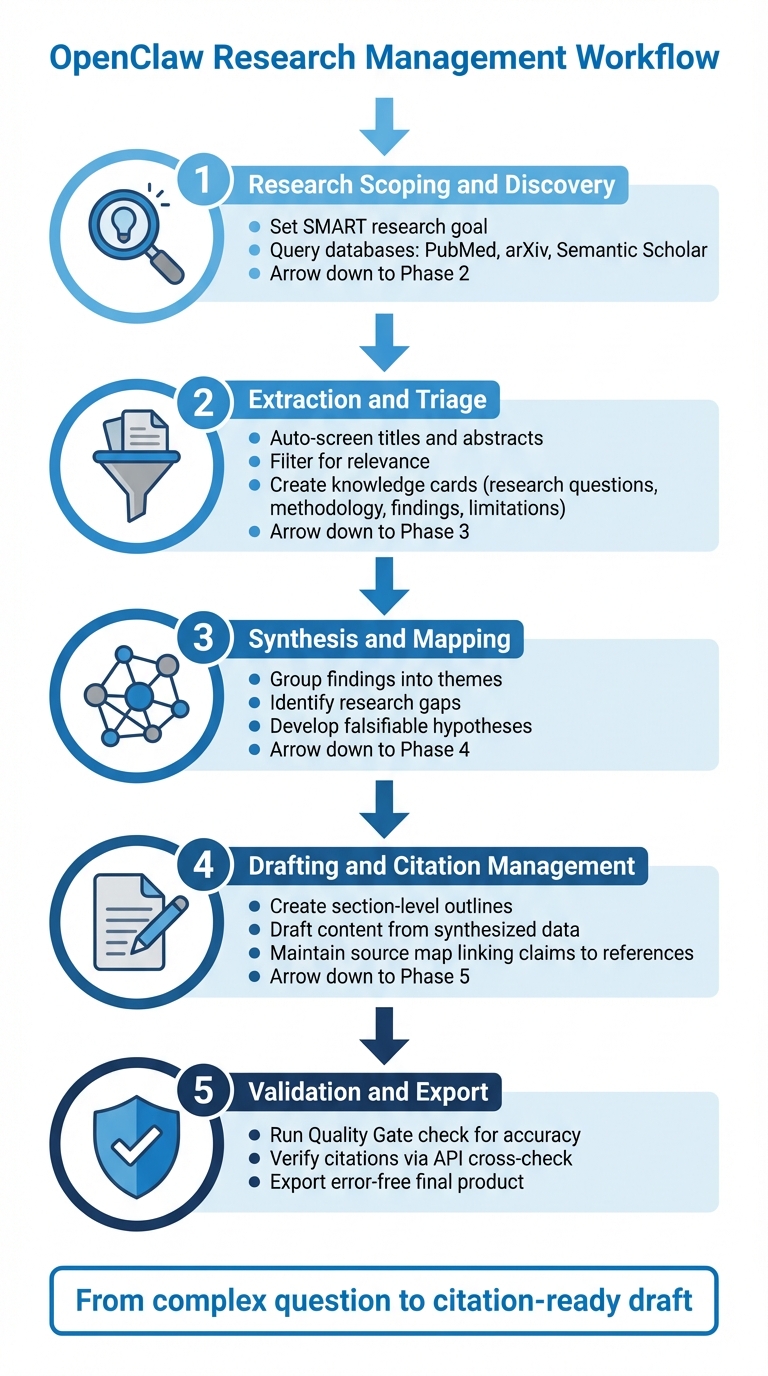
5-Step OpenClaw Research Management Workflow
Step-by-Step Research Management Workflow
OpenClaw simplifies the research process by transforming complex questions into citation-ready drafts. Here's a streamlined five-phase workflow to help you make the most of its capabilities:
- Research Scoping and Discovery: Start by setting a SMART research goal. Use your browser skills to query live databases like PubMed, arXiv, and Semantic Scholar for relevant resources.
- Extraction and Triage: Let OpenClaw automatically screen titles and abstracts, filtering for relevance. It then organizes the information into "knowledge cards" that summarize each paper's research questions, methodology, key findings, and limitations.
- Synthesis and Mapping: Group findings into themes, pinpoint research gaps, and develop falsifiable hypotheses based on the data.
- Drafting and Citation Management: Use the synthesized data to create section-level outlines and draft content. Maintain a detailed source map so every claim is linked back to its original reference.
- Validation and Export: Run a "Quality Gate" check to evaluate the output's accuracy. Use a citation verification step to cross-check references with real APIs, ensuring the final product is error-free.
This workflow allows you to handle complex literature reviews in a fraction of the time it would take using traditional methods, saving you hours of manual effort.
Tips for Getting the Most from OpenClaw
To maximize OpenClaw's efficiency, keep these practical tips in mind:
- Manage Token Usage: Summarize findings into short, persistent notes instead of feeding raw data into the language model all at once.
- Start Focused: Begin with a narrow query and a manageable number of sources (5–10 papers). This approach helps validate the workflow before scaling up to more extensive research.
- Use Lightweight Models First: Start with lightweight models for initial source classification and filtering. Switch to advanced models for final synthesis to balance cost and performance.
- Verify Citations: Always include a "Citation Verify" step to cross-check DOIs and titles against real-world databases. This ensures no inaccurate references make it into your final draft.
- Leverage Persistent Hosting: For large-scale research, consider using persistent hosting options like Blink Claw (starting at $45/month). This allows you to run intensive literature sweeps overnight, so results are ready for review the next morning.
Conclusion
OpenClaw simplifies academic research by turning complex tasks into an automated, hands-off process. It handles everything - searching databases, finding the right sources, extracting key data, and formatting citations - all without constant oversight. When paired with persistent hosting options like Blink Claw (starting at $45/month), it operates around the clock, providing well-organized summaries and references by the next morning.
The results speak for themselves. Institutions using similar automated tools have reported a 2–4× increase in workload capacity without needing to expand their teams. This highlights how OpenClaw optimizes each step of the research process, from the initial search to managing citations.
Whether you're working on a systematic review, compiling literature for a dissertation, or just keeping up with developments in your field, OpenClaw takes care of the logistical heavy lifting. That way, you can focus your energy on the intellectual aspects that truly matter to your work.
FAQs
How do I choose the right AI model for my research tasks?
When picking an AI model, it's all about finding the features that align with your specific needs. Whether you're looking for capabilities like web browsing, file management, or automation, focus on what matters most to your tasks.
For instance, OpenClaw offers a mix of cloud-based and local models, giving you options depending on your preference for flexibility or control. Look for models that excel at managing multi-step workflows, maintaining context, and remembering your preferences - these are especially important for detailed tasks like conducting literature reviews or managing citations.
Lastly, ensure the model integrates seamlessly with your existing tools and workflows to avoid unnecessary disruptions.
How can I keep OpenClaw’s saved sources and notes organized across multiple projects?
To keep your sources and notes well-organized across different projects in OpenClaw, use project-specific workspaces. These workspaces act as dedicated hubs for storing files like notes and curated knowledge.
Here’s how to do it:
- Create a separate folder for each project.
- Save relevant Markdown files, such as MEMORY.md or SOUL.md, within these folders.
This setup ensures that all your data is stored in an orderly fashion, making it easy to access and update whenever needed. By keeping everything organized, you can maintain the context of your work without having to start over.
What’s the best way to verify citations so my references are accurate?
To keep your citations precise, make it a habit to cross-check sources using reliable databases like PubMed or official publisher websites. Tools like OpenClaw can help you query verified sources and steer clear of inaccurate or fabricated references. Make sure to include identifiers like DOIs or PMIDs and verify these details with trustworthy platforms to ensure your citations remain dependable.