How to Find Peer Reviewed Articles Without Wasting Hours
Finding peer-reviewed articles doesn’t have to be a time-consuming process. Here’s how you can simplify it:
- Use AI Tools: Platforms like Sourcely allow you to search over 200 million academic papers from trusted databases like PubMed and Semantic Scholar. Features like "Peer-Reviewed Only" filters and AI-generated summaries help you quickly find and evaluate relevant sources.
- Google Scholar Tips: While Google Scholar doesn’t have a built-in peer-reviewed filter, linking it to your university library and using advanced search techniques (e.g.,
author:orintitle:) can help refine your results. - Academic Databases: Discipline-specific databases like PsycARTICLES or ProQuest often include built-in filters for peer-reviewed content, saving you additional steps.
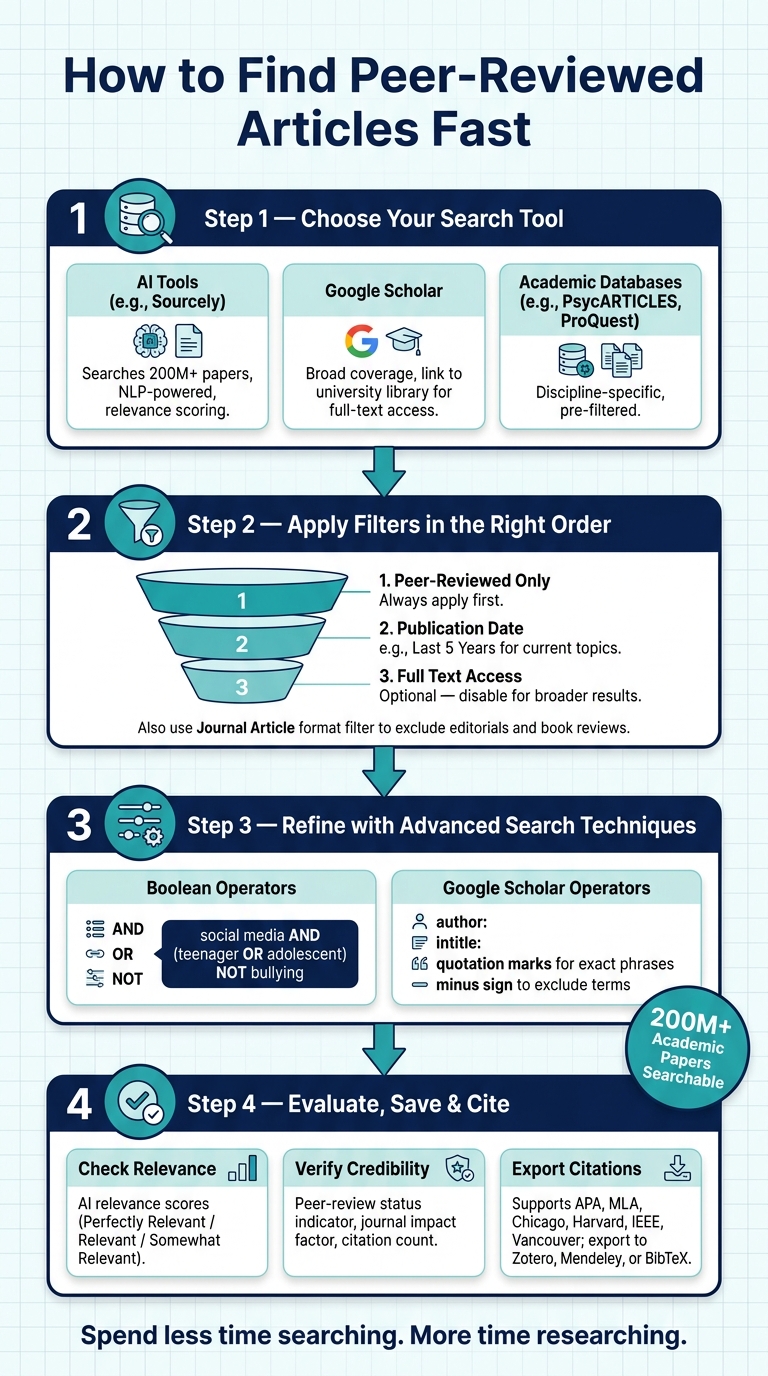
- Efficient Filtering: Apply filters in this order for best results: peer-reviewed first, then date range, and finally full-text access if needed.
Key Takeaways:
- Use AI tools like Sourcely to streamline your search.
- Link Google Scholar to your university library for better access.
- Leverage academic databases with built-in peer-review filters.
- Combine filters and Boolean operators to refine your searches.
These strategies ensure you spend less time searching and more time focusing on your research.
How to Find Peer-Reviewed Articles Fast: Step-by-Step Guide
How to Find Peer Reviewed Journal Articles on Google Scholar
sbb-itb-f7d34da
How Sourcely Makes Finding Peer-Reviewed Articles Easier
Sourcely is an AI-driven research tool designed to simplify your search for academic papers. It scans over 200 million articles from trusted databases like Semantic Scholar, PubMed, arXiv, CrossRef, and CORE. By pulling results from multiple sources, it saves time and ensures you’re working with credible material - all in one place. With over 100,000 users already benefiting from it, Sourcely is transforming how researchers approach literature reviews. Let’s dive into how its features make research more efficient.
Searching with Keywords or Essay Text
Sourcely’s search system is user-friendly and smart. Instead of just matching keywords exactly, it uses natural language processing (NLP) to grasp the context of your query. This means you can type out a research question, a few relevant terms, or even paste a paragraph from your draft, and the AI will return results that align with your needs.
Once the results are displayed, each paper is given an AI-generated relevance score: "Perfectly Relevant", "Relevant", or "Somewhat Relevant." This scoring system helps you zero in on the most useful sources without the hassle of opening each one individually.
Narrowing Results with Advanced Filters
After running your initial search, you can refine your results using Sourcely’s advanced filtering options. One standout feature is the "Peer-Reviewed Only" toggle, which weeds out non-scholarly sources, ensuring your results are academically sound. Additional filters let you narrow down by publication year, paper type, or even open-access availability.
| Filter Category | Options Available |
|---|---|
| Source Credibility | Peer-Reviewed Only, Author Credibility, Journal Quality |
| Recency | Publication Year, Publication Date Range |
| Content Type | Meta-analysis, Review, Preprint, Conference Proceedings, Dissertations |
| Access | Open Access (Free PDFs) |
| AI Relevance | Perfectly Relevant, Relevant, Somewhat Relevant |
These tools make it easy to fine-tune your search and focus on the most relevant and credible sources.
Reading Summaries and Downloading Articles
Sourcely also helps you evaluate papers quickly by providing AI-generated summaries for each source. These summaries give you a snapshot of a paper’s content, so you can decide if it’s worth diving into the full text.
"Save time and effort by quickly getting a general overview/summary of a source material." - Sourcely
When a paper catches your attention, Sourcely offers direct links to download free PDFs, giving you instant access to the research you need. Plus, the "Chat with Sources" feature lets you ask specific questions about a paper, making it easier to extract key details like methodologies or data points without having to read the entire document.
How to Use Google Scholar for Peer-Reviewed Research
Google Scholar is a helpful tool for academic research, but it doesn't come with a built-in filter for peer-reviewed content. This is because its index includes a mix of sources such as patents, court opinions, preprints, and journal articles. To find peer-reviewed studies, you'll need to take a more deliberate approach.
"Google Scholar does not provide the option to filter for peer reviewed content because not everything in Google Scholar is scholarly." - Yale University Library
Here are two strategies to make your searches more effective.
Connecting Google Scholar to Your University Library
One way to streamline your search for peer-reviewed articles is by linking Google Scholar to your university library. Once connected, you'll see links like "Find it @ Stanford" or "View at NYU Libraries" next to search results. These links often lead directly to full-text, peer-reviewed articles instead of abstracts or paywalled pages.
Setting this up is simple:
- Open the Settings menu in Google Scholar.
- Select Library Links.
- Search for your institution, select it, and click Save.
If you're on campus when you do this, Google Scholar will remember your library access for up to 30 days, making it easier to continue your research from off-campus.
Applying Advanced Search Techniques
Once your library is linked, you can refine your searches using Google Scholar's Advanced Search tools. For example:
- Use the
author:operator to find works by specific researchers (e.g.,author:"J Smith"). - Place phrases in quotation marks to search for exact terms (e.g., "cognitive behavioral therapy").
- Exclude irrelevant results by adding a minus sign before terms you want to avoid (e.g.,
-patent). - Use the
intitle:operator to focus on article titles.
To find more recent studies, click "Cited by" under a relevant article. This shows newer research that builds on the original work, helping you stay up-to-date.
Finding Peer-Reviewed Sources Through Academic Databases
Subject-specific academic databases work differently than general search engines. While platforms like Google Scholar cover a wide range of topics, academic databases tailored to specific disciplines pre-filter their results. Universities often provide access to these databases through an "A-Z Databases" list or "Subject Guides" on their library websites. This built-in focus makes them an efficient option for targeted research.
Some databases even handle part of the filtering process for you. For instance, PsycARTICLES is designed for psychology research and automatically limits its results to peer-reviewed journals. This saves you the step of manually applying a peer-review filter.
Filtering Search Results to Peer-Reviewed Journals Only
Databases like EBSCOhost and ProQuest make it easy to filter for peer-reviewed sources. On EBSCOhost, you can check the "Peer-Reviewed" box below the search bar, while ProQuest offers this option in its "Advanced Search" settings. Knowing where these filters are located before starting your search can save time.
However, even after applying a peer-review filter, you might encounter book reviews, editorials, or letters - content that appears in peer-reviewed journals but isn’t research-based. To avoid this, use an additional filter like "Journal Article" under "Content Type" or "Format" to refine your results further.
Combining Keywords with Date and Full-Text Filters
Once you've applied the peer-review filter, you can refine your search even more by combining specific keywords with date and full-text filters. Using Boolean operators (AND, OR, NOT) helps narrow your focus. For example, a search like social media AND (teenager OR adolescent) NOT bullying uses parentheses to group terms and exclude irrelevant topics.
After your initial search, apply filters in this order for the best results: peer-reviewed first, then date range, and finally full-text access if needed. A 5-year date range works well for current topics, especially in fields like medicine or technology. If this narrows your results too much, you can expand the range.
The "Full Text" filter is handy when you're on a tight deadline and need immediate access to articles. However, leaving it off allows access to a wider range of research. If an article isn’t available in full text, you can often request it through your university’s Inter-Library Loan service. These strategies help streamline the research process and improve accuracy.
| Filter | When to Use It |
|---|---|
| Peer-Reviewed | Always - apply this first in every search |
| Publication Date | Use "Last 5 Years" for recent topics; expand if necessary |
| Journal Article (Format) | To exclude editorials and book reviews |
| Full Text | For immediate access; disable for broader results |
| Subject Terms | To focus results when keywords return unrelated topics |
How to Manage and Cite Your Sources Efficiently
Once you've gathered your sources, the next step is ensuring they're reliable and incorporating them into your work without wasting time on tedious formatting.
Checking Whether a Source Is Peer-Reviewed
Sourcely makes it easy to verify the credibility of your sources with its peer-review status indicator. This feature appears directly in the search results for each suggested reference, alongside the journal impact factor and citation count. Clicking on any result lets you access detailed metadata to confirm whether the source is peer-reviewed.
The platform gathers its data from reputable repositories like PubMed, CrossRef, arXiv, and Semantic Scholar, tapping into a database of over 200 million research papers. Because Sourcely pulls from multiple trusted sources, you don’t have to rely on just one to confirm the academic credibility of your references.
If you’re looking to match claims with peer-reviewed sources quickly, Sourcely’s Citation Finder can help. Simply paste in the claim, and the tool will locate relevant peer-reviewed references in seconds. This saves you from starting a manual keyword search from scratch.
Once you’ve confirmed your sources are credible, you can move on to exporting citations with ease.
Exporting References in Different Citation Formats
Sourcely simplifies citation management. After saving your sources, you can choose your preferred citation style and either copy individual citations or export your full reference list in one go.
The platform supports a wide range of academic citation styles, including:
| Citation Style | Best For |
|---|---|
| APA (7th Ed.) | Psychology, education, social sciences |
| MLA (9th Ed.) | Literature, humanities, liberal arts |
| Chicago / Turabian | History, business, fine arts |
| Harvard | Business, natural sciences, social sciences |
| IEEE | Engineering, computer science, IT |
| Vancouver | Medicine, nursing, biomedical sciences |
For those using reference management tools, Sourcely allows direct exports to Zotero or Mendeley, and you can also download a BibTeX file for LaTeX projects. This eliminates the need for manual data entry, saving you time and reducing the risk of errors when recording author names, publication years, or journal titles.
Conclusion: Find Peer-Reviewed Articles Faster Without Cutting Corners
Discover peer-reviewed articles in just minutes. With Sourcely's AI-driven search, advanced filtering options, and seamless integration with university library systems, finding relevant sources for your research has never been easier.
These tools work together to simplify your research process. Sourcely, alongside other academic search platforms, such as Google Scholar with AI technology, offers a complete workflow - from locating sources to exporting citations - all in one place.
As Clarivate aptly notes, "Finding relevant research and journal articles in your field is critical to a successful research project. Unfortunately, it can be one of the hardest, most time-consuming challenges for academics." The right tools not only save time but also enhance the quality of your research. Using databases with consistent and transparent search algorithms ensures stable results over time, which is especially crucial for literature reviews and long-term studies. Plus, automated keyword alerts help you stay updated without the hassle of redoing searches.
Spend less time searching and more time engaging with the sources that matter. Work smarter, not harder.
FAQs
How can I tell if an article is truly peer-reviewed?
To determine if an article is peer-reviewed, start by checking if it’s published in a scholarly journal that relies on expert reviews in the field. Tools like Sourcely offer advanced filters to help you narrow down your search to peer-reviewed content. Additionally, many journals and academic databases clearly mark articles as peer-reviewed or provide details about their review process. Always take a moment to evaluate the journal’s credibility and look for clear signs that the article has undergone a peer-review process.
What’s the fastest way to get the full text if I hit a paywall?
To read an article that's behind a paywall, consider using legal methods to access it. For instance, you can try tools that help locate publicly available versions of the article. Alternatively, AI chatbots can sometimes summarize content using available fragments. Some platforms even combine multiple tools to increase the chances of finding what you need. Just make sure that whatever approach you choose aligns with legal and ethical standards.
How should I combine keywords and filters to avoid missing key studies?
To make sure you don't overlook important studies, it's essential to use advanced filtering tools wisely. Start by combining specific keywords with filters such as publication date, peer-review status, and study type. This helps narrow down your search to the most relevant results.
You can also save and reuse filter sets for future searches, saving time and effort. Incorporate Boolean operators (like AND, OR, NOT) to fine-tune your search by including or excluding certain terms. Prioritize recent research to stay updated on the latest developments.
Lastly, keep your filters current by adjusting them to align with emerging trends. This way, you'll consistently capture the most relevant and credible studies without missing any key findings.