
Using OpenClaw to Write a Literature Review - Complete Walkthrough
Writing a literature review can be overwhelming, but OpenClaw makes it faster and more efficient. Here's how it works:
- Automates tedious tasks: OpenClaw searches multiple academic databases (like PubMed, arXiv, Semantic Scholar) simultaneously, organizes results, and removes duplicates.
- Streamlines workflows: It summarizes papers, formats citations in various styles (APA, MLA, Chicago), and integrates with tools like Zotero.
- Saves time: Tasks that used to take hours - like clustering papers or extracting key points - can now be done in minutes.
- Customizable setup: Use it locally (free) or via managed hosting ($45/month for Blink Claw or $25 in credits with ClawCloud).
- Powerful search tools: Refine results with filters (date, citations, publication type) and export data in formats like Markdown or BibTeX.
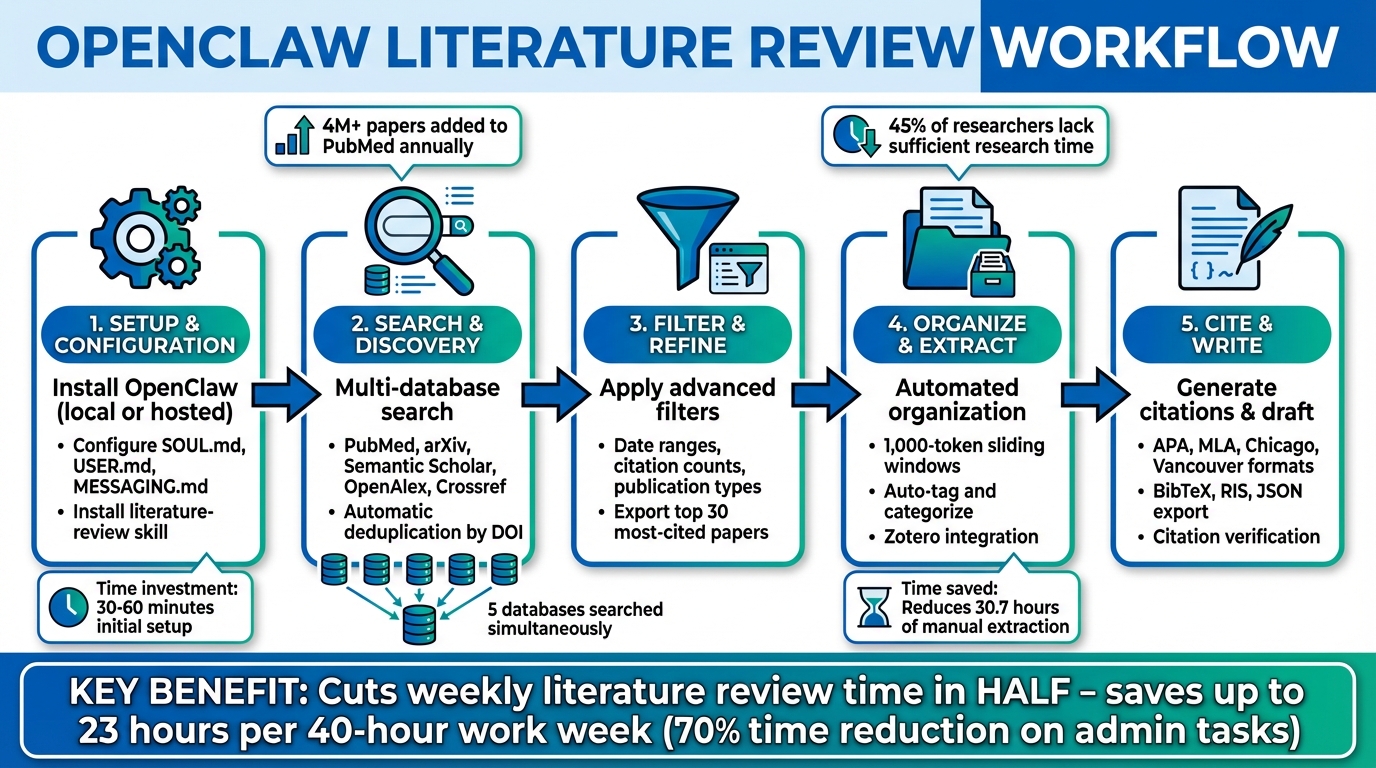
OpenClaw Literature Review Workflow: 5-Step Process from Setup to Publication
Getting Started with OpenClaw
Creating an Account and Setting Preferences
You can start with OpenClaw by choosing either a local installation (free, requires Node.js) or managed hosting options. Managed hosting includes Blink Claw (around $45/month) or ClawCloud, which offers $25 in free credits. A local installation is free but requires your machine to stay powered on for uninterrupted use. Managed hosting, on the other hand, takes care of the infrastructure, ensuring the agent runs 24/7 - perfect for tasks like overnight literature searches without needing to leave your laptop open.
For local installation, follow these steps:
npm install -g openclaw
openclaw onboard
The onboarding process will guide you through linking your language model provider (commonly Anthropic Claude 4.5 or Gemini 3), setting up security permissions, and configuring the background daemon. By setting your USER_EMAIL environment variable early, you gain access to "Polite Pools" for APIs like OpenAlex and Crossref, which improves access speed and reliability for scholarly databases.
Next, customize three key configuration files located in ~/.openclaw/:
- SOUL.md: Defines your assistant's communication style. For research, you might prioritize traits like "accuracy over speed" or "direct communication."
- USER.md: Stores your professional context, such as current projects and tools (e.g., Zotero).
- MESSAGING.md: Sets communication rules.
Spend about 30–60 minutes fine-tuning SOUL.md. According to the official documentation, the quality of your assistant improves with the effort you put into this step.
To enhance your research capabilities, install research-specific skills with this command:
npx playbooks add skill openclaw/skills --skill literature-review
This enables automated searches in academic databases. Additionally, configure a model failover in your openclaw.json file by specifying a primary model (e.g., Anthropic Claude 4.5) and a fallback (e.g., GPT-4o). This ensures your workflow continues uninterrupted during provider outages.
Once your account and preferences are set, you can dive into the OpenClaw dashboard to manage tasks and track research progress.
Understanding the OpenClaw Dashboard
To access your local dashboard, open a browser and go to http://127.0.0.1:18789/. If authentication is required, retrieve your token using:
openclaw config get gateway.auth.token
The dashboard is divided into four main sections:
- Skill Library: Install connectors for academic databases.
- Task Manager: Design and manage multi-step workflows.
- Memory Store: Use vector-based memory (via Redis or SQLite) to search through your reading history. This enables semantic searches across previously reviewed papers.
- Scheduler: Set up recurring research digests.
You can interact with OpenClaw through your browser or messaging platforms like Telegram or Slack, allowing you to send structured research prompts. Unlike standard search tools that stop working when your browser closes, managed OpenClaw instances operate continuously. For example, you can schedule a weekly literature digest to arrive every Monday at 7 AM or use the /pipe command to automate tasks like searching, downloading, and summarizing.
"I used to spend half my time just trying to remember what I'd read. Now I process papers in minutes and can actually find my notes when I need them." – Dr. Sarah Chen, Assistant Professor, Neuroscience
To keep your research accurate and relevant, review your MEMORY.md file every two to four weeks to remove outdated project details.
sbb-itb-f7d34da
Finding Relevant Sources with OpenClaw
Defining Your Research Topic
How you phrase your research topic can make or break the quality of your results. Instead of vague queries like "find papers on machine learning", try crafting specific, detailed prompts. For example:
"Search PubMed and arXiv for papers published between January 2024 and March 2026 on federated learning in healthcare. Return the 30 most-cited papers. Include key metadata such as title, authors, year, summary, methodology, and key findings. Output the results as a markdown table sorted by citation count."
OpenClaw's literature-review skill makes this process seamless by querying multiple academic engines at once, including Semantic Scholar, OpenAlex, Crossref, and PubMed. You can even narrow your focus by specifying databases with the --source parameter. For instance:
- Use
--source pmfor PubMed, ideal for biomedical research. - Use
--source oafor arXiv, great for physics or computer science preprints. - Use
--source allfor a broader search across multiple platforms.
OpenClaw also deduplicates results automatically using DOIs, saving you the hassle of sorting through repeated entries. To streamline your search further, request specific metadata like citation counts, impact factors, or methodologies. This way, you can zero in on the most influential papers without opening each one.
Once you've nailed down your topic, OpenClaw's advanced filters take your search to the next level.
Using Search Filters for Better Results
To refine your search, leverage filters like --start-date, --end-date, --year, --min-citations, and publication type. For PubMed, you can filter by specific publication types - such as Clinical Trials, Systematic Reviews, or Meta-Analyses - and exclude papers without accessible PDFs by enabling the "full-text only" option.
OpenClaw's browser skill also supports search operators for more precise queries. For example:
filetype:pdfensures results include downloadable PDFs.site:arxiv.orglimits results to arXiv.after:YYYY-MM-DDnarrows results by publication date.
When searching arXiv, you can focus on categories like cs.AI for artificial intelligence or math.CO for combinatorics. If you're tracking the work of a particular researcher, the --author flag lets you target their publications directly.
| Database | Best For | Key Features |
|---|---|---|
| PubMed | Biomedical research | Full abstracts, MeSH terms, publication type filters |
| arXiv | CS, physics, math preprints | Category-specific searches and recent preprints |
| Semantic Scholar | Citation analysis | Influence metrics, citation graphs, TL;DR summaries |
| OpenAlex | Comprehensive searches | Fast API access, effective abstract reconstruction |
| Crossref | Precise metadata | DOI-based lookups (no abstracts) |
For the most thorough results, combine multiple engines using --source both or --source all. OpenClaw handles deduplication automatically, making it easier to work with the massive volume of new publications - PubMed alone adds over 4 million annually.
Saving and Accessing Sources
After narrowing your search and selecting key papers, OpenClaw helps you securely store and organize your findings. Its memory system saves your research for easy access later, using SQLite for smaller setups or Redis for larger ones.
To make your research more accessible, OpenClaw allows you to search your saved sources using natural language. For example:
/ask memory.papers "What are the dominant metrics?"
This creates a searchable archive of your reading history. You can also export results in formats like BibTeX, RIS, JSON, CSV, or Markdown, making them compatible with tools like LaTeX and reference managers. If you're a Zotero user, OpenClaw integrates through the Composio framework, automatically creating library entries complete with metadata and summaries. Plus, the file.download skill lets you save full-text PDFs directly to your local or cloud storage.
For a fully automated workflow, you can chain tasks together with the pipe operator. For instance:
search-papers → process-pdf → extract-notes
This setup moves seamlessly from searching to saving summaries. Considering that researchers spend up to 70% of their time - about 23 hours out of a 40-hour workweek - on administrative tasks like data collection and document review, this kind of automation is a game-changer.
Organizing and Managing Research Materials
Tagging and Categorizing Sources
After gathering your research sources, keeping them organized is key to staying efficient. OpenClaw simplifies this with YAML frontmatter in Markdown files, allowing you to store metadata like tags. For instance, you can add tags: [project, methodology] to your notes, and OpenClaw's semantic indexing will help you locate the exact information you need.
A well-structured folder system also goes a long way. Consider creating directories such as /projects for ongoing work, /knowledge for general resources, and /reference for archived materials. This setup works seamlessly with OpenClaw's memorySearch system, making your searches more focused while keeping your workspace tidy. Additionally, namespacing can help avoid data overlap. For example, saving files under namespace: papers ensures your research materials stay distinct from other types of data.
For tagging automation, the expanso-keyword-extract skill can identify key phrases and assign tags to your materials. To maintain version control, store your categorized Markdown files in a private GitHub repository. This approach helps you track changes, compare versions, and revert to earlier drafts when necessary. With this system in place, you’ll be ready for the next step: taking detailed notes and adding annotations.
Adding Notes and Annotations
A well-organized research system paves the way for efficient note-taking, which is essential for analyzing and synthesizing your findings. OpenClaw offers tools like extract-notes to generate bulleted summaries automatically. For manual annotations, the apple-notes skill with memo notes -a provides an interactive terminal editor, cutting down on the time spent on manual tasks. This is especially useful when you consider that systematic reviews often require an average of 30.7 hours for manual data extraction.
You can configure OpenClaw to save annotations directly to Obsidian or a local database, ensuring they remain searchable and version-controlled. As Steph Ango, CEO of Obsidian, aptly notes:
"Apps are ephemeral, but your files have a chance to last."
For added efficiency, Zotero integration via the Composio framework automatically attaches summaries to new entries. When working with lengthy PDFs, use 1,000-token sliding windows with a 200-token overlap to ensure no critical details are missed between sections.
Managing Citations and References
Generating Citations in Different Formats
OpenClaw's citation-management skill makes it easy to retrieve bibliographic data from sources like CrossRef, PubMed, and arXiv. With this tool, you can create references in styles such as APA 7, MLA 9, Chicago 17, or Vancouver by simply providing a paper's DOI or title along with your preferred citation format. It supports exporting citations in formats like BibTeX (for LaTeX), RIS (for Zotero or Mendeley), JSON, Markdown, and plain text.
For quick conversions, you can use the doi_to_bibtex.py script, which transforms DOIs into formatted entries and even includes clipboard support. If you need to standardize your bibliography, the scripts/format_bibtex.py tool lets you adjust the formatting with a --style flag.
To ensure your citations are accurate, run the python scripts/validate_citations.py references.bib --auto-fix script. This tool verifies DOIs through doi.org, checks for missing fields, and flags duplicate entries. As noted in the Blink Blog:
"Switching between APA, MLA, Chicago, and Vancouver for different journals is pure overhead - no intellectual value, just formatting busywork."
Once your citations are ready, the next step is integrating them into your document.
Exporting and Adding References to Your Document
After generating and validating your citations, you can easily integrate them into your manuscript. If you're using LaTeX, the system creates a references.bib file alongside a paper.tex file. Citation keys in Markdown (like [cite_key]) are automatically converted to LaTeX commands (\cite{cite_key}). For those working in Word or Google Docs, you can export citations in RIS format and import them into Zotero or Mendeley. OpenClaw also allows direct export to Google Docs and Markdown files.
For Zotero users, setting up the zotero.yaml integration ensures that every processed paper is automatically added to your reference manager, complete with summaries saved as notes. Additionally, the system includes a "CITATION_VERIFY" stage that cross-checks references against real APIs to eliminate any fabricated citations. Before submitting your work, review the verification_report.json file to confirm that all citations have been validated. If you're manually editing BibTeX files, remember to enclose capitalized words in curly braces {} to prevent LaTeX from converting them to lowercase.
These tools and export options make it simple to incorporate accurate references into your preferred writing platform.
Writing and Structuring the Literature Review
Extracting Key Information from Sources
OpenClaw simplifies the process of extracting research notes from lengthy PDFs using its sliding window method. This involves breaking documents into 1,000-token sections with a 200-token overlap, thanks to the built-in text.chunk helper. To ensure consistent and concise results, the llm.map function generates bullet-point notes that focus on critical elements like key findings, methods, and datasets. For a more in-depth analysis, OpenClaw stores these document chunks as embeddings using vectorized memory systems like RedisVec or PgVector. This setup allows you to query your entire collection of papers with commands such as /ask memory.papers. This feature is particularly handy for spotting dominant evaluation metrics or tracking how methodologies evolve over time [2,8]. By organizing this extracted data, you lay the groundwork for a thorough analysis of research trends and gaps.
Identifying Research Gaps
Once the key information is extracted, the next step is identifying patterns and finding gaps in the research. OpenClaw uses thematic clustering to group papers based on textual features and citation chains, making it easier to see where research is concentrated and which areas are underexplored [1,24]. This automated grouping helps you systematically analyze your field and quickly identify gaps. To make this process even more precise, you can structure your synthesis prompt to focus on specific sections like "Trends", "Methods", and "Gaps." Additionally, vector memory queries let you compare different perspectives, while using OpenAlex with the --sort citations flag surfaces highly cited foundational works, offering deeper insights into the field [8,24].
Organizing Your Content
OpenClaw follows a systematic "Extract → Organize → Draft" workflow [7,5]. After extracting data, you can organize papers by themes to highlight research gaps or arrange them chronologically to trace the development of your topic. Logical grouping connects the dots between data extraction and drafting your literature review. OpenClaw supports both approaches, enabling you to streamline your writing process. Automated tasks, as outlined earlier, help keep your workflow efficient. For drafting, OpenClaw synthesizes information from multiple sources into a cohesive narrative, complete with citation keys [7,12]. You can even automate regular updates by setting up a schedule.yaml file with a cron job (e.g., "0 7 * * 1") to perform weekly literature reviews and deliver summaries directly to platforms like Telegram or Slack.
Conclusion
Main Benefits of Using OpenClaw
OpenClaw streamlines the literature review process by automating the tedious tasks that can take up to 23 hours of a standard 40-hour work week. It handles everything from searching multiple databases to deduplicating results and delivering organized summaries directly to tools you already use - like Zotero, Obsidian, or even messaging platforms like Telegram and Slack.
By cutting weekly literature review time in half, OpenClaw allows researchers to dedicate more energy to analysis and synthesis instead of administrative tasks. This is particularly valuable given that only 45% of researchers worldwide say they have enough time for actual research. The time savings and efficiency improvements make a noticeable difference in productivity.
These features make it easier than ever to optimize your review process.
Getting Started with OpenClaw
You can get started easily with hosted options like Blink Claw (about $45/month) or ClawCloud, which includes $25 in free credits to try it out. If you prefer, the open-source local installation is also available at no cost.
After setting up, install the literature-review skill to unlock multi-engine searches across platforms like PubMed, arXiv, Semantic Scholar, OpenAlex, and Crossref. For faster API responses, configure your USER_EMAIL environment variable to access the "Polite Pool". Plus, linking your Zotero account lets you save processed papers with pinned summaries automatically. You can even schedule weekly digests for Monday mornings, ensuring you wake up to the latest research updates without lifting a finger.
With OpenClaw, you can bridge the gap between your research ideas and published findings, focusing on what truly matters - critical analysis and discovery.
FAQs
What’s the fastest way to set up OpenClaw for my first literature review?
To get OpenClaw up and running for your first literature review, here’s what you need to do:
- Install OpenClaw: Open your terminal and enter
npm install -g openclaw@latestto install the latest version. - Check the installation: Confirm it's installed correctly by typing
openclaw --version. You should see something likev2025.2.3. - Add the literature review skill: Use the command
npx playbooks add skill openclaw/skills --skill literature-reviewto include the necessary skill for your review. - Complete the onboarding wizard: Follow the prompts to connect APIs and finalize the setup process.
You can complete this entire setup in about 30 minutes.
How can I make OpenClaw searches more precise without missing key papers?
To get the best out of OpenClaw searches while covering all the bases, make use of the "literature-search" and "academic-research" skills. Be specific with your keywords, include subfields, or target either recent studies or cornerstone works. Turn on the multi-source search option to eliminate duplicate results using DOIs, and apply filters like publication years or specific authors to narrow things down. Always check the metadata to ensure you're capturing the most relevant papers. This approach strikes a balance between accuracy and thoroughness.
How do I ensure OpenClaw’s citations are accurate and not fabricated?
To keep OpenClaw’s citations accurate, take advantage of its multi-source search feature to pull data from reliable databases such as Semantic Scholar, OpenAlex, Crossref, and PubMed. Cross-check the DOIs and metadata with the original sources to ensure everything matches up. It's crucial to verify key details like author names, publication dates, and journal titles directly from the linked databases to prevent errors or the inclusion of incorrect citations.