Research Rabbit vs Connected Papers: Which Tool Finds Better Related Studies?
If you're a researcher trying to find related studies, Research Rabbit and Connected Papers are two popular tools that can help - but they work differently. Here's the short version:
- Research Rabbit: Best for broad topic exploration and building a growing collection of papers. It uses multiple "seed papers" to recommend related studies, tracks authors, and integrates seamlessly with Zotero for citation management.
- Connected Papers: Best for diving deep into the academic context of a single paper. It creates a visual graph showing how studies are related through co-citation and shared references, making it easy to trace the intellectual "neighborhood" of a paper.
Key Findings:
- Discovery Style: Research Rabbit offers dynamic, iterative recommendations across a topic, while Connected Papers focuses on static, single-paper networks.
- Ease of Use: Connected Papers is simpler and quicker to use, ideal for immediate insights. Research Rabbit has a steeper learning curve but provides more advanced features.
- Data Sources: Both rely on Semantic Scholar, but Research Rabbit also incorporates PubMed and OpenAlex, making it better for interdisciplinary research.
- Cost: Connected Papers' Academic plan starts at ~$6/month, while Research Rabbit's premium plan is ~$12.50/month.
Quick Comparison
| Feature | Connected Papers | Research Rabbit |
|---|---|---|
| Input | Single paper (DOI/title) | Multiple seed papers |
| Discovery Style | Citation graph (static) | Iterative suggestions |
| Visualization | Similarity-based graph | Graph with citation counts |
| Zotero Integration | Manual export only | Two-way sync |
| Free Tier | 5 graphs/month | 50 seed papers per search |
| Paid Tier | ~$6/month | ~$12.50/month |
Bottom Line: Use Connected Papers for quick, paper-specific insights. Use Research Rabbit for building a broad literature base and managing citations. Combining both tools can maximize your research efficiency.
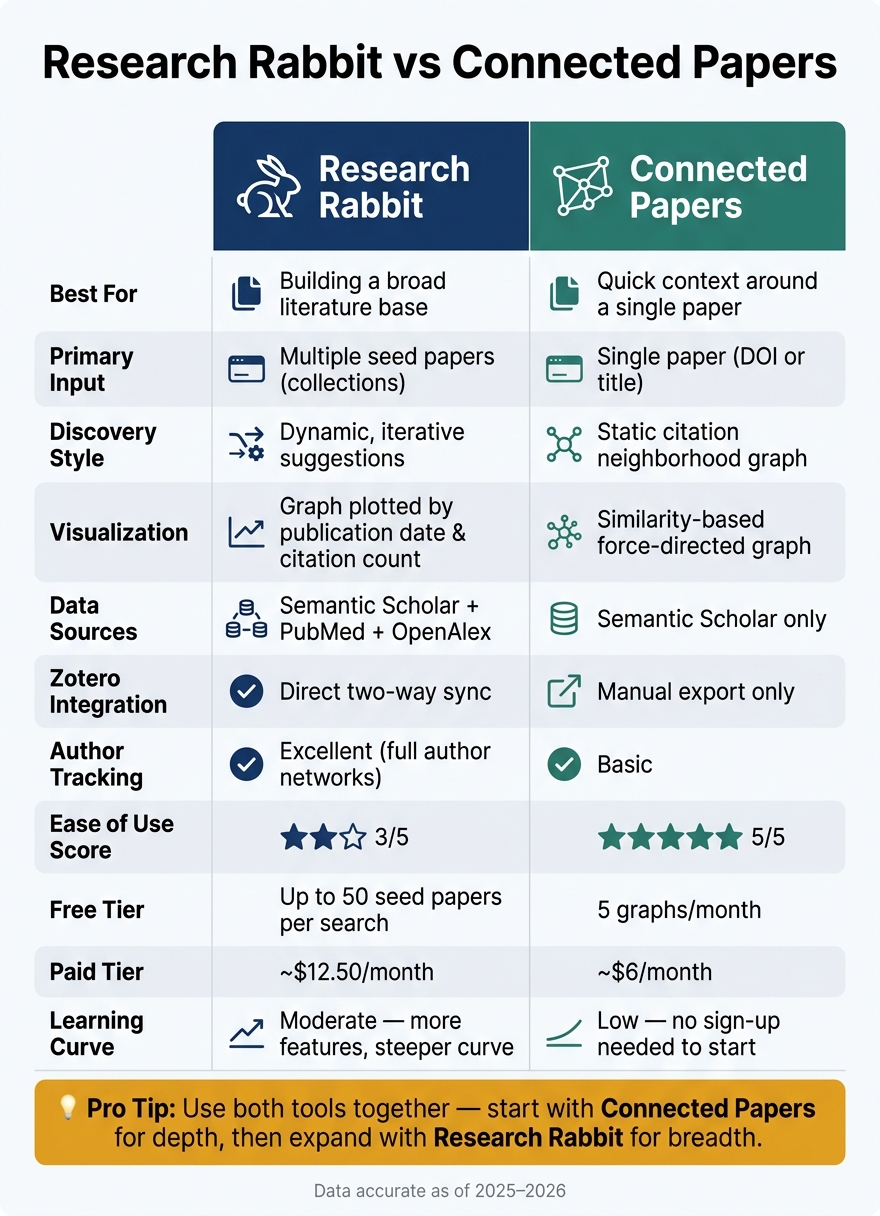
Research Rabbit vs Connected Papers: Side-by-Side Feature Comparison
Research Rabbit: Features and Workflow
How Research Rabbit Finds Related Studies
Research Rabbit bases its recommendations on seed papers, which are studies you identify as relevant to your research. By adding a few papers to a collection, the tool builds a network of related studies using four types of connections: direct citations, shared references between papers (bibliographic coupling), co-authorship links, and AI-inferred semantic similarity from titles and abstracts.
To get the most accurate recommendations, experts suggest starting with 5–20 seed papers. The more context you provide, the better the algorithm can pinpoint your area of interest, analyzing hundreds of thousands of articles to find the most relevant ones.
"Recommendations are calculated based on the articles that are the most influential in the citation network, where influence comes from both the number and quality of citations." - Digl, Writer, ResearchRabbit Guides
You can explore recommendations through three modes: Similar Work, Earlier Work, and Later Work. These options help you track the development of a research field or uncover recent advancements. Once you've gathered your recommendations, Research Rabbit's organizational tools simplify managing them.
Organization and Workflow Features
Research Rabbit organizes your work into collections, which act like project folders. As you add papers, the tool refines its suggestions, helping you build a more focused collection. The Monitor function is particularly helpful - it watches your collection and notifies you when new papers align with your research interests.
The graph view provides a visual layout of papers, plotting them on an X/Y axis. The horizontal axis represents publication dates, while the vertical axis shows citation counts. This design makes it easy to identify key works (older papers with high citations) and emerging studies (recent papers with growing citations). You can also share collections with collaborators, making it a practical tool for team-based literature reviews.
For citation management, Research Rabbit integrates with Zotero, allowing you to import existing Zotero libraries as seed collections. The free tier offers basic Zotero integration, while the paid ResearchRabbit+ plan (about $12.50/month) includes advanced features like two-way sync, unlimited projects, and filters such as SJR Quartiles and journal H-index rankings. While these features enhance collaboration and organization, there are some trade-offs to consider.
Strengths and Limitations
Research Rabbit's collection-based approach ensures that your discovery process evolves over time, rather than starting from scratch with each search. The path-tracing feature, which saves every search iteration, is especially useful if your research focus becomes too narrow and you need to revisit earlier steps.
"Research Rabbit is unique in letting you trace through your search process. Every search iteration is saved, allowing you to 'go back' to earlier steps." - Ilya Shabanov, Founder, The Effortless Academic
However, the platform does have its challenges. The interface can feel overwhelming, particularly for new users managing large collections. Another drawback is the lack of transparency in how recommendations are selected, which might leave users questioning the logic behind certain suggestions. Additionally, because Research Rabbit primarily sources from Semantic Scholar and PubMed, very recent publications may take 1–3 months to appear in the database.
In November 2025, following its acquisition by Litmaps, Research Rabbit transitioned from a fully free model to a freemium structure. The free tier now limits users to 50 seed papers per search. While this is sufficient for most projects, it might feel restrictive for those conducting large-scale systematic reviews.
sbb-itb-f7d34da
Connected Papers: Features and Workflow
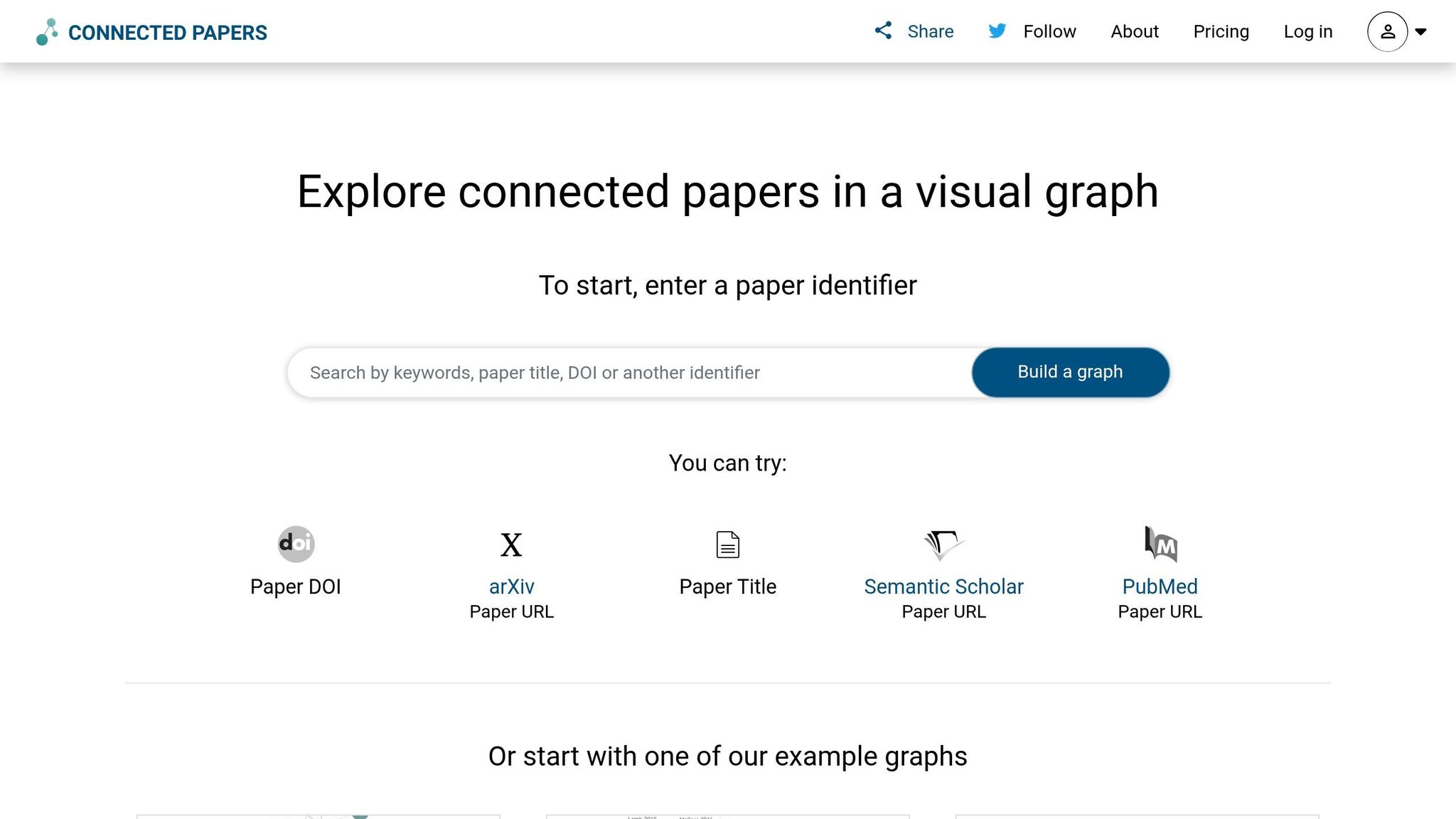
How Connected Papers Shows Related Studies
Connected Papers offers a unique approach to finding relevant sources for your research. Instead of starting with multiple seed papers like Research Rabbit, this tool begins with a single "origin" paper. From there, it generates a visual map of related studies, creating what could be described as an intellectual neighborhood.
The tool uses co-citation (papers often cited together by others) and bibliographic coupling (papers sharing the same references) to determine relationships. This means two papers can appear closely connected on the graph even if they don’t directly cite one another, as long as they explore similar topics. This system makes for an intuitive and visually engaging way to trace research connections.
"Connected Papers is not a citation tree... papers are arranged according to their similarity. That means that even papers that do not directly cite each other can be strongly connected." - discordy, Co-founder, Connected Papers
When building its graphs, Connected Papers analyzes about 50,000 papers and selects the most closely connected ones to your origin paper. The data comes from Semantic Scholar, which holds a vast collection of approximately 200 million published papers spanning various scientific fields.
Visualization and Organization Features
Connected Papers uses its similarity-based system to create an interactive graph. This graph is a Force Directed Graph, where clusters naturally form based on conceptual overlap. Each node represents a paper, with its size reflecting citation count and its color indicating the publication year. The closer two nodes are on the graph, the more closely related their topics are. Clicking on a node highlights the shortest path back to your origin paper and opens a side panel showing details like the abstract, DOI, and a link to the PDF.
The tool also offers two specialized views: Prior Works and Derivative Works. These are great for quickly identifying foundational research and recent studies that build upon your origin paper. Prior Works highlights the key papers that laid the groundwork for the research area, while Derivative Works showcases newer surveys, meta-analyses, and cutting-edge studies. For those who prefer a more traditional format, you can switch to a sortable list view and filter papers by similarity, citation count, or publication year.
"The resulting graph makes it easy to visually grasp both the volume of related literature and the strength of the connections between those papers." - Acanon, MD, PhD
Strengths and Limitations
Connected Papers is praised for its speed and simplicity. Academic librarian Aaron Tay calls it "the fastest and easiest to use 'single-seed' map". One researcher at ORNL shared, "I found important papers in minutes that may have taken me hours to find digging through the references of one paper otherwise". A 2026 review of research tools gave it an impressive 4.9/5 rating.
However, its focus on single-paper networks comes with some trade-offs. Unlike Research Rabbit, which allows for exploring collections of papers, Connected Papers limits users to one starting point at a time. The free plan allows only 5 graphs per month, while an Academic plan offers unlimited graphs for about $6/month. It’s also less effective for non-English papers, monographs, and textbooks. These limitations make it more suited to specific use cases rather than a comprehensive research solution.
Head-to-Head Comparison: Research Rabbit vs. Connected Papers
Discovery Depth and Breadth
When it comes to discovery strategies, the key difference between these tools lies in how they approach research. Connected Papers focuses on providing an in-depth view of a paper's academic context, including its references and subsequent studies. This makes it perfect for diving deep into a specific topic. On the other hand, Research Rabbit uses multiple seed papers to create a wide-ranging network, uncovering author connections and related works that might otherwise go unnoticed.
"Connected Papers gives you depth around a single paper. Research Rabbit gives you breadth across a topic." - PapersFlow
This means Connected Papers excels when you have a clear starting point, like a foundational paper. Research Rabbit, however, is better suited for exploring a broader field or when you're still figuring out where to focus. In these early stages, using AI-generated sources can further accelerate the discovery of relevant literature.
Ease of Use and Learning Curve
Connected Papers is easier to get started with. You can create a graph without even signing up, and its user-friendly interface makes it accessible within minutes. In fact, it scored a 5/5 for ease of use in a 2026 tool comparison.
Research Rabbit, while more complex, offers greater functionality. Its collection-based structure and seamless Zotero integration are especially appealing for PhD students or anyone managing long-term research projects.
Aside from usability, these tools also differ in their data scope and how well they fit various disciplines.
Data Coverage and Disciplinary Fit
Both tools pull data from Semantic Scholar, but Research Rabbit goes a step further by also incorporating PubMed and OpenAlex. This expanded data scope makes Research Rabbit more versatile for interdisciplinary research. However, both tools face a 1–3 month delay in indexing the latest publications, so using Google Scholar and AI tools or PubMed for cutting-edge topics is often necessary.
For researchers in STEM and biomedicine, both tools perform well due to the dense citation networks in these fields. However, for areas like ecology or the social sciences, results can sometimes be less precise. For instance, citation-based tools might highlight papers sharing a common methodological reference (e.g., use of the R programming language) rather than genuine topic alignment.
These differences in data sourcing also influence their efficiency in managing citations and workflows.
Export Options and Citation Workflow
Research Rabbit integrates directly with Zotero, allowing for seamless two-way syncing. In contrast, Connected Papers requires manual export (e.g., BibTeX or RIS) before importing into a reference manager. For researchers already using Zotero, this integration can be a game-changer. While Connected Papers' manual process isn’t overly complicated, it does add an extra step to the workflow.
Comparison Table
| Feature | Connected Papers | Research Rabbit |
|---|---|---|
| Primary Input | Single paper (DOI or title) | Multiple seed papers (collections) |
| Discovery Style | Citation neighborhood (static graph) | Iterative suggestions (dynamic) |
| Visualization | Similarity-based, unordered graph | Graph that plots papers by publication date and citation count |
| Author Tracking | Basic | Excellent (full author networks) |
| Zotero Integration | Manual export only | Direct two-way integration |
| Data Sources | Semantic Scholar | Semantic Scholar, PubMed, OpenAlex |
| Ease of Use Score | 5/5 | 3/5 |
| Free Tier | 5 graphs/month | Up to 50 input papers |
| Paid Tier | From ~$7/month | From ~$12.50/month |
| Best For | Quick context around one paper | Building a broad literature base |
Research Rabbit vs Connected Papers (2026) - Which One Is BETTER?
Practical Recommendations for Academic Research
Knowing what each tool excels at is helpful, but understanding when to use them is what truly saves time.
Starting Out in a New Research Area
When diving into a new topic, Connected Papers is your go-to for quickly visualizing the key studies that define the field. Simply input a seminal paper and use the "Prior Works" tab to uncover foundational research that shaped the area.
"Connected Papers is particularly effective for identifying prior works and derivative works. It excels at this task better than most tools on the market." - Adam S., Gistly AI
After gathering a few key papers with Connected Papers, switch to Research Rabbit to expand your search. Its algorithm will suggest related studies across the broader topic, refining its recommendations as you add more papers to your collection.
Building a Complete Literature Base
If you're looking to build a thorough literature base, Research Rabbit's collection-based approach is ideal. It allows you to create project-specific collections, and its "Smart Recommendations" feature continuously suggests relevant studies as your collection grows. Plus, its seamless Zotero two-way sync eliminates the hassle of manually exporting references.
To ensure you’re not missing any critical foundational works, revisit the citation network of key papers using Connected Papers periodically. This dual approach keeps your research comprehensive and up-to-date.
Working Under Tight Deadlines
When time is short, both tools offer ways to speed up your workflow. Connected Papers is especially quick - input a single paper to generate an immediate visual graph without needing to set up a project or collection. For fast citation exports, use Research Rabbit to add seed papers and sync directly with Zotero, which is significantly faster than manual exporting.
"Direct Zotero export saves significant time versus manually copying citations from Connected Papers." - PapersFlow
Conclusion
Key Takeaways
Connected Papers and Research Rabbit serve different purposes in academic research. Connected Papers focuses on depth, offering a clear visual graph of a single paper's foundational influences and its subsequent impact. On the other hand, Research Rabbit emphasizes breadth, expanding as you add papers to your collection, refining its suggestions, and syncing seamlessly with Zotero. These distinctions align with the analysis of how each tool complements unique research workflows, particularly in discovery, usability, data scope, and citation management.
Before committing to either tool, it's worth considering the limitations of their free tiers. If your research needs exceed those limits, both platforms offer paid plans.
"Connected Papers gives you depth around a single paper. Research Rabbit gives you breadth across a topic." - PapersFlow
Final Recommendations
Neither tool is a one-size-fits-all solution, but together, they can significantly enhance your research process. Use Connected Papers when you have a strong starting paper and need to explore its intellectual connections. Turn to Research Rabbit for building extensive reading lists, following authors, or leveraging its Zotero integration. By combining these tools, you can create a balanced and effective research strategy tailored to your needs.
FAQs
How many seed papers do I need for Research Rabbit to work well?
Research Rabbit tends to deliver the best results when you start with 3 to 5 seed papers. Providing this initial set of papers allows the tool to create a more precise and relevant network of literature tailored to your research focus.
Why do some papers show up as “related” even if they don’t cite each other?
Some tools, such as Research Rabbit and Connected Papers, go beyond tracking direct citations to identify "related" academic papers. They use techniques like analyzing citation neighborhoods, shared references, or semantic similarities. For instance, Connected Papers creates citation graphs to uncover contextually linked studies, while Research Rabbit recommends papers based on themes or overlapping references. These approaches are especially helpful for discovering relevant research, even when there are no direct citation connections between the papers.
Which tool is better for a systematic literature review?
Research Rabbit tends to be the better choice for systematic literature reviews. It shines in tasks like citation analysis, creating citation maps, and identifying trends, which makes it well-suited for thorough and continuous research efforts. Its features, such as importing collections and suggesting related studies, allow researchers to efficiently find relevant literature and map out research networks. On the other hand, Connected Papers is helpful for visualizing the citation network of a single paper but isn’t as effective for conducting broader, systematic reviews.