
AI Paper Finder: 8 Tools That Find Research Papers From a Topic or a Paragraph
I’d choose an AI paper finder based on the task - not the size of its database. For an existing paragraph, start with Sourcely. For a research question, consider Elicit or Consensus. Across these 8 tools, I compare inputs, paper relevance, filters, source links, exports, and free-plan limits.
Quick Comparison
| Tool | What I’d use it for | Input or feature to know |
|---|---|---|
| Sourcely | Finding sources for existing writing | Pasted text and suggested citation locations |
| Elicit | Finding papers and comparing study details | Topic or question searches; extraction tables |
| Consensus | Checking research agreement | Cited answers and the Consensus Meter |
| Semantic Scholar | Building a reading list | Topic searches, citation links, and short summaries |
| SciSpace | Finding and reading papers | Paragraph searches and PDF chat |
| scite | Checking how later papers cite a study | Supporting, contrasting, and mentioning citation contexts |
| Undermind | Searching a detailed research question | Searches in rounds with relevance notes |
| Perplexity | Getting an initial overview | Conversational search across scholarly and web sources |
My rule: <u>find relevant sources first, verify claims second</u>. Split a paragraph into separate claims, open the source papers, and check whether their methods and results support your wording. Free search doesn’t mean free full text, and plan limits can change.
8 AI Paper Finders: Choose by Research Task
Best Free AI Tools to Find ALL Research Papers (2025 Review)
sbb-itb-f7d34da
How to Choose an AI Paper Finder
Compare five things to narrow your options: input type, source coverage, evidence, access, and export.
Match the input to your search. Does the tool accept a topic, a research question, or pasted text? Check PDF uploads separately: analyzing an uploaded paper isn’t the same as searching the literature.
Focus on coverage, not database size. When you search from a topic or pasted paragraph, the tool should search scholarly sources that fit your field. A larger database doesn’t necessarily mean better results for your work.
Then check how the tool presents evidence. Look for filters you need, such as peer-reviewed literature. Results should link to the original paper and make clear whether the information comes from its abstract or full text.
Free search doesn’t mean free full text. A free account may let you see a paper’s title and abstract without providing the PDF. Check whether the tool includes open-access links.
Before you commit, check export options: RIS or BibTeX for reference managers, CSV for spreadsheets. Review the current limits for searches, synthesis, PDF analysis, and data extraction separately. Free searches don’t mean every research feature is free.
AI Paper Finders Compared: Inputs, Filters, and Access
Here’s how the eight tools compare using the same criteria as the previous section: inputs, filters, source access, and free-plan limits.
| Tool | Supported input(s) | Main use case | Filter details | Paper and PDF access | Free-plan note |
|---|---|---|---|---|---|
| Sourcely | Pasted essay; separate topic/question workflow unconfirmed | Finding sources for academic research and suggesting insertion points | Advanced filters available | Free PDF downloads described | Basic free option; limits unconfirmed |
| Elicit | Topic or question search | Literature discovery and data extraction | - | PDF analysis available | Unlimited Find Papers; advanced workflows require credits or a subscription |
| Consensus | Topic or question search | Evidence-focused answers based on authors’ findings | - | Paper search available; PDF links unconfirmed | Reported limits: 15 Pro messages or 20 searches per month |
| Semantic Scholar | Topic or question search | Scholarly search, TLDRs, and recommendations | - | Scholarly records available; PDFs unconfirmed | Free search, summaries, and recommendations |
| SciSpace | Topic or question search | Finding papers and asking questions about PDFs | - | PDF uploads supported | Restricted free plan; about 5 searches per month |
| scite | Topic or question search | Citation context and checks for supporting or contrasting evidence | - | Citation context available; PDFs unconfirmed | Core Assistant and full search require payment |
| Undermind | Topic or question search | In-depth literature searches; results may take several minutes | - | Detailed reports; paper/PDF links unconfirmed | Reported limits: 5 or 10 searches per month |
| Perplexity | Topic or question search | Research and questions about PDFs | Academic search reported; current availability unconfirmed | PDF uploads supported | Free basic access; Pro for advanced models and higher limits |
Table note: Documentation leaves two areas unclear for most tools: exact filter fields and coverage of links to original papers. Both should be treated as unconfirmed, meaning the documentation doesn’t establish the feature or limit - not that it’s unavailable.
Claim-by-claim paragraph matching is also unconfirmed for all eight tools. Reports give conflicting free-tier limits for Consensus and Undermind, so treat those numbers as reported estimates.
1. Sourcely
Topic, Question, and Paragraph Inputs
Sourcely lets you search for research papers using a broad topic, research question, claim, paragraph, or essay. Paste in text, and it can also flag statements that may need supporting evidence.
Results and Relevance
Each match comes with an AI summary, so you can quickly check whether a paper fits your research.
Search Filters and Source Checks
Search filters help you narrow the results.
Full Text, Exports, and Free Limits
Sourcely offers free PDF downloads, reference exports, and a free tier. Paid plans are available for heavier use.
2. Elicit
Topic, Question, and Paragraph Inputs
Elicit finds papers based on a topic or question, then organizes the results into structured evidence.
Paper Coverage and Relevance
Elicit searches a large collection that includes preprints and conference papers. Its evidence tables and summaries help you compare methods and findings, so you can find papers and see how they stack up.
Search Filters and Source Checks
Check paywalled papers against the original full text. Elicit bases its summaries on abstracts and open-access text.
Full Text, Exports, and Free Limits
You can export results as CSV, RIS, or BibTeX. The free plan includes basic Find Papers searches. Evidence extraction and reports may require paid access or have separate limits.
While Elicit excels at structured extraction, you can also [streamline research with Google Scholar] (https://www.sourcely.net/post/streamlining-research-with-google-scholar-discovering-reliable-sources-with-ai-technology) using AI integrations. Elicit is best suited to fast paper discovery and evidence extraction.
3. Consensus
Topic and Question Inputs
Consensus turns topics or natural-language questions into cited answers and study summaries linked to source papers. Pro messages support longer requests.
Paper Coverage and Relevance
Consensus searches more than 200 million peer-reviewed papers and links its summaries to the source papers. The Consensus Meter gives a high-level view of scientific agreement on a question. Use it as a guide, not proof.
Full Text, Exports, and Free Limits
Connect LibKey in your account settings to open papers through participating libraries. You can export citations in RIS and BibTeX formats.
Free access has limits. Sources report roughly 15 to 20 Pro messages per month, but reports differ on basic-search limits.
Use it for cited answers and a quick look at whether a claim has broad support.
4. Semantic Scholar
Use Semantic Scholar to find papers on a topic or start with a seed paper, then follow citations to build your reading list.
Topic, Question, and Paragraph Inputs
If you're working from a pasted paragraph, pull out its main question or search terms first. Semantic Scholar supports topics, keywords, natural-language questions, and author searches, but not paragraph-to-papers search.
Paper Coverage and Relevance
Developed by the Allen Institute for AI (Ai2), Semantic Scholar indexes more than 200 million academic works. It also provides one-sentence TL;DR summaries where available. Once you find a relevant paper, check its references for earlier work and its citing papers for follow-up research.
Search Filters and Source Checks
Narrow your results with exact terms or an author name. Then check citation information and open-access indicators to find linked versions.
Full Text, Exports, and Free Limits
Free search includes reading lists, alerts, recommendations, and RIS or BibTeX exports. But an indexed paper isn't always free to read: publisher links may require a subscription or library login.
5. SciSpace
Topic, Question, and Paragraph Inputs
SciSpace’s Literature Review tool lets you search with a topic, question, or pasted paragraph. Its Research Agent lets you refine that search through follow-up prompts. Uploading a PDF to a Workspace switches the task from literature search to document analysis.
Start with a topic or paragraph to find papers, then move to the PDF tools when you’re ready to examine a source.
Paper Coverage and Relevance
SciSpace searches roughly 270 million to 280 million papers and can combine information from multiple papers into summaries or tables. Use those summaries to rank results before opening the full text.
If your results are too broad, narrow the query with specific constraints and check the sources.
Search Filters and Source Checks
SciSpace uses semantic search and keywords to find relevant papers. Include your main constraints directly in the query. Then check relevance using the AI summary or the linked publisher or open-access page.
Full Text, Exports, and Free Limits
Once you’ve found candidate papers, use the PDF tools to check the source text. Chat with PDF (Copilot) explains highlighted passages, equations, and tables in uploaded files.
Full-text access is limited to open-access copies in SciSpace’s index or files you upload. SciSpace does not connect directly to institutional library subscriptions.
You can export in RIS, BibTeX, CSV, and XML formats. The free plan reportedly allows about five searches per month.
6. scite
Topic and Question Inputs
Ask scite Assistant research questions in natural language, then use follow-up prompts to refine your search.
Paper Coverage and Relevance
scite indexes over 300 million scholarly articles and more than 1.2 billion Smart Citations, which show how papers cite earlier work. Coverage depends on publisher agreements and open-access content, so citation context may be incomplete. Use it to screen papers before opening the source text.
Search Filters and Source Checks
Once you find a candidate paper, filter citation contexts by supporting, contrasting, or mentioning to see how later papers treat the study and narrow your next round of results. These labels describe citation stance - not proof. Open the linked paper to check its methods and results.
Full Text, Exports, and Free Limits
After screening, read the full text to check the claim, methods, and context. You can export references in RIS or BibTeX. Keep access limits in mind: source links don’t guarantee full-text access, free access is limited, and full search results and Assistant require a login and paid plan.
7. Undermind
Undermind is built for slower, deeper literature searches when a quick keyword query isn’t enough.
Topic, Question, and Paragraph Inputs
Enter a topic, a detailed research question, or a pasted paragraph. Undermind then uses chat to refine the search scope before starting. This helps when you need broad literature coverage before filtering results.
Paper Coverage and Relevance
Undermind searches in rounds, following related concepts and citation trails, mainly through Semantic Scholar records. Results can take several minutes. Each paper includes a match score and a short relevance note to help you decide what to read first. A literature coverage estimate also helps you judge whether the search covers enough ground or still has gaps.
Search Filters and Source Checks
Narrow results by year, citations per year, and match score. Check each finding against the original paper before relying on it.
Full Text, Exports, and Free Limits
Results link to papers and open-access full text when available. Reported export formats include CSV, BibTeX, and RIS, though some may require a paid plan. Reported free limits range from 5 to 10 literature searches per month.
8. Perplexity
Topic, Question, and Paragraph Inputs
Start with a topic, research question, or pasted paragraph, then narrow your search with follow-up questions. You can also upload PDFs and ask about their contents.
Paper Coverage and Relevance
Perplexity provides quick summaries with inline source links. It searches journals, preprints, and general websites - not just scholarly sources - so it isn’t a dedicated academic index. It’s better suited to first-pass screening than deep academic filtering.
Search Filters and Source Checks
Choose Academic focus to prioritize scholarly sources. Results can still include preprints. Open each citation to check whether the paper is peer-reviewed and supports the claim.
Full Text, Exports, and Free Limits
Source links may take you to publisher pages or open-access versions, but they don’t bypass paywalls. Perplexity doesn’t offer RIS, BibTeX, or CSV exports, so you’ll need to copy citation details manually.
The free tier includes basic search and Academic focus. Pro offers higher usage and file-upload limits. Use Perplexity for fast scoping rather than citation management, and check the source text before citing it.
Search Examples: Turn a Topic or Paragraph Into a Reading List
Turn a research question or paragraph into separate searches for each claim.
Do later school start times improve sleep duration and academic performance among U.S. high school students?
Run two searches: one for sleep duration and one for academic performance. Keep “U.S. high school students” and “later school start times” in both. Add terms like GPA, test scores, longitudinal study, or systematic review as needed.
Paragraph to investigate - not a verified finding: Later school start times increase sleep duration among U.S. high school students. They also improve academic performance.
Treat each sentence as a separate claim. Check each result’s population, school-start time change, measured outcome, and study design. In Elicit, use extraction columns to organize these details. Use scite’s citation contexts to flag supporting or contrasting evidence.
Filter by year - for example, 2018–2026 - and expand the date range if you find few results. If needed, broaden the population term to adolescents or secondary school students. These are search instructions, not reported search findings. Build separate reading lists for sleep and academic performance, then verify both against the original papers.
Which Paper Finder Fits Your Task?
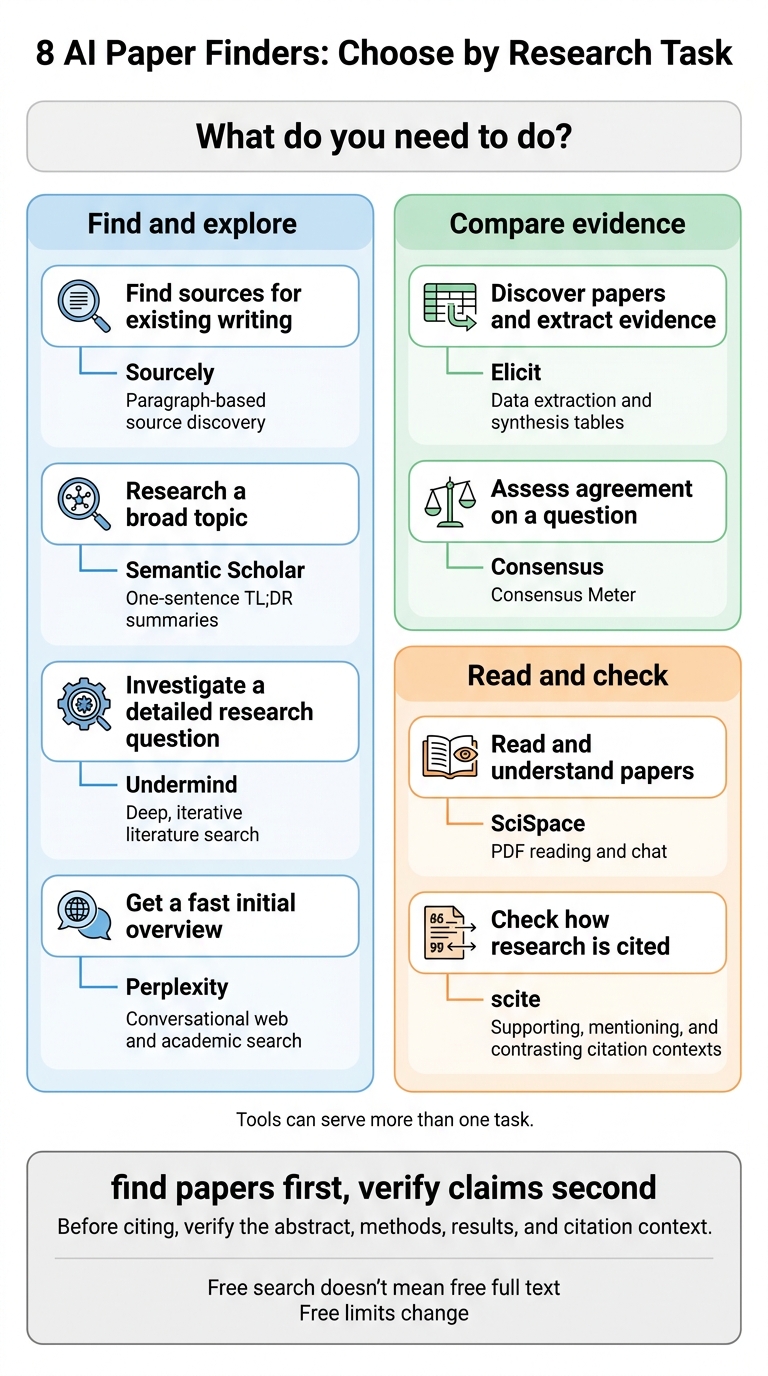
Choose a tool based on what you need to do: find sources for an existing paragraph, research a question, or understand a paper. After comparing inputs, filters, and access, use this table to find your match.
| Task | Tool | Defining feature |
|---|---|---|
| Find sources for existing writing | Sourcely | Paragraph-based source discovery |
| Discover papers and extract evidence | Elicit | Data extraction and synthesis tables |
| Assess agreement on a question | Consensus | Consensus Meter |
| Research a broad topic | Semantic Scholar | One-sentence TL;DR summaries |
| Read and understand papers | SciSpace | PDF reading and chat |
| Check how research is cited | scite | Supporting, mentioning, and contrasting citation contexts |
| Investigate a detailed research question | Undermind | Deep, iterative literature search |
| Get a fast initial overview | Perplexity | Conversational web and academic search |
For question-led discovery, choose Elicit, Consensus, Semantic Scholar, or Undermind. SciSpace helps with reading papers, scite shows citation context, and Perplexity offers a fast first pass.
Free limits change, so check each tool’s current allowance.
Before citing, verify the abstract, methods, results, and citation context. A source link or PDF viewer does not bypass a paywall.
FAQs
How can I spot AI-generated citation errors?
Read each cited paper in full. Many tools rely only on titles or abstracts, and a citation’s existence doesn’t mean it supports the AI-generated argument. Check claims against reliable primary sources to confirm that the findings and context match what the argument says.
Check your reference list for duplicate sources, too. Some models cite the same few papers repeatedly, making the evidence look stronger than it is.
Can I use AI paper finders for a systematic review?
Don’t use AI paper finders as your sole or primary search method. They can help you scope a topic, identify core themes, and find supplementary literature. But systematic reviews need thorough searches that retrieve as much relevant evidence as possible.
These tools may miss relevant papers because they have limited access to publisher content. Use them alongside established search methods - not instead of them - and check their findings against reliable scholarly sources.
Is it safe to paste unpublished research into Sourcely?
No. Don’t paste unpublished or sensitive research into AI tools. Many AI platforms may incorporate uploaded content into their underlying data, creating a risk that other users could retrieve your private or unpublished information.
Keep sensitive information and unpublished intellectual property out of these tools. Protecting your research’s confidentiality helps safeguard your academic integrity and ownership of your findings.


