
Boolean Search Strategy for Research: Operators, Examples, and Search Strings
Boolean search is a method that helps you refine and control research results using logical operators like AND, OR, and NOT. Unlike simple keyword searches, Boolean queries allow you to combine terms, exclude irrelevant topics, and structure searches for better precision and recall. For example, instead of searching "EU GDP" and getting limited results, a Boolean query like ("GDP" OR "gross domestic product") AND ("EU" OR "European Union") can significantly expand your results.
Key Takeaways:
-
Operators:
- AND: Narrows results by including all terms (e.g.,
poverty AND crime). - OR: Broadens results by including any of the terms (e.g.,
college OR university). - NOT: Excludes specific terms (e.g.,
mercury NOT planets).
- AND: Narrows results by including all terms (e.g.,
-
Search Tools:
- Use quotation marks for exact phrases (e.g.,
"adverse drug reaction"). - Apply truncation (
*) to include word variations (e.g.,educat*for education, educator). - Add wildcards (
?) for spelling variations (e.g.,labo?rfor labor and labour). - Group terms with parentheses to control logic (e.g.,
(chest OR thorax) AND (imaging OR radiography)).
- Use quotation marks for exact phrases (e.g.,
- Advanced Tips:
Boolean search saves time, improves accuracy, and is essential for systematic reviews or complex research. Whether you're analyzing medical studies, exploring social sciences, or investigating STEM topics, structured queries ensure more relevant and robust results.
Boolean Search Operators & Tools: Quick Reference Guide
Core Boolean Operators Explained
AND, OR, and NOT: What They Do
Mastering Boolean operators can greatly improve your search accuracy.
"Boolean operators are words that are used as conjunctions to combine and exclude keywords in a search." - University Libraries, Appalachian State University
Here’s how the key operators work:
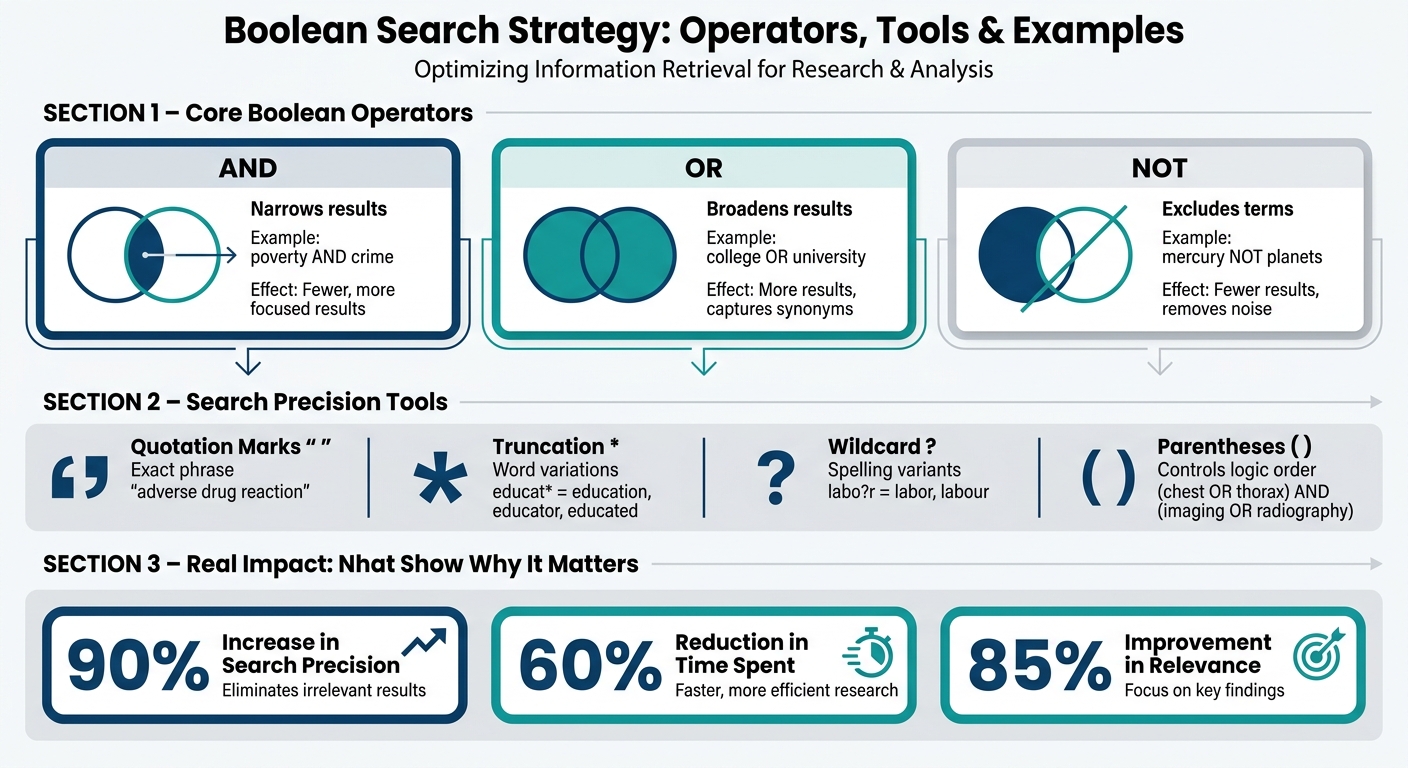
- AND: Combines different concepts and narrows your results. All terms must appear in every result. For instance,
poverty AND crimewill only return results containing both terms. - OR: Links synonyms or related terms, broadening your search. It retrieves results that include at least one of the terms. For example,
college OR universitywill include results for either term. - NOT: Excludes specific terms, refining your search. However, use it carefully. A query like
dementia NOT Alzheimer'swill omit any article mentioning Alzheimer's, even if it has valuable information about dementia.
| Operator | Function | Effect on Results | Example |
|---|---|---|---|
| AND | Includes all terms | Narrows search (fewer results) | poverty AND crime |
| OR | Includes either term | Broadens search (more results) | college OR university |
| NOT | Excludes specific terms | Narrows search (fewer results) | mercury NOT planets |
Pro Tip: Always write Boolean operators in ALL CAPS. Many search platforms, like Google Scholar, only recognize them this way.
Now, let’s dive into tools that add even more precision to your searches.
Quotation Marks, Truncation, and Wildcards
These tools help refine your searches even further:
- Quotation marks: Use them to find exact phrases. For example, searching
"adverse drug reaction"ensures only results with that exact phrase will appear. - Truncation: Add an asterisk (
*) to the end of a word stem to include all variations. For instance,educat*will find education, educator, and educated. Be cautious - truncating too early, likefemini*, might yield irrelevant results such as feminine along with feminism. - Wildcards: Replace a single character using a
?. This is ideal for capturing spelling variations. For example,labo?rretrieves both labor and labour.
These techniques give you more control, but there’s one more tool that ensures your searches follow the correct logic.
How Parentheses Control Search Order
Parentheses are essential for structuring your search logic, much like in math. They ensure that the terms inside them are processed first. Without parentheses, databases prioritize AND over OR, which can skew your results.
For example, consider these two queries:
(chest OR thorax OR thoracic) AND (imaging OR radiographs OR radiography)
This query returned 35,378 results. However, running the same search without parentheses:
chest OR thorax OR thoracic AND imaging OR radiographs OR radiography
produced 232,120 results. The difference highlights how grouping terms with parentheses ensures accurate results.
"Parentheses (or brackets) are used to set the order of the execution of Boolean logic in a search." - McGill Library
To get the most out of your search, group related terms with OR inside parentheses first. Then, connect those groups using AND. This approach ensures the database processes each set of related terms as a unit before combining them.
sbb-itb-f7d34da
Part 1: Search Strategy and Boolean operators
How to Build a Boolean Search Strategy
Creating an effective Boolean search strategy involves identifying key concepts, using filters, and refining your queries to achieve accurate results.
Finding Key Concepts and Synonyms
Start by identifying 2–4 main concepts from your research question, leaving out connecting words.
"Keywords describe your research topic, and are the words that describe the most important themes and ideas within your thesis or question." - Northwestern University
Next, list synonyms, related terms, and spelling variations for each concept. Organize these using a concept table, where each column represents a core concept, and the rows below it list alternate terms.
| Concept 1: Brain-Computer Interfaces | Concept 2: Human Cognition | Concept 3: Neurotechnology |
|---|---|---|
| BCI terms | "cognitive processes" | "neural engineering" |
| BCI | "mental functions" | neurotech |
| BMI | thinking | neuroprosthetics |
To ensure comprehensive results, consult controlled vocabularies to capture variations in terminology.
Combining Boolean Operators with Database Filters
Boost search precision by combining Boolean logic with database filters. Most academic databases allow you to refine results by publication year, document type, language, or specific fields like Title and Abstract.
Field searching is particularly useful. For example, in PubMed's Advanced Search, you can add field-specific tags to your query:
("social media"[Title/Abstract]) AND ("adolescent mental health"[Title/Abstract]) AND (anxiety OR depression)
Here’s an example of why this approach matters: searching PubMed for the exact phrase "pressure wounds" retrieves only 52 articles. Expanding the query with synonyms - ("pressure wounds" OR "pressure injuries" OR "pressure sores" OR bedsores) - yields over 20,000 articles. This highlights the power of combining broad OR groupings with targeted field filters.
"Precise or focused searches retrieve less irrelevant results but have a higher risk of missing targeted literature. Sensitive or broad searches retrieve most of the targeted literature, but also return a higher proportion of irrelevant results." - Lane Medical Library, Stanford School of Medicine
Once your query is structured and filtered, refine it iteratively to improve accuracy.
Refining Your Search Queries Step by Step
Refining a Boolean search involves reviewing and adjusting your query based on initial results. After running your first search, examine titles and abstracts to identify additional synonyms or subject terms.
Use database tools like "Advanced Search" or "Search History" to see how your query was processed. For instance, PubMed’s "Search Details" feature reveals whether the system applied automatic term mapping or added unintended parentheses. This helps you quickly spot and correct logic errors.
Keep a log of your search strings, databases, filters, and result counts. This not only supports reproducibility for systematic reviews or research projects but also ensures a more refined and precise search process. By iterating and documenting your steps, you can consistently improve your results.
Boolean Search String Examples for Academic Databases
Standard Patterns for Combining Concepts
A straightforward and effective Boolean search strategy involves two key steps: group synonyms with OR inside parentheses, then link those groups with AND. This approach ensures that each concept is treated as a cohesive unit before combining them, keeping your search logic clean and precise.
"The more concepts that are added to the strategy with AND, the more precise and fewer results. The more search terms or synonyms that are added to the strategy with OR, the more sensitive and more results." - Lane Medical Library, Stanford School of Medicine
Here’s a basic template for reference:
(term1 OR synonym1 OR synonym2) AND (term2 OR synonym2) AND (term3)
Using parentheses effectively helps reduce irrelevant results and keeps your search focused.
Search String Examples by Field
Below is a table showcasing Boolean search strings tailored to different academic fields. Each example follows the standard structure, customized for specific research scenarios and terminology.
| Field | Research Scenario | Example Boolean Search String |
|---|---|---|
| Medicine | Telehealth for back pain | ("Low Back Pain"[Mesh] OR "low back pain" OR lumbago) AND ("Telerehabilitation"[Mesh] OR telehealth OR "virtual physical therapy") AND (pain OR disability OR function) |
| Medicine | Geriatric drug interactions | alcohol AND ("medication interactions" OR "drug interactions") AND (elderly OR aged OR "older adults") |
| Nursing | Palliative care for cancer | (palliative care OR hospice OR "end of life care") AND ("quality of life" OR QOL) AND ("breast cancer" OR "breast neoplasm") |
| Social Sciences | Child psychology | ("emotional bonding" OR "attachment behavio?r") AND ("emotion regulation" OR "affect regulation" OR "emotional control") AND (child* OR youth OR adolescen*) |
| Public Health | Occupational cancer risk | (Occupational exposure OR Environmental exposure OR "Occupational Risk") AND (Neoplasms OR cancer OR malignancy OR tumor) AND (Firefighters OR firefighter) |
| STEM | Energy research | Solar N5 energy (finds "energy" within 5 words of "solar") |
Notice how these examples adapt to the needs of each discipline. For instance, the medicine examples incorporate MeSH terms alongside natural language keywords to ensure both indexed and unindexed literature is captured. The social sciences string uses a wildcard (adolescen*) to include variations like adolescent, adolescents, and adolescence, while also using a ? wildcard (behavio?r) to cover both American and British spellings. The STEM example employs a proximity operator (N5), which is more flexible than an exact phrase search but still narrows down results effectively.
These examples illustrate how Boolean logic can be tailored to different fields, offering a solid foundation for more advanced search strategies.
Using Boolean Logic in Sourcely

Sourcely makes it easy to integrate Boolean logic into your research workflow. Its AI-powered search engine directly supports Boolean operators, allowing you to paste your structured search string - complete with AND, OR, parentheses, and quotation marks - right into the search bar. Sourcely then applies this logic to retrieve relevant academic sources from its database.
This feature is especially handy if you’ve already fine-tuned a search string in another database and want to cross-check or expand your results. Instead of starting from scratch, you can simply transfer your query into Sourcely and let it handle the sourcing. Plus, with filters for publication year and document type, you can refine your results even further, making it a powerful tool for focused, up-to-date research.
How to Evaluate and Improve Your Boolean Search Results
Understanding Precision and Recall
Once you've crafted a Boolean search string, the next step is to evaluate and refine your results. Two key metrics - precision and recall - help ensure your search strategy delivers relevant and thorough results.
- Precision focuses on relevance, meaning your search primarily returns useful results but may miss some critical studies.
- Recall (or sensitivity) emphasizes completeness, capturing as much relevant literature as possible, even if it means wading through irrelevant material.
These two metrics often work against each other: improving recall can lower precision and vice versa.
"Precise or focused searches retrieve less irrelevant results but have a higher risk of missing targeted literature. Sensitive or broad searches retrieve most of the targeted literature, but also return a higher proportion of irrelevant results." - Lane Medical Library, Stanford School of Medicine
Your research goal determines the balance. For a quick literature review, aim for higher precision. For a systematic review, prioritize recall.
| Goal | What to Do | Tool to Use |
|---|---|---|
| Increase precision | Add specific concepts | AND, phrase searching (" ") |
| Increase recall | Add synonyms or related terms | OR, truncation (*), wildcards (?) |
| Fix logic errors | Check how the database interprets your query | "Search Details" or Advanced History in PubMed |
After running your search, check the "Search Details" panel to confirm the Boolean logic was executed correctly. Red flags like grouping issues or errors can signal the need for adjustments.
Testing Multiple Search String Versions
Your initial Boolean search is just a starting point.
"Testing your search strings is an essential step in systematic searching... your first search is never your final search." - Walsh University LibGuides
Start by testing individual concept blocks before combining them. For example, if you're researching telehealth and chronic low back pain, test the block for low back pain (("Low Back Pain"[Mesh] OR "low back pain" OR lumbago)) separately from the telehealth block. Once each performs well, connect them using AND.
Next, compare different versions of your complete search string. One example from PubMed illustrates this: the search "pressure wounds" returned just 52 articles, while expanding it to ("pressure wounds" OR "pressure injuries" OR "pressure sores" OR bedsores) retrieved over 20,000. This shows how a single OR expansion can drastically improve recall. As you review results, watch for recurring keywords in relevant articles and add them as synonyms to refine your string. This iterative process is key to fine-tuning both precision and recall over time.
Be cautious with truncation, though. Over-truncating can pull in irrelevant terms. For instance, searching food* might return "foodie", "foodstuff", or even "foodlessness", creating unnecessary noise. Use truncation only when the root word is specific enough to stay relevant.
Using Sourcely with Boolean Search Strategies
Once you've optimized your Boolean string, Sourcely's filters can help further narrow your results. Start by pasting your search string into Sourcely's search bar, then use the publication year filter to focus on recent studies. This is especially helpful in fields like medicine or technology, where older research may not be relevant. The document type filter allows you to target peer-reviewed journal articles, eliminating less credible sources.
If your results are too broad, refine your Boolean string by adding an additional concept with AND. If they're too narrow, remove a limiting concept or expand an OR block with more synonyms. This back-and-forth process between Boolean adjustments and Sourcely's filters helps you quickly zero in on high-quality, relevant sources without constantly starting over.
Conclusion and Key Takeaways
Boolean search is a systematic way to refine and control your research results. By using tools like operators, quotation marks, parentheses, truncation, and wildcards, you can craft searches that are both precise and effective.
These techniques can significantly impact your results. For instance, a Boolean string used to search for GDP data can yield vastly different outcomes - 322 results compared to 10,070 - highlighting how critical proper syntax is when working with academic databases.
As Virginia Tech's research guide explains:
"Boolean search statements are incredibly powerful in retrieving what you need provided: 1. The statement is formatted correctly, and; 2. Your choice of search terms is correct for the topic you are researching."
This underscores the importance of a structured and thoughtful approach when creating your Boolean search strings.
FAQs
How do I choose the best synonyms for each concept?
To find the best synonyms, start by breaking your research question into its main concepts. Then, list related terms or synonyms for each concept. Use Boolean operators like OR to include all possible variations. For instance, if you're searching for "heart attack", you might also include terms like myocardial infarction or cardiac arrest. This method helps fine-tune your search and ensures you gather all relevant information.
When should I use NOT without losing important results?
Using the NOT operator can help refine your search results by excluding terms or topics that aren't relevant to your query. This is particularly useful when irrelevant results dominate your search and make it harder to find what you need.
However, there’s a downside. The NOT operator might also filter out sources that are actually useful but happen to include the excluded term. To avoid missing important information, it’s a good idea to double-check your results and ensure you haven’t accidentally removed something valuable.
How do I adapt one Boolean string across different databases?
To fine-tune a Boolean search string, it's essential to account for the specific syntax and features of each database. While the primary operators like AND, OR, and NOT are universally recognized, the way databases handle other elements can vary. For example, phrase searching often requires quotation marks, while nesting uses parentheses. Truncation symbols like *, !, or ? may also differ depending on the platform.
Always consult the database's help or support guide to understand its unique requirements. Once you've made the necessary adjustments, test your search string to ensure it retrieves relevant results. Adapting your syntax this way helps maintain the accuracy and intent of your search across different platforms.