How to Cite Images in APA, MLA, and Chicago (Including AI-Generated Images)
Most image citations come down to 3 questions: Did I show it, change it, or just mention it? Then I match the source details to APA, MLA, or Chicago. If the image was made with AI, I also save the prompt, tool, version, and date.
Here’s the short version:
- If I reproduce an image: I add a figure label, a caption, and a full citation.
- If I modify an image: I mark it as “Adapted from” instead of “From.”
- If I only mention an image: I use an in-text citation plus a full source entry.
- If the image is AI-generated: I keep the exact prompt, model name/version, and generation date.
- If I found it on Google Images: I do not cite Google Images. I cite the original page.
About 3 style systems handle images in different ways:
- APA 7: figure + note + reference list entry
- MLA 9: Fig. label + caption + Works Cited entry
- Chicago: caption or footnote, with bibliography when needed
One mistake causes a lot of citation problems: citing the search result instead of the source itself.
Citing Images in APA: How to Cite a Meme? A Museum Image?
sbb-itb-f7d34da
Quick Comparison
| Style | Image label | Where I put source info | AI image handling |
|---|---|---|---|
| APA 7 | Above image as figure number | Figure note + reference list | Company named; prompt goes in note |
| MLA 9 | Below image as Fig. | Caption + Works Cited | Prompt used as title; no AI author |
| Chicago | Usually below image | Footnote, sometimes bibliography | Prompt and model details in note |
If I collect the source details first - creator, title, date, format, source, URL, and for AI the prompt/tool/version/date - the rest is mostly formatting.
How to cite images in APA, MLA, and Chicago
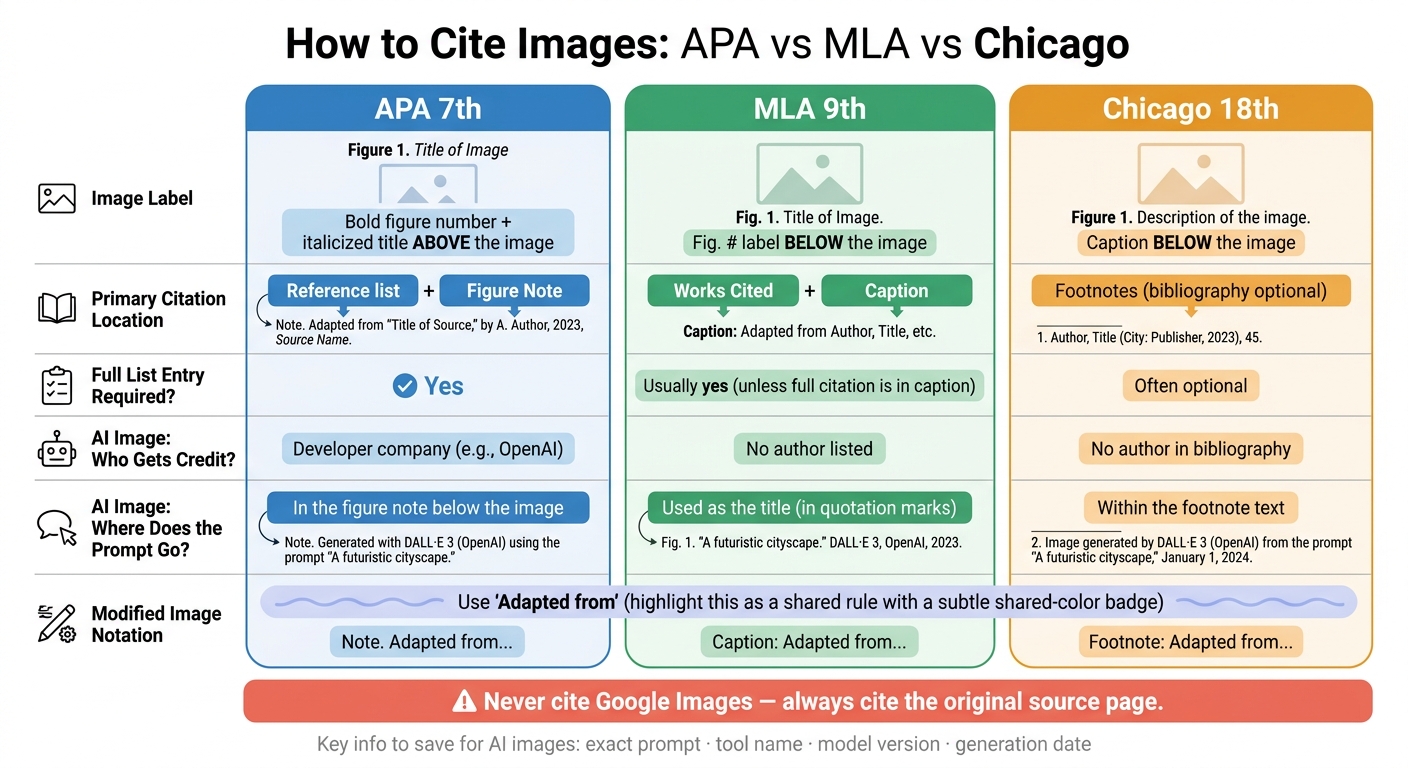
How to Cite Images in APA, MLA & Chicago: Quick Reference Guide
Once you have the source details, the next step is simple: put them into the right style. APA, MLA, and Chicago use much of the same basic information, but they place it in different spots on the page.
APA image citations: figures, references, and source notes
In APA 7th edition, images are treated as figures. Put the figure number above the image, add an italicized title, and place a note below the image with source and copyright details.
For an online image, use this format:
Artist, A. A. (Year). Title of work [Description]. Site Name. URL
If no creator or date appears, start with the title or a short description and use (n.d.).
For museum works, include the museum name and location. If the image comes from a book or journal, include the book or journal title and a format label like [Chart] or [Illustration].
MLA image citations: works cited and figure references
In MLA 9th edition, images are treated as works published in a source, such as a website, book, museum collection, or social platform.
The Works Cited entry usually includes the creator, image title, year, source, and URL. In the paper itself, label the image Fig. 1 and place the caption below it.
For a museum work, include the location of the original before the source details, such as the museum name and city. For a social media post, the platform counts as the source. If the image has no title, use a short, non-italicized description instead.
If you include the full citation in the caption, you can leave out a separate Works Cited entry for that image.
Chicago image citations: captions, notes, and bibliography entries
Chicago usually puts image details in a caption or footnote. Add a bibliography entry if your paper includes a bibliography.
A Chicago footnote for an online image will often include the artist, title, year, medium, site, and URL. For a museum collection, add the medium and the institution's location. If the image was reproduced from a book or article, the footnote should name the original source and page number.
| Style | Label placement | Primary citation location | Full list entry required? |
|---|---|---|---|
| APA 7th | Above the image | Reference list + Figure Note | Yes |
| MLA 9th | Below the image | Works Cited + Caption | Usually yes, unless the full citation is in the caption |
| Chicago 18th | Below the image | Footnotes | Often optional |
How to cite specific image types, including AI-generated images
Photographs, paintings, charts, screenshots, and memes
The rule depends on what you did with the image: created it yourself, reproduced it, or changed it. If it's your own image, a short credit is enough. Put a brief note under it, like "Photograph by author." For reproductions, use "From" in the APA figure note. If you changed the image, use "Adapted from."
Memes and screenshots can be a little messy because they often don't have formal titles. When that happens, use a short description in [square brackets] for APA, or plain, non-italicized text for MLA and Chicago. You should also cite the platform where you found the image and add a direct URL to the exact post.
Images from websites, books, museums, and social media
After you identify the image type, the next step is to track down the original source. Cite that original source, not the search engine result that led you there. If Google Images helped you find it, click through and cite the actual page.
Museum images need a bit more detail. If you viewed the work online, include the museum website URL. If you saw it in person, list the institution name and city. Chicago style also suggests adding the museum's accession number when it's available, since that can help readers find the exact physical item. For images from textbooks or journal articles, treat the book or journal as the container and include the page number or DOI.
Social media works the same way. Cite the account username, the date of the post, a short description of the image, the platform name, and a direct URL to the specific post.
AI-generated images in APA, MLA, and Chicago
AI-generated images follow the same basic logic, but the creator part works a little differently. Instead of a person, the credit comes from the tool. The three styles handle that in different ways. APA names the developer company as the author, such as OpenAI for DALL·E, and asks you to describe the prompt in the figure note below the image. MLA uses the full prompt, in quotation marks, as the title and does not list the AI tool as an author. Chicago usually puts the citation in a footnote instead of the bibliography, with the prompt and model details included in the note.
Version details matter here more than many people expect. DALL·E 3 and Midjourney v5.2 can produce very different results, so you should list the tool name, developer, and model version. Save the exact prompt, tool name, model version, and generation date right after you make the image. If the tool doesn't give you a shareable link for that exact output, use the tool's homepage URL instead.
There's one more wrinkle. If you find an AI-generated image inside a published article or book, cite the article or book as your main source, not the AI tool that first made the image.
| Style | Who gets credit | Where the prompt goes | Citation location |
|---|---|---|---|
| APA 7th | Developer company (e.g., OpenAI) | Figure note below the image | Reference list + figure note |
| MLA 9th | No author listed | Used as the title (in quotes) | Works Cited + figure caption |
| Chicago 18th | No author in bibliography | Within the footnote text | Footnotes (bibliography optional) |
Quick comparison table and common citation mistakes
Comparison table: required citation elements by style and source type
After the style-specific rules above, use this recap to check the core fields at a glance.
Think of this as a last-pass checklist. It lets you scan the key fields for each image type without digging back through every rule.
| Source Type | APA 7th | MLA 9th | Chicago (Notes & Bibliography) |
|---|---|---|---|
| Website image | Figure number, title, note, reference entry | Fig. #, caption, Works Cited entry with URL | Footnote with URL; bibliography entry for stable sources |
| Book image | Figure number, title, note with page number, reference entry | Fig. #, caption with book details, Works Cited entry | Footnote with page number; bibliography entry |
| Museum object | Artist, year, title, medium, museum, location | Artist, title, year, museum, location | Artist, title, year, medium, museum, location |
| Social media post | Username, date, description, platform, URL | Username, description/title, platform, date, URL | Footnote with username, platform, date, URL |
| Untitled image | Figure label, description in brackets, source details in note | Fig. #, description as title, Works Cited entry | Footnote with description and URL |
| AI-generated image | Figure number, description, note with prompt and tool | Fig. #, prompt in quotation marks as title, tool, version, date, URL | Footnote with tool, version, date, and prompt; bibliography entry if your paper uses one |
Use the table above as a final format check.
Common mistakes: citing a search result instead of the original source, missing captions, and missing AI disclosure
Before you finish, check these common errors.
The big one is simple: don't cite Google Images or any other search results page. Cite the original source instead.
Another common slip is skipping the figure label or caption. In APA, that format is pretty strict: a bold figure number, an italicized title above the image, and an italicized "Note." below it. MLA and Chicago also use figure labels and captions in sequence, so the image has to be formatted in the body of the paper too.
AI images bring a couple of extra traps.
- Don't list the AI tool as if it were a human author in MLA.
- Save the exact prompt, tool name, version number, and generation date.
- Use the generation date as the date for AI images.
- Make sure the AI disclosure is clearly labeled.
Those details are part of the citation record for AI-generated media, not optional extras. If they're missing or unlabeled, you can run into academic integrity concerns.
Use "From" for reproductions and "Adapted from" for modified images.
With those mistakes out of the way, the last part is the citation workflow.
Conclusion: A simple workflow for accurate image citations
Here’s a quick checklist to keep image citations clean and accurate. First, identify the image type. Then decide whether you’re mentioning it, reproducing it, or adapting it. After that, gather the source details and apply the right format for APA, MLA, or Chicago. Follow that order, and the process is pretty simple.
For a photograph or chart, collect the creator’s name, title, date, and a stable URL or DOI. For an AI-generated image, record the exact prompt, the tool name, the version number, and the date you generated it. Save that information right away, because AI outputs can be hard to track down later.
Don’t cite Google Images or any other search results page. Cite the original source instead. And if you can’t trace a chart or figure back to its original publication, track down the primary source before citing it.
Consistency also counts. Figure numbers should run in sequence. The label in your text should match the caption exactly. And AI-generated images need a clear disclosure along with the citation entry. When you handle those details carefully in every caption and reference entry, your citations stay accurate and consistent across APA, MLA, and Chicago.
FAQs
Do I need permission to use an image I cite?
Yes, you often do. Citing an image and having the legal right to use it are two different things.
First, check whether the image is under copyright. If it is, you may need permission from the copyright holder, especially if you're using it in published work.
Some images can be used without direct permission if their license allows it. For example, images under certain Creative Commons licenses may be used as long as you give proper attribution.
If you were given permission to use the image, add a note in your figure note such as Reprinted with permission.
How do I cite an image with no author or date?
If an image has no author, APA and Chicago usually list the organization as the author. If no organization is named, start with the image title. In MLA, skip the author and begin with the title.
If there’s no official title, use a short descriptive title, such as Untitled infographic. If there’s also no date, include an access date.
Can I cite an AI image without a shareable link?
Yes. You can cite an AI-generated image even if it doesn’t have a shareable link.
If there’s no direct URL, cite the AI tool’s homepage instead. Then add the tool name, version, developer, date of generation, and the exact prompt. That gives readers enough detail to understand where the image came from and how it was made.