MLA Works Cited Page: Formatting Rules and a Full Sample Page
If you cite a source in your paper, it must appear on the MLA Works Cited page. That page should start on a new page, use 1-inch margins, stay double-spaced, and list entries in alphabetical order with a 0.5-inch hanging indent.
Here’s the short version:
- Use the heading Works Cited, centered
- Keep the same header as the rest of the paper
- List only sources you cite in the paper
- Put entries in one A–Z list
- Use quotes for article or page titles
- Use italics for books, journals, and website names
- End each entry with a period
- Use the MLA 9 core elements to build each citation
I’d treat this page as a final checklist, not just a source dump. Most MLA mistakes come from small format issues, and even one page can include 4+ common errors if you skip the last review.
What this article covers:
- Page setup rules
- How to sort entries
- How to format books, journal articles, and websites
- A sample Works Cited page
- A short proofreading checklist
This makes the article a plain guide for building the page from start to finish.
MLA Works Cited: References and Formatting | Scribbr 🎓

sbb-itb-f7d34da
How to Set Up the Page
Before you list your sources, set up the Works Cited page itself. This part is pretty mechanical, but it matters.
New Page, Header, Title, and Margins
Start the Works Cited list on a new page at the end of your paper. Set all four margins to 1 inch.
Keep the same running header used in the rest of the paper. That means your last name and page number should appear in the upper-right corner, 0.5 inches from the top margin. Then center Works Cited at the top of the page in regular font.
Double Spacing, Font, and Left Alignment
Double-space the entire page, including the title and every citation. Don’t add extra blank lines anywhere.
Use the same 12-point font as the rest of the paper. Times New Roman is standard. Align each entry with the left margin.
Hanging Indents for Every Citation
If an entry goes beyond one line, use a hanging indent. The first line stays flush with the left margin, and each line after that should be indented 0.5 inches.
Set the hanging indent in your word processor’s paragraph settings. Don’t create it with tabs or spaces.
After the page is set, place all entries in alphabetical order.
How to Order Your Entries
Now that the page is set up, put your citations in MLA order.
Alphabetize by Author or Title
List every source in one alphabetical sequence based on the first element of each entry.
Most of the time, that first element is the author's last name. If a source doesn't list an author, sort it by the first main word in the title. Skip A, An, and The if they appear at the start. So The Great Gatsby goes under G, not T.
| Scenario | What to Sort By | Example Placement |
|---|---|---|
| Individual author listed | Author's last name | Morrison, Toni → under M |
| No author | First main word of the title, ignoring A, An, and The | The Bluest Eye → under B |
| Corporate or organization author | First word of the organization name | United States Dept. of Justice → under U |
| Title begins with a number | Spell out the number | 5th Edition → under F (as "Fifth") |
If two authors share the same last name, sort them by first name. For example, Smith, Emma comes before Smith, John.
One Author, Two Authors, and Three or More Authors
The way you write names depends on how many authors the source has. The main rule is simple: invert only the first author.
| Number of Authors | Formatting Rule | Example |
|---|---|---|
| One author | Last Name, First Name. | Smith, John. |
| Two authors | First author inverted; second author in normal order. | Smith, John, and David Jones. |
| Three or more authors | First author inverted, then et al. | Smith, John, et al. |
That pattern trips people up at first, but it’s pretty straightforward once you see it in action.
Multiple Works by the Same Author
If you cite more than one source by the same author, write the author's name only in the first entry. In each entry after that, replace the name with three em dashes and a period, then add the title.
Sort those later entries alphabetically by title. So if you're citing Malcolm Gladwell's Blink and Outliers, Blink comes first because B comes before O.
Once the entries are in the right order, the next step is to format each source type the right way.
How to Format Common Source Types
MLA Works Cited: How to Format Books, Journal Articles & Websites
Now let’s put those rules to work with the source types you’ll cite most often. The patterns below cover the sources that show up again and again in student papers and research projects.
Books and Book Chapters
A standalone print book follows a simple pattern: author, italicized title, publisher, and year.
Mantel, Hilary. Wolf Hall. Picador, 2010.
A few small details can throw people off. After the publisher name, use a comma, not a period. If the publisher includes "University Press", shorten it to UP or U of [State] P. So you’d write Oxford UP or U of Chicago P.
If you’re citing one chapter from an edited collection, the setup shifts a bit. Put the chapter title in quotation marks, italicize the book title, add the editor’s name after "edited by", and finish with the page range.
For ebooks from platforms like Kindle, add "Kindle ed." or "e-book ed." right after the title.
Journal Articles and Periodicals
Journal articles follow a clear order. Put the article title in quotation marks and the journal title in italics. Then list the volume, issue number, date, and page range, in that order, with commas between them.
Salenius, Sirpa. "Marginalized Identities and Spaces: James Baldwin's Harlem, New York." Journal of Black Studies, vol. 48, no. 8, July 2016, pp. 883–902. Sage Journals, https://doi.org/10.1177/0021934716658862.
If the article comes from a database, add the database name in italics after the page range. And if you have both a DOI and a URL, use the DOI. Write it as https://doi.org/ plus the identifier.
Magazines and newspapers use much of the same setup, but the date is more exact. Instead of just the year, include the day, abbreviated month, and year.
Websites and Online Media
Website citations use the same basic logic. Start with the author’s name if one is listed. Then give the page title in quotation marks and the website name in italics.
Deresiewicz, William. "The Death of the Artist - and the Birth of the Creative Entrepreneur." The Atlantic, 28 Dec. 2014, theatlantic.com/magazine/archive/2015/01/the-death-of-the-artist-and-the-birth-of-thecreative-entrepreneur/383497/.
If no author appears, begin with the page title instead. When alphabetizing your Works Cited, use the first meaningful word in that title. Skip A, An, and The.
"Martin Luther King Jr." Nobel Prize, The Nobel Foundation, 10 July 2003, www.nobelprize.org/nobel_prizes/peace/laureates/1964/king-bio.html.
There are two easy rules to keep in mind here. First, leave out https:// in regular URLs, but keep it for DOIs. Second, add an access date when a page has no publication date or changes often. Format it like this: Accessed 22 July 2026.
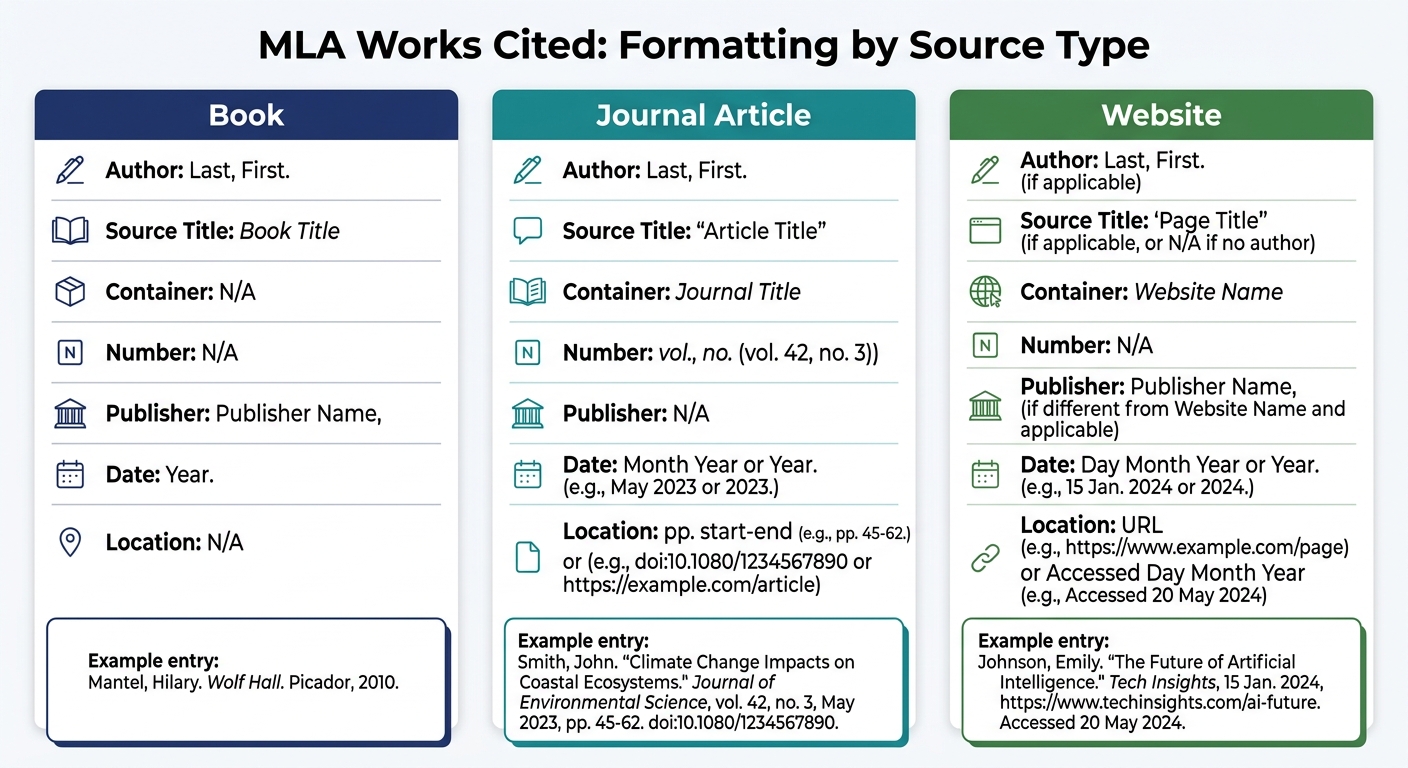
Here’s a side-by-side look at how the main parts line up across the three source types:
| Element | Book | Journal Article | Website |
|---|---|---|---|
| Author | Last, First. | Last, First. | Last, First (or skip). |
| Source Title | Book Title (italics) | "Article Title" (quotes) | "Page Title" (quotes) |
| Container | N/A | Journal Title (italics) | Website Name (italics) |
| Number | N/A | vol. #, no. # | N/A |
| Publisher | Publisher Name, | N/A (usually omitted) | Sponsoring org (if different) |
| Date | Year. | Month Year. | Day Month Year. |
| Location | N/A | pp. range + DOI/URL | URL |
Build and Check a Complete Works Cited Page
Now it’s time to turn those rules into one finished page.
Step-by-Step: From Source Details to Final Page
Build the page in five quick steps.
- Collect your source details. For each source, gather the nine core MLA elements: Author, Title of Source, Title of Container, Other Contributors, Version, Number, Publisher, Publication Date, and Location.
- Build each entry. Put the elements in MLA order and punctuate them the right way.
- Format the page, sort entries alphabetically, and apply hanging indents.
Sourcely can export references, but you should still review every citation by hand.
Full Sample Page and Final Proofreading Checks
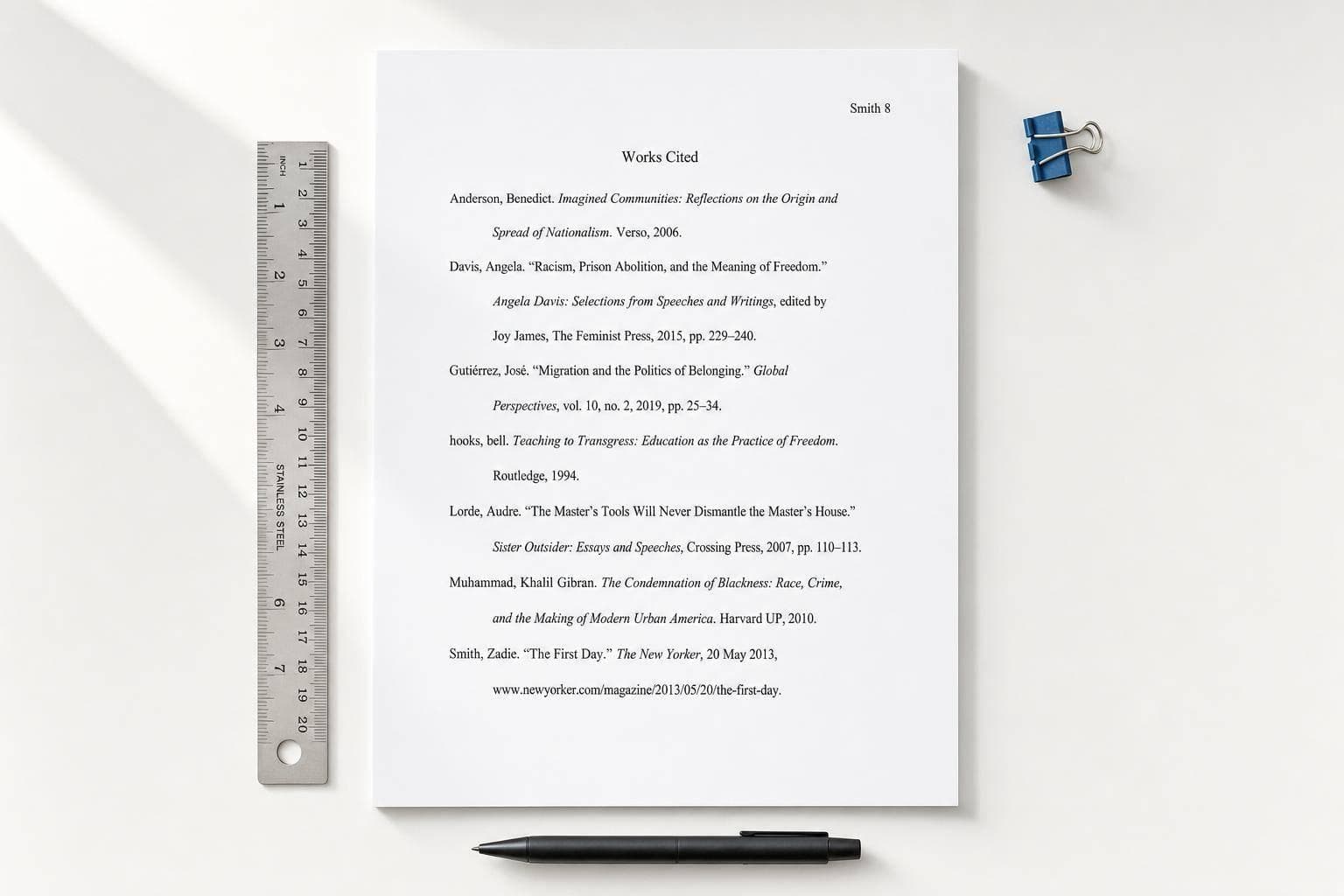
Once the entries are built and sorted, the page should look like this.
Smith 4
Works Cited
Deresiewicz, William. "The Death of the Artist - and the Birth of the Creative Entrepreneur." The Atlantic, 28 Dec. 2014, theatlantic.com/magazine/archive/2015/01/the-death-of-the-artist-and-the-birth-of-thecreative-entrepreneur/383497/.
"Martin Luther King Jr." Nobel Prize, The Nobel Foundation, 10 July 2003, www.nobelprize.org/nobel_prizes/peace/laureates/1964/king-bio.html.
Mantel, Hilary. Wolf Hall. Picador, 2010.
Salenius, Sirpa. "Marginalized Identities and Spaces: James Baldwin's Harlem, New York." Journal of Black Studies, vol. 48, no. 8, July 2016, pp. 883–902. https://doi.org/10.1177/0021934716658862.
Use the sample page above as your last formatting check.
| What to Check | What It Should Look Like |
|---|---|
| Title | Works Cited centered, plain text - no bold, italics, or quotes |
| Page layout | 1-inch margins, double-spaced, left-aligned, no extra gaps |
| Italics vs. quotes | Books, journals, and websites in italics; articles and chapters in "quotes" |
| Punctuation | Every entry ends with a period |
| Page header | Last name and correct page number in the top right corner |
| Hanging indent | All lines after the first indented 0.5 inches |
FAQs
What if I cited a source in the paper but forgot it on the Works Cited page?
Every source you quote, paraphrase, or summarize in your paper needs to appear on the Works Cited page.
If a source shows up in the paper but not in the list, the bibliography is incomplete. It’s that simple.
Go back, add the missing source, format it the right way, and place it in proper alphabetical order with a hanging indent.
How do I cite a source with no author in MLA format?
If a source has no named author, leave out the author part and begin the Works Cited entry with the title. Don't use Anonymous unless the source itself lists that credit.
Then file the entry by the first word of the title, but skip opening articles like A, An, or The when alphabetizing.
When should I include an access date for a website?
Include an access date when it helps the reader most. That’s often the case when a page has no publication date or might change, move, or disappear later - like a homepage or informal self-published content.
You can also add an access date even when it isn’t required. In MLA style, the access date goes at the end of the entry.