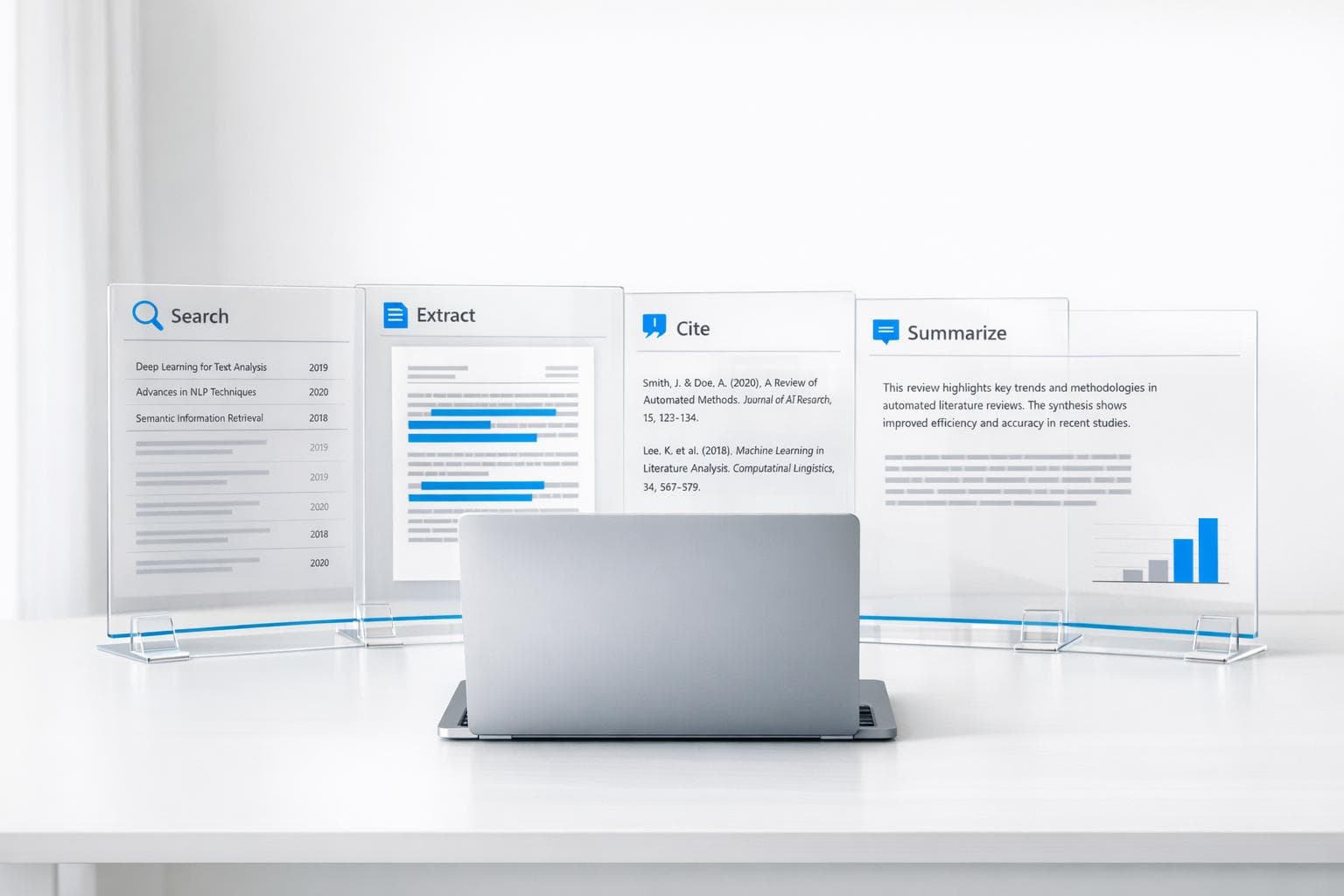
How to Automate Literature Reviews with OpenClaw
Tired of spending hours on literature reviews? OpenClaw is an AI tool that automates repetitive research tasks like searching databases, organizing citations, and summarizing papers. It saves time by handling up to 70% of the manual effort researchers typically face.
Key Takeaways:
- Time-Saving: Automates tasks like abstract screening, data extraction, and citation management.
- Database Coverage: Searches PubMed, arXiv, Semantic Scholar, and more, deduplicating results.
- Smart Summaries: Extracts key details (e.g., methods, findings) from PDFs in minutes.
- Customizable Workflows: Runs scheduled searches and delivers results via platforms like Slack or Telegram.
- Integration: Syncs with tools like Zotero and exports in formats like BibTeX, CSV, and Markdown.
OpenClaw transforms the tedious parts of research into an efficient, automated process, giving you more time to focus on analysis and writing. Below, learn how it works, its features, and how to set it up.
What Is OpenClaw and How Does It Automate Literature Reviews
OpenClaw is an open-source AI framework designed to handle multi-step research workflows without constant human oversight. Unlike traditional search tools that require active management, OpenClaw operates independently. It can run overnight on platforms like Blink Claw or ClawCloud, completing entire literature reviews while you're offline.
This framework goes beyond the typical "browser tab" approach to research. It combines browser navigation, PDF parsing, and semantic memory to extract and organize data. In other words, OpenClaw doesn't just locate papers - it processes them, extracts key information, formats citations, and compiles results, all without interruptions.
"The bottleneck is no longer AI availability. It is that most tools require constant human prompting and stop working the moment you close the browser." – Blink Team
OpenClaw addresses a significant challenge for researchers: balancing the overwhelming volume of academic publications with the time-consuming administrative tasks of organizing them. By automating the screening process, it works across multiple databases simultaneously, including PubMed, arXiv, Semantic Scholar, DOAJ, OpenAlex, and Crossref. It interacts with live web interfaces and APIs to streamline the process.
The tool integrates seamlessly into academic workflows, taking over tasks that can consume up to 70% of a researcher's time. These tasks include title screening, bibliography formatting, data extraction from PDFs, and reference organization. By 2025, 51% of researchers reported using AI tools specifically for literature reviews, reflecting a growing shift toward systems that execute entire workflows rather than just responding to queries.
Below, we’ll explore OpenClaw’s key features and how its operating model simplifies the literature review process.
Main Features of OpenClaw
OpenClaw focuses on solving common challenges in managing academic literature. Its features are designed to save time and reduce manual effort:
- Automated Source Identification: OpenClaw uses a "literature-search" skill combined with headless Chromium to query major databases like PubMed, arXiv, Semantic Scholar, IEEE, ACM, and Google Scholar. It can search multiple databases simultaneously and deduplicate results by DOI, prioritizing journal or conference versions over preprints.
- Intelligent Filtering: The system sorts results by citation count, journal impact, or date range, filtering results based on your research criteria. This eliminates the need to open countless tabs to compare papers manually.
- Citation Management: OpenClaw integrates with Zotero via Composio, automatically creating library entries complete with metadata (DOI, authors, publication year) and summaries. It also supports multiple citation styles, including Nature, Cell, APA, and Vancouver.
- Abstract and PDF Summarization: Using a "File Skill" with PDF parsing and text chunking, OpenClaw generates structured summaries that cover research questions, methodologies, and findings. For example, it analyzed 34 papers and grouped them into thematic clusters in about 5 minutes.
- Data Extraction for Systematic Reviews: OpenClaw extracts structured data - like sample sizes, endpoints, and effect sizes - from PDFs into spreadsheet-ready formats. This automation replaces manual extraction, which can take anywhere from 2 to 219 hours, with an average of 30.7 hours.
| Feature | Description |
|---|---|
| Source Identification | Queries major databases via browser skills |
| Filtering | Sorts results by citation count, journal impact, or date range |
| Summarization | Produces structured summaries covering research questions, methods, and findings |
| Citation Management | Formats references in multiple styles and syncs with Zotero |
| Data Extraction | Pulls study parameters from PDFs into CSV/Markdown |
How OpenClaw Operates
OpenClaw’s operation highlights its ability to function autonomously. By leveraging headless browser technology, it interacts with academic databases as a human researcher would, navigating login pages and search interfaces to retrieve results. This approach ensures compatibility with databases that don’t offer public APIs.
The framework connects to major repositories like PubMed, arXiv, Semantic Scholar, and OpenAlex through specialized modules tailored to each platform. Its ability to schedule tasks makes it incredibly efficient. For instance, you can program OpenClaw to perform literature searches overnight - from 11:00 PM to 6:00 AM - and wake up to organized summaries delivered via messaging apps like Telegram or Slack. This eliminates the need to keep your computer running or supervise the process.
OpenClaw also uses Retrieval-Augmented Generation (RAG) to turn collections of PDFs into a searchable knowledge base. You can ask specific questions, like "What are the methodology limitations across these 20 papers?" and receive synthesized answers based on your entire corpus. Notes and embeddings are stored in Redis or SQLite, creating what researchers often call an "Academic Second Brain."
Institutions using tools like OpenClaw have reported a 2–4× increase in workload capacity without additional staffing. Its technology stack is compatible with modern research workflows and offers local-first options for projects involving sensitive or IRB-protected data, ensuring security and flexibility.
sbb-itb-f7d34da
Setting Up OpenClaw for Your Literature Review
How to Set Up and Use OpenClaw for Automated Literature Reviews - Step-by-Step Guide
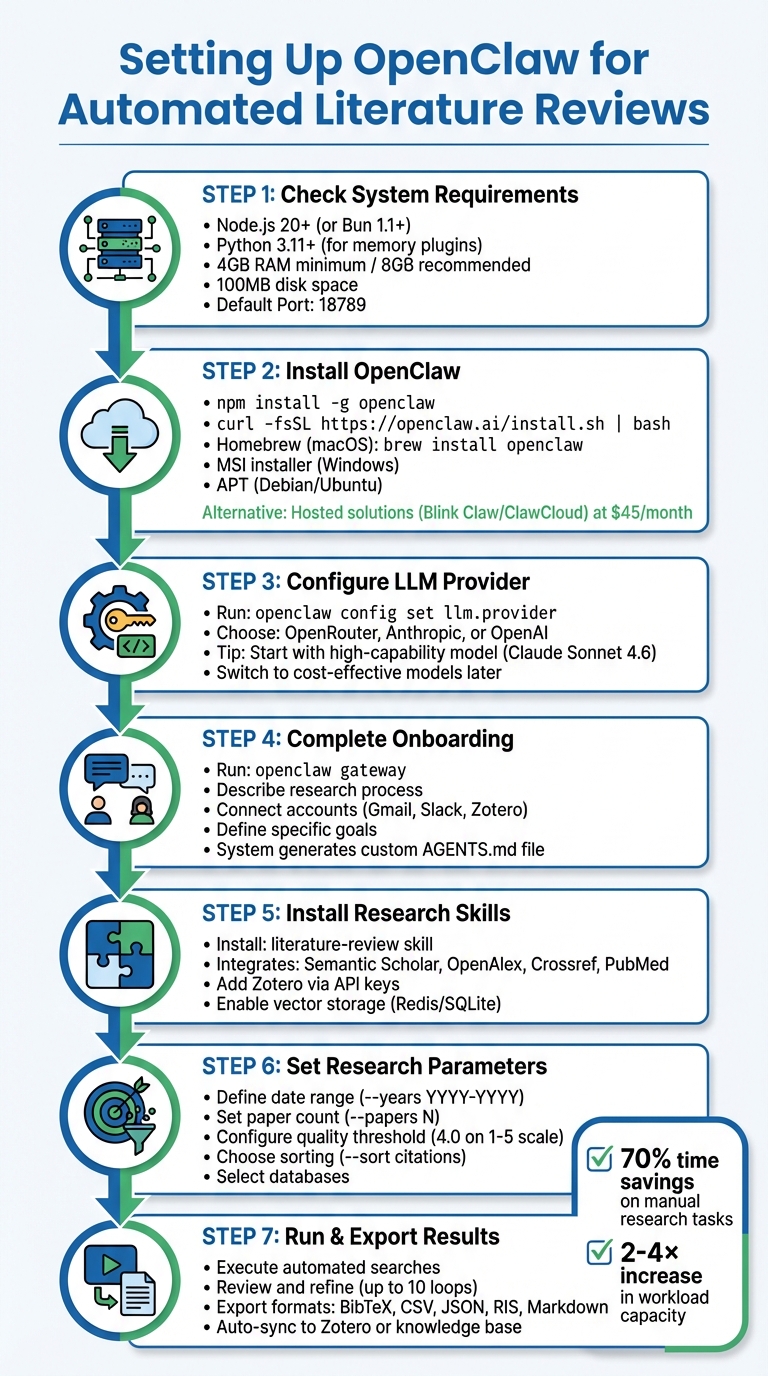
Getting OpenClaw up and running is simple, provided you have standard hardware - at least 4GB of RAM (though 8GB is better) and about 100MB of free disk space. If you’re planning to use it continuously, a dedicated machine or cloud-based VPS running Ubuntu 22.04+ is recommended. Once you’ve reviewed your system requirements, you can proceed with the installation.
System and Access Requirements
Before diving in, make sure your system meets the necessary prerequisites. OpenClaw requires Node.js version 20 or higher (or Bun 1.1+) for its core platform. If you plan to use memory plugins or experiment modules, you’ll also need Python 3.11+. The framework works across macOS (via Homebrew), Windows (using the MSI installer, WSL2, or npm), and Linux (via npm or APT). These tools are essential for enabling OpenClaw’s automated literature review capabilities.
For database access, OpenClaw integrates with open-access platforms like PubMed and arXiv. If you need API-based access, you’ll want to connect to Semantic Scholar or Scopus to avoid rate limits and speed up your searches. For subscription-based databases such as JSTOR or Web of Science, you’ll need institutional credentials, as OpenClaw uses browser automation to navigate these platforms.
Additionally, you’ll need an API key from an LLM provider like OpenAI, Anthropic, or OpenRouter. If you prefer running models locally, you can use Ollama on your hardware. For citation management, a Zotero Web API key is crucial for syncing processed papers and summaries. OpenClaw also supports Markdown exports, which integrate seamlessly with tools like Obsidian, helping you build a searchable knowledge base.
| Component | Requirement/Detail |
|---|---|
| Node.js | 20+ (Recommended) |
| RAM | 4GB Min / 8GB Rec |
| Default Port | 18789 |
| Config Path | ~/.config/openclaw/config.yaml or ~/.openclaw/openclaw.json |
| GPU Support | NVIDIA CUDA or Apple MPS (for local experiments) |
Installing and Configuring OpenClaw
To install OpenClaw, choose the method that works best for your operating system. For a global CLI installation, use the following command:
npm install -g openclaw
Alternatively, you can run:
curl -fsSL https://openclaw.ai/install.sh | bash.
Other options include installing via Homebrew (brew install openclaw) on macOS, the MSI installer for Windows, or APT for Debian/Ubuntu systems.
If running OpenClaw locally isn’t feasible, consider hosted solutions. Managed services like Blink Claw or ClawCloud offer an easy alternative for about $45 per month. These services handle server maintenance and let you avoid the hassle of keeping your computer on 24/7. ClawCloud even provides $25 in free credits for new users.
Once installed, configure your LLM provider by running:
openclaw config set llm.provider
You’ll then select a provider like OpenRouter, Anthropic, or OpenAI. During the initial setup, it’s a good idea to use a high-capability model (e.g., Claude Sonnet 4.6) to streamline configuration and generate the AGENTS.md file. Later, you can switch to more cost-effective models for routine tasks to save money.
One of the most important steps is the onboarding conversation. Start by running:
openclaw gateway
This is where you’ll describe your research process, connected accounts (like Gmail, Slack, or Zotero), and your specific goals. As Alex, a Software Developer, aptly put it:
"You gotta treat it like a new employee. You can't just hire someone and expect that person to do it all".
This conversation helps OpenClaw create a customized configuration file, tailoring its functions to your workflow.
To maximize efficiency, install research-focused skills such as literature-review, which integrates with platforms like Semantic Scholar, OpenAlex, Crossref, and PubMed. Add Zotero via API keys or Composio for seamless syncing of processed papers. For long-term projects, enable vector storage using Redis or SQLite - this allows OpenClaw to remember and compare past findings, effectively acting as your "Academic Second Brain." You can even automate tasks with cron-style schedules (e.g., 0 7 * * 1 to get a literature digest every Monday at 7:00 AM). With these configurations, OpenClaw becomes a powerful tool for conducting automated literature reviews.
How to Automate Your Literature Review with OpenClaw
Once configured, OpenClaw can handle the heavy lifting of your literature review. It simplifies the process of searching, filtering, and organizing papers across multiple databases, saving you time and effort.
Setting Your Research Parameters
OpenClaw allows you to define your research needs using natural language or command-line interface (CLI) flags. For example, you could type:
"Search PubMed and arXiv for papers published between January 2024 and March 2026 on federated learning in healthcare. Return the 30 most-cited papers".
If you need more control, CLI parameters are available. Use flags like --papers N to specify the number of results, --years YYYY-YYYY to set a date range, and --sort citations to prioritize highly-cited works.
For recurring or complex workflows, you can edit the ~/.config/openclaw/config.yaml file. This lets you set parameters like a quality_threshold (e.g., 4.0 on a 1-5 scale) to filter out lower-quality papers, define a daily_paper_count for scheduled searches, and select research domains to narrow the focus. OpenClaw supports databases like PubMed, arXiv, Semantic Scholar, OpenAlex, and Crossref, with automatic deduplication of results using DOIs.
| Parameter Type | Configuration Method | Example Value |
|---|---|---|
| Date Range | CLI Flag / YAML | --years 2020-2025 |
| Paper Volume | CLI Flag / YAML | daily_paper_count: 10 |
| Quality Filter | YAML | quality_threshold: 4.0 |
| Search Engine | CLI Flag / Skill Config | --source pm (PubMed) |
| Sorting Logic | CLI Flag | --sort citations |
| Output Format | Prompt / CLI Flag | --json or --output review.md |
To speed up API access for databases like OpenAlex and Crossref, set the USER_EMAIL environment variable.
Once your parameters are set, you can run and refine your searches to fine-tune the results.
Running and Refining Your Searches
After defining your parameters, OpenClaw runs iterative searches to improve accuracy. While the initial results might not be perfect, the system can perform up to 10 refinement loops. During these loops, it adjusts criteria based on the results and re-runs the search to improve relevance.
If you encounter CAPTCHAs, switch the search engine to Semantic Scholar by updating browser.search.engine: s2 in your settings. For specialized research, install skills like AgentPatch for arXiv and PubMed or use the academic-research skill for broad searches across OpenAlex, which includes over 250 million academic works.
To make searches even more precise, use advanced operators in the browser.search() function. For instance, you can specify filetype:pdf, site:arxiv.org, or after:YYYY-MM-DD. You can also filter results by metrics like citation counts, journal impact factors, or publication type (e.g., "Clinical Trial" or "Systematic Review").
For critical reviews, avoid using the --auto-approve flag. Instead, enable Gate Stages (e.g., Stage 5: Literature Screen) to manually verify the shortlist before OpenClaw proceeds to synthesis.
In early 2026, the AgentPatch team showcased OpenClaw's efficiency by using it to analyze a federated learning corpus. Configured with an arXiv search skill, the system identified the 40 most-cited papers from 2023–2025, grouped them into five themes (e.g., privacy-preserving federated learning, communication efficiency), and pinpointed the key paper in each cluster. What would typically take a human researcher several hours was completed in just 5 minutes.
Once you’re satisfied with the results, you can export your findings in a format that suits your needs.
Exporting Your Results
OpenClaw supports exporting results in various formats, including Markdown, CSV, JSON, BibTeX, RIS, and Plain Text. For LaTeX users, you can generate a bibliography file with the following command:
python scripts/research.py --format bibtex --output references.bib
This file is ready for use with Overleaf or TeXstudio. If you’re using Zotero, configure the zotero.yaml integration to automatically create journal articles with metadata (like title, authors, and DOI) and attach AI-generated summaries as notes. For Mendeley or EndNote users, export in RIS format using the --format ris flag.
For personal knowledge management, export in Markdown for use with tools like Obsidian or Notion. If you’re conducting systematic reviews that involve statistical analysis, the CSV export option lets you extract details like study design, sample size, and effect sizes directly into a spreadsheet. OpenClaw can also verify citations by cross-checking references against APIs, generating a references_verified.bib file to minimize errors from AI-generated citations.
| Export Format | Best Use Case | Supported Tools |
|---|---|---|
| BibTeX | Academic writing and LaTeX | Overleaf, TeXstudio, Tectonic |
| RIS | Reference management | Zotero, Mendeley, EndNote |
| Markdown | Personal knowledge bases | Obsidian, Notion, GitHub |
| CSV | Data analysis and systematic reviews | Excel, Google Sheets, R, Python |
| JSON | Programmatic use and custom apps | Web applications, custom scripts |
Automated tools like AutoResearchClaw can organize outputs into timestamped directories, storing final papers, LaTeX files, and BibTeX references in a "stage-22" folder for easy access. As Run Lobster aptly put it:
"Good summaries are useless if you can't cite later".
Advantages of Using OpenClaw for Literature Reviews
OpenClaw stands out by simplifying the often overwhelming process of conducting literature reviews. By automating repetitive tasks, it allows researchers to dedicate their time and energy to deeper analysis and synthesis - the aspects that truly drive progress.
Saving Time on Research Tasks
A staggering 70% of a researcher's time is often spent on manual tasks like searching databases, downloading articles, and managing citations. OpenClaw steps in to handle these tasks automatically, freeing up hours for more meaningful work.
The platform extracts key data - such as study design, sample size, and primary endpoints - directly from PDFs and organizes it into spreadsheet-ready formats. Unlike tools that require constant user interaction, OpenClaw operates autonomously around the clock. You can schedule it to run overnight or set up weekly reviews, and it will deliver a complete summary without further input.
Institutions using similar AI-driven tools have reported impressive results: a 30–60% reduction in manual workflows and a 2–4× increase in workload capacity. This means researchers can accomplish more in less time, significantly boosting productivity.
Improving Accuracy and Reliability
Accuracy is another area where OpenClaw excels. It pulls data exclusively from trusted academic sources like PubMed, arXiv, Semantic Scholar, and OpenAlex. By using DOI extraction, it automatically removes duplicate results from searches across multiple platforms, ensuring that you don’t waste time reviewing the same paper twice. Additionally, it retrieves full XML records and reconstructs complete abstracts, providing precise and uncut data with PMID or DOI references for seamless cross-referencing.
To ensure summaries are grounded in the original text, OpenClaw employs Retrieval-Augmented Generation (RAG) with vector databases. This approach avoids relying on generalized model knowledge, keeping the focus on the actual content of source PDFs. For specialized searches, it offers tools like MeSH (Medical Subject Headings) term optimization, date and study-type filters, and even citation graph traversal. These features help pinpoint influential papers and critical citations, making it easier to identify high-impact research.
Conclusion
Literature reviews don't have to consume your entire schedule anymore. OpenClaw transforms the tedious manual process into an automated workflow that operates 24/7. By taking care of tasks like database searches, citation management, and data extraction, it allows you to focus on what really matters - analyzing research and driving innovation.
This tool not only saves time but also ensures you're working with accurate, well-rounded data. With access to over 250 million academic works from reputable databases, OpenClaw guarantees credible sources. Its RAG technology creates summaries directly from original content, while features like DOI extraction help eliminate duplicates and refine your searches. When paired with infrastructure like Blink Claw, OpenClaw runs continuously, delivering organized results while you sleep.
"I used to spend half my time just trying to remember what I'd read. Now I process papers in minutes and can actually find my notes when I need them. My last literature review took half the time it usually does." - Dr. Sarah Chen, Assistant Professor of Neuroscience
With 51% of researchers already incorporating AI into their literature reviews by 2025, it's clear that autonomous tools are becoming essential. OpenClaw is open-source and free to use locally, with hosted plans starting at around $45/month for uninterrupted operation. Whether you're tackling a systematic review or staying updated with new research, OpenClaw removes the repetitive tasks, letting you focus on turning your ideas into published work.
FAQs
How do I keep OpenClaw from missing key papers?
To make sure OpenClaw collects important papers, take advantage of its multi-source search features and link it to databases such as PubMed, OpenAlex, and Crossref. Set up automated workflows to conduct both broad and specific searches, and adjust search parameters regularly to stay current. OpenClaw’s DOI-based deduplication system and API integrations streamline the process, ensuring accurate and thorough results while saving you time.
Can I use OpenClaw with paywalled databases?
Yes, OpenClaw is capable of working with paywalled databases like PubMed, as long as you have proper access. It connects with major research platforms, allowing you to scrape PDFs and extract notes, which can streamline automated literature reviews. However, it's crucial to have the required credentials or permissions to access and utilize content from these restricted sources.
How do I reduce LLM costs with OpenClaw?
To reduce the expense of using LLMs with OpenClaw, try these strategies:
- Model routing: Assign simpler tasks to less expensive models, saving advanced ones like GPT-4 for more demanding queries.
- Override default models: Configure the system to prioritize cost-effective models for routine tasks.
- Optimize prompts: Streamline your prompts to use fewer tokens, helping to control usage and costs.
These approaches can help trim expenses without sacrificing performance.