Best Practices for Metadata Export Formats
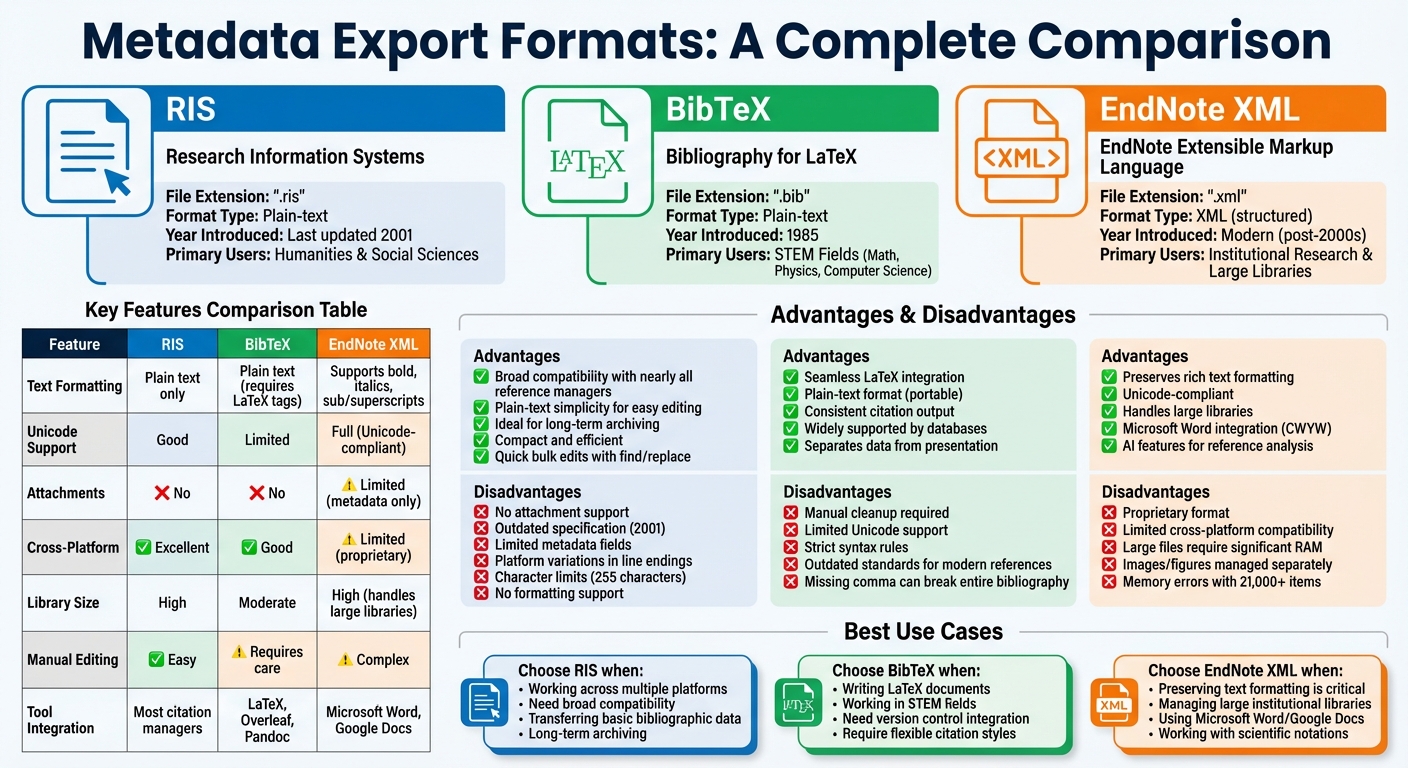
Metadata export formats simplify transferring bibliographic data between tools like citation managers and databases. The three most popular formats - RIS, BibTeX, and EndNote XML - each serve different research needs:
- RIS: Simple, plain-text format compatible with most tools. Ideal for basic metadata but lacks support for attachments and formatting.
- BibTeX: Designed for LaTeX users, it offers flexible citation styles and is widely used in STEM fields. However, it requires careful syntax management and has limited Unicode support.
- EndNote XML: Retains rich text formatting and handles large libraries, but its proprietary nature limits cross-platform usability.
Each format has advantages and limitations, so choosing the right one depends on your research workflow and project requirements. For instance, RIS works well for general compatibility, BibTeX is perfect for LaTeX-based projects, and EndNote XML excels in preserving detailed metadata.
Key takeaway: Matching the format to your research needs ensures efficient workflows and accurate metadata transfer.
Comparison of RIS, BibTeX, and EndNote XML Metadata Export Formats
BibTeX Format Guidelines
BibTeX, introduced in 1985 by Patashnik and Lamport, is a bibliographic database tool designed for use with LaTeX. It’s particularly popular in fields like mathematics, physics, and computer science. One of its standout features is the separation of bibliographic data from its presentation, allowing you to switch citation styles - like APA or Chicago - without modifying the original data.
Each BibTeX entry has three main components: an entry type (e.g., @article or @book), a unique citation key (e.g., Smith2023), and field tags (such as author, title, and year). With 14 standard entry types, BibTeX is widely supported by databases like Google Scholar, NASA ADS, and MathSciNet, making it a cornerstone for managing research citations and finding academic sources.
Even after four decades, BibTeX remains widely used thanks to its plain-text format, which makes .bib files editable in any text editor. For example, NASA’s Astrophysics Data System offers BibTeX citations for over eight million papers in astronomy and physics. However, BibTeX does have its challenges: limited Unicode support and strict syntax rules mean that even small errors - like a missing comma - can disrupt the entire bibliography.
BibTeX Citation Keys Explained
Citation keys are essential in BibTeX, as they link in-text citations to their corresponding bibliography entries. For instance, in @book{Hrabovsky2013, ...}, the key Hrabovsky2013 is used in your LaTeX document with the command \cite{Hrabovsky2013}.
Maintaining stable citation keys can be tricky. Many reference managers generate these keys during export, and re-exporting - especially after updates to fields like the title - might produce a different key. This can result in "Citation undefined" errors in your document. To avoid such issues, adopt a consistent naming convention, such as AuthorYear or AuthorTitleYear. Stick to alphanumeric characters, hyphens, underscores, and colons for keys. When dealing with duplicate keys (e.g., two papers by Smith from 2023), tools often append suffixes like "a" or "b" to differentiate them. A stable key system is crucial for error-free re-exports and clean file generation.
How to Export Clean BibTeX Files
To ensure clean BibTeX files, focus on proper character encoding and syntax. Since BibTeX has limited Unicode support, special characters like ü must be converted into LaTeX commands (e.g., {\"u}) to avoid compilation errors.
Protect proper nouns and acronyms from automatic lowercase conversion by wrapping them in double curly braces. For example, use {{NASA}} instead of {NASA} to preserve capitalization.
Also, verify that all mandatory fields are included and properly separated by commas. For instance, an @article entry should include fields like author, title, journal, and year. Be consistent in using either curly braces or quotation marks for field values.
BibTeX: Advantages and Disadvantages
| Advantages | Disadvantages |
|---|---|
| LaTeX Integration: Works seamlessly with LaTeX. | Manual Cleanup: Special characters and formatting often need manual adjustments. |
| Plain-Text Format: Easy to edit and portable. | Limited Unicode Support: Non-ASCII characters can be problematic. |
| Consistent Output: Ensures uniform citation formatting across documents. | Strict Syntax Rules: A single error can prevent the bibliography from compiling. |
| Widely Supported: Compatible with major databases and tools. | Outdated Standards: Some styles lack fields for modern references like DOI or URL. |
For those needing better Unicode support or more flexible formatting, BibLaTeX with the Biber backend is a modern alternative. It offers full Unicode compatibility and advanced formatting options via TeX macros. Despite its age, BibTeX continues to be maintained, with its latest stable release (version 0.99e) issued in September 2025.
Next, we’ll explore RIS format guidelines, another widely used option for exporting metadata.
sbb-itb-f7d34da
RIS Format Guidelines
RIS (Research Information Systems) is a plain-text format designed to transfer bibliographic data between citation management tools. Similar to BibTeX, RIS simplifies the process of moving citations across platforms. It uses a straightforward structure where each line starts with a two-letter tag, followed by two spaces and a hyphen - such as TY - to indicate the reference type.
What makes RIS so widely used is its compatibility with major reference managers like EndNote, Zotero, Mendeley, and RefWorks. Many academic databases, including Web of Science, Scopus, IEEE Xplore, and ScienceDirect, also support RIS exports. This format essentially acts as the backbone for transferring search results into citation managers.
RIS Structure
Each RIS record begins with the TY - tag and ends with the ER - (End of Reference) tag. Between these, you’ll find tags for common fields like:
AU: AuthorTIorT1: Primary TitlePY: Publication YearJOorT2: Journal or Book Title
RIS supports various reference types, such as JOUR (Journal), BOOK (Book), CHAP (Book Chapter), and THES (Thesis). Its plain-text format allows for easy verification and manual editing using any basic text editor. This simplicity also makes it a dependable option for long-term archiving, as it avoids the risks tied to proprietary formats. However, since the RIS specification hasn’t been updated since 2001, tag usage can vary across platforms, leading to occasional inconsistencies.
Exporting and Managing RIS Files
Exporting RIS files is typically straightforward. Select the records you want, choose "Export" or "Save", and pick RIS as the format. Once exported, you can import the .ris file into your reference manager.
For PubMed, which uses its own .nbib format, an extra step is required: export to EndNote first, then use the "RefMan (RIS) Export" style to convert it to RIS. When exporting from EndNote, ensure you select the correct output style and rename the file extension to .ris if it defaults to .txt.
Zotero users can right-click an item or collection, select "Export Items/Collection", and choose RIS with the default character encoding. If metadata issues arise during import, check your character encoding settings. While most tools auto-detect encoding, manual adjustments may be necessary. Additionally, bulk metadata corrections can be quickly handled using the "search and replace" function in a text editor, a simpler process compared to editing XML formats.
It’s worth noting that RIS files have their limits. While they handle metadata and notes effectively, they don’t support attachments (like PDFs), folder structures, or links between word processor documents. For comprehensive backups, stick to the native export formats of your reference manager.
RIS: Advantages and Disadvantages
| Advantages | Disadvantages |
|---|---|
| Broad Compatibility: Works with nearly all reference managers and academic databases. | No Attachments: Cannot transfer files like PDFs or maintain folder structures. |
| Plain-Text Simplicity: Easy to verify and edit manually. | Outdated Spec: The last official update was in 2001, leading to inconsistencies. |
| Archival Reliability: Ideal for long-term preservation as it’s not tied to specific software. | Limited Fields: Lacks the depth of metadata offered by XML-based formats. |
| Compact and Efficient: Can store hundreds of citations in a small file. | Platform Variations: Differences in line endings between systems can cause import issues. |
| Quick Edits: Simple structure allows bulk corrections with "find and replace" tools. | Character Limits: Some fields are capped at 255 characters. |
| No Formatting: Cannot handle italics, bold text, or special symbols. |
"Endnote XML is a newer and richer format, so may preserve a bit more than RIS when exporting from Endnote... but either should bring in 90+% of what you'd like." - noksagt, Zotero Forums
Although RIS has its shortcomings, it remains a solid choice for transferring basic bibliographic data across platforms. Its widespread support and straightforward design make it indispensable for managing research workflows, even if it sacrifices some advanced features.
EndNote XML Format Guidelines
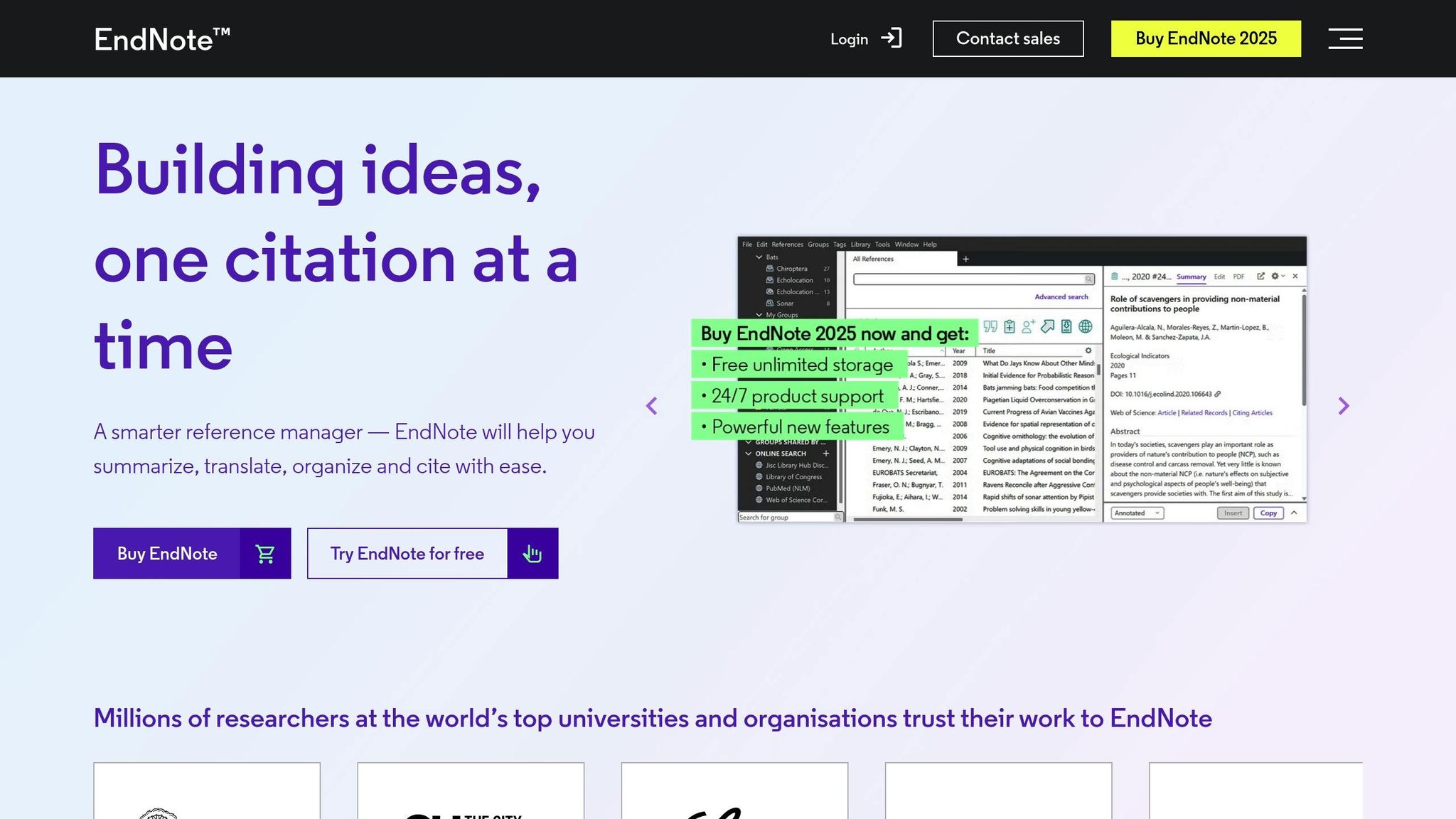
EndNote XML is a specialized format created to facilitate data transfer between EndNote libraries while keeping rich text formatting intact. Unlike simpler formats like RIS or BibTeX, it retains italics, bold text, as well as superscripts and subscripts - essential for scientific notations such as species names or chemical formulas. This makes it especially useful for researchers who need to preserve these details during data transfers.
The format is Unicode-compliant, ensuring that special characters and multiple languages are transferred without issues. This feature is invaluable for researchers working with diverse languages or technical symbols. Additionally, EndNote XML integrates smoothly with Microsoft Word, Word Online, and Google Docs through the "Cite While You Write" (CWYW) feature, enabling real-time citation management while drafting papers.
"The advantage to this format for transferring data between EndNote users is that text formatting such as italics, bolding, superscripts, and subscripts will be included." - Clarivate EndNote Documentation
To export in EndNote XML, go to File > Export, select XML (*.xml) as the file type, and skip the "Output Style" option since it’s irrelevant for XML exports. Keep in mind that XML exports only include text metadata, so images and figures need to be managed separately through the Figure and Caption fields. This makes EndNote XML a strong choice for managing detailed and complex research libraries.
Using EndNote XML for Large Research Libraries
When managing large libraries, EndNote XML proves robust but requires a thoughtful approach. While it handles extensive metadata effectively, importing very large files (e.g., 21,000+ items) into some third-party tools can lead to memory errors. A practical tip is to export smaller batches - around 2,000 records at a time - to avoid performance issues on modern systems.
You can export your entire library or focus on specific subsets by selecting "All References" or filtering through "Groups" and search results. For older libraries, convert figures to file attachments using References > Figure > Convert Figures to File Attachments to ensure they’re included in the export.
To manage duplicates, use the "EndNote Library" import option instead of importing raw XML files. This method offers better control over merging references and prevents duplicates from cluttering your library. After importing, look for notes tagged with "_EndnoteXML import" - these might contain data from unsupported custom fields that may need manual adjustments.
EndNote XML: Advantages and Disadvantages
Here’s a quick comparison of EndNote XML with RIS and BibTeX formats:
| Feature | EndNote XML | RIS | BibTeX |
|---|---|---|---|
| Primary Use | EndNote-to-EndNote transfers | Cross-platform sharing | LaTeX/Technical documents |
| Text Formatting | Supports bold, italics, sub/superscripts | Plain text only | Plain text (requires LaTeX tags) |
| Storage Capacity | High (handles large libraries) | High | Moderate (can get bulky) |
| Tool Integration | Microsoft Word (CWYW), Google Docs | Most citation managers | LaTeX, Overleaf, Pandoc |
| AI Features | Integrated AI for reference analysis | Limited/External | Limited/External |
| Proprietary | Yes (Clarivate) | No (Standardized) | No (Open) |
"Endnote XML is a newer and richer format, so may preserve a bit more than RIS when exporting from Endnote." - noksagt, Zotero Forums
While EndNote XML excels in preserving formatting and handling large libraries, its proprietary nature limits its compatibility with other bibliographic tools. Additionally, large XML files - such as those containing 60,000 items and reaching 360MB - can require up to 4GB of RAM to parse, potentially causing crashes in some citation managers. For those collaborating across platforms, RIS is often a safer and more universally compatible choice.
Matching Export Formats to Research Needs
Format Selection by Academic Discipline
When it comes to managing citations, the best export format often depends on your field of study. For researchers in STEM fields, BibTeX (.bib) is the go-to format. It's designed for LaTeX documents and offers a plain-text structure that's easy to manage with version control systems. This makes it especially useful for academic publishing in science and engineering disciplines.
"BibTeX is a reference management system for LaTeX documents, widely used in academic publishing, especially in STEM fields." – ACS Citation Team
On the other hand, RIS (.ris) is a favorite among researchers in the humanities and social sciences. Its broad compatibility with most reference management tools makes it a reliable choice across various disciplines. For larger projects, particularly those involving institutional research, EndNote XML stands out. It handles extensive libraries while maintaining detailed metadata, making it ideal for managing large-scale bibliographies.
Other formats also have their niche uses. CSV (.csv) is often chosen by researchers working with bibliometrics or citation analysis, as it allows for batch processing and data manipulation. Meanwhile, DOCX is perfect for those who need ready-to-use, formatted bibliographies for word processors. Ultimately, the right format depends on your project’s scale, workflow, and specific metadata requirements.
Simplifying Exports with Sourcely

Exporting references in the correct format can save you time and ensure your metadata stays accurate. That’s where Sourcely comes in. This AI-powered platform simplifies the process, offering seamless exports in BibTeX, RIS, and EndNote formats. After using its advanced filters and summaries to pinpoint the sources you need, you can export them in the format that best suits your workflow - whether you're drafting a LaTeX thesis, working with a team using diverse reference managers, or curating a library for institutional use.
Sourcely offers both free and subscription-based options. The free tier allows basic exports, while the $17/month plan (or $167/year) unlocks premium features. These include the ability to paste entire essays for analysis and access millions of sources with one-click exports. By integrating these tools, Sourcely eliminates the need for manual format conversions and ensures your metadata stays intact from start to finish.
Building Efficient Export Workflows
Creating smooth export workflows requires not only error-free data but also precise use of metadata filters. These steps build on earlier advice about choosing the right export formats.
Checking Metadata for Errors
Before importing your exported file, open it in a plain text editor like Notepad or TextEdit. This allows you to check for formatting issues, missing fields, or encoding errors. Pay close attention to character encoding - ensure it's correctly recognized. If you're using BibTeX, tools like Better BibTeX can help by converting accented characters into plain-text LaTeX commands during export, avoiding Unicode-related problems.
For those managing large research libraries, enable quality reports in your export settings. These reports can flag missing fields or duplicate citation keys, helping you fix issues before they cause problems. Keep in mind that most export formats won’t retain all data. Fields like "Date Added", "Date Modified", and links to word processor documents are commonly lost, except when exporting with Zotero RDF.
Once you've addressed any errors, you can fine-tune your export with targeted filters.
Using Filters for Accurate Exports
After error-checking, applying smart filters can make your export process more efficient. Start by narrowing your scope to the specific library, collection, or items you need to export.
Use field omission settings to exclude unnecessary metadata. For example, Better BibTeX allows you to skip fields like note if they're not relevant. If you need to include custom metadata that isn’t part of standard fields, use the "extra" field. You can define this data manually in a bibtex[key=value] format to ensure it’s captured during export.
Advanced filtering tools like those in Sourcely can further refine your metadata. Once you've selected the exact sources you need, you can export them directly in formats like BibTeX, RIS, or EndNote. This avoids the need for manual format conversions, reducing the risk of errors and preserving the integrity of your metadata throughout your research process.
Conclusion
Choosing the right metadata export format isn’t just about compatibility - it’s about preserving the integrity of your research and streamlining your workflow. The correct format ensures your data remains accurate while making your research process more efficient.
"RIS is a simple plain-text reference format. It is nearly universally supported by reference management software and journal databases".
For transferring metadata across platforms, RIS is a reliable choice. If you’re working with LaTeX, formats like BibTeX or BibLaTeX are ideal for citation management. EndNote users will find EndNote XML delivers the most accurate results. On the other hand, when handling PubMed data, remember that its proprietary .nbib format often requires conversion through a reference manager to ensure compatibility with RIS. Matching the format to your specific needs helps maintain precise metadata standards.
Paying attention to details like proper capitalization and correctly separating "first page" and "last page" fields can prevent common errors. Following character encoding and field consistency guidelines, as discussed earlier, is equally important for maintaining high-quality bibliographic data.
To simplify this process even further, tools like Sourcely can be a game-changer. With advanced filtering options and one-click exports in formats like BibTeX, RIS, or EndNote, Sourcely minimizes manual conversions and errors, allowing you to focus more on your research and less on troubleshooting technical issues.
FAQs
Which export format should I use for my workflow?
The best format for exporting metadata depends on the tools you use and how you work. If you're a LaTeX user, BibTeX (.bib) is a great choice because it integrates seamlessly and supports version control. For those using EndNote software, EndNote (.enw) is the go-to option, providing detailed metadata tailored to the platform. Meanwhile, RIS (.ris) offers flexibility and works well with tools like Zotero and Mendeley. Pick the format that fits your main tools and how you collaborate with others.
How do I prevent BibTeX key changes after re-exporting?
If you want to maintain consistent BibTeX keys after re-exporting, the BetterBibTeX plugin for Zotero is your go-to solution. This handy tool allows you to "pin" citation keys, making sure they stay fixed. You can also set up a custom format for your keys, which helps avoid any automatic changes. By configuring the citekey generator in BetterBibTeX, you can guarantee stable and predictable keys that won't shift during re-exports.
What metadata is lost when exporting to RIS?
When exporting to RIS, some metadata - such as contributors, editors, or call numbers - might not transfer. This happens because the RIS format doesn’t include support for every field or reliably retain certain metadata during the import and export process.