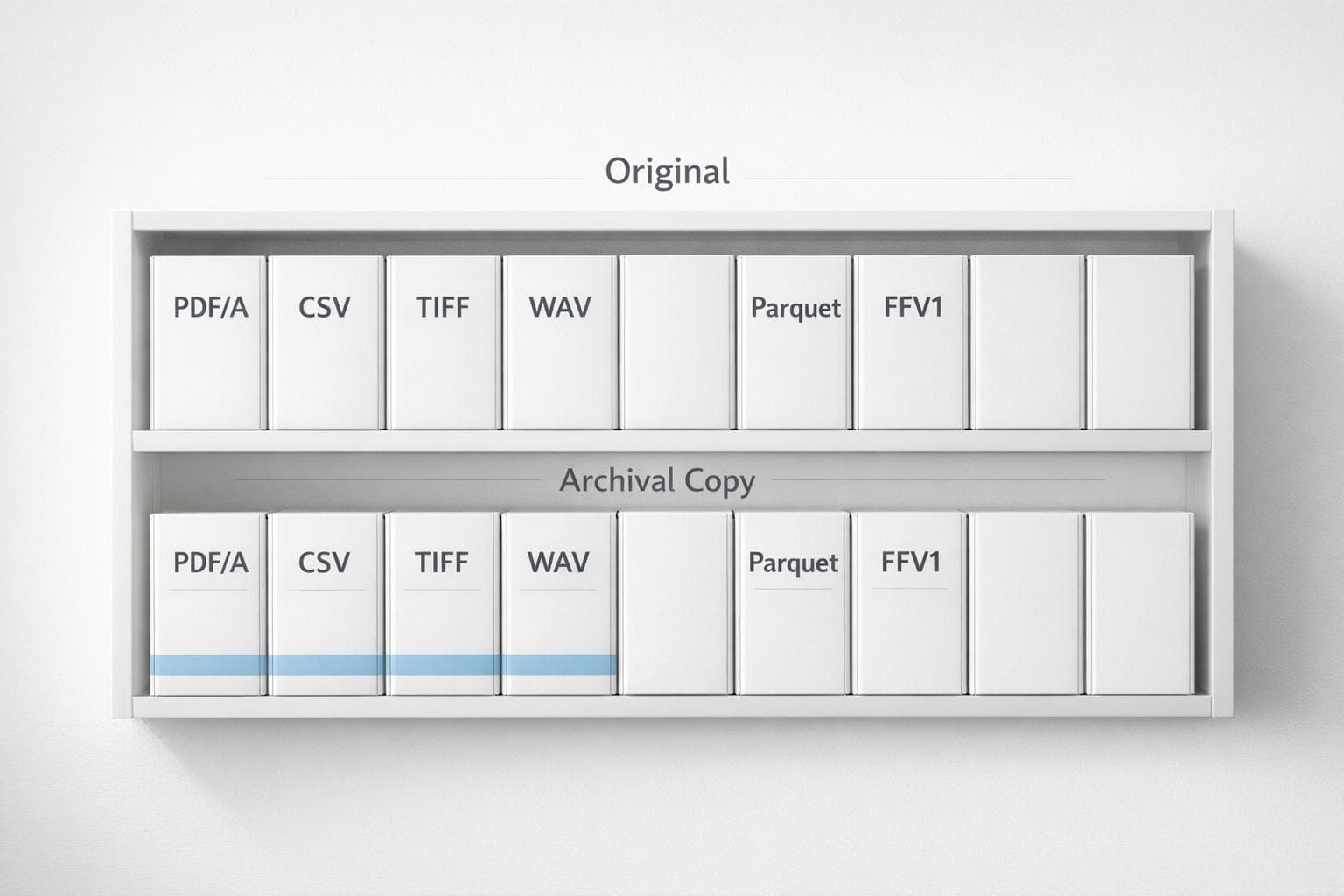
Recommended Formats for Academic Data Storage
The file formats you choose today can determine whether your research data remains accessible decades from now. Here's why: proprietary formats may become obsolete, leaving your work unreadable, while open, standardized formats are built for longevity. This guide will help you select the best formats for preserving academic data across text, spreadsheets, images, audio, and more.
Key Takeaways:
- Text: Use PDF/A for documents and plain text (UTF-8) for universal access.
- Spreadsheets: Save as CSV for basic data or Parquet for large datasets.
- Images: Opt for TIFF (uncompressed) or PNG for lossless preservation.
- Audio: Choose WAV for uncompressed quality or FLAC for storage efficiency.
- Video: Use FFV1 or MKV for archival purposes.
Why It Matters:
- Open formats like CSV, TIFF, and WAV ensure long-term accessibility, even as software evolves.
- Lossless formats preserve the integrity of your data, while proprietary or lossy formats risk data loss or inaccessibility.
- Avoid encryption and password protection for archival files to prevent permanent loss of access.
By choosing the right formats and following best practices, you can safeguard your research for future use and collaboration. Below, we dive into specific recommendations and tools to help you manage your academic data effectively. This includes knowing how to find relevant sources to build your dataset.
File Formats for Textual Data
PDF/A for Long-Term Archiving
PDF/A is a specialized version of the Portable Document Format (ISO 19005-1) created for the long-term preservation of digital documents. Its strength lies in requiring all elements necessary to render the document - like fonts, color profiles, and images - to be embedded within the file. This ensures the document maintains a consistent appearance over time.
To maintain reliability, PDF/A excludes features that might hinder long-term access. For instance, encryption, password protection, and embedded executable scripts are not permitted. This makes it a preferred format for academic repositories, such as those at Oregon State University and the University of Washington, which rank PDF/A as a "Highest Confidence" or "Tier One" format. These institutions also commit to migrating the format if it ever becomes outdated.
"PDF is a good choice for preservation, with PDF/A being the best option." - Rice University
It's important to validate PDF/A files using specialized tools to ensure they fully comply with the PDF/A-1 standard. Additionally, avoid embedding multimedia elements like audio or video, as these are unsupported by the preservation standard and may result in data loss.
Plain Text (TXT/ASCII) for Universal Access
Plain text files offer a simple yet effective solution for preserving data. Their strength lies in their universal accessibility, as they are not tied to any specific software or platform.
The durability of plain text comes from its standardized character encoding. Common encodings like US-ASCII and UTF-8 are widely documented and openly available, reducing the risks associated with proprietary formats. Robin Rice, a Data Librarian at the University of Edinburgh, explains, "By using standard preservation formats, you are maximising the likelihood that most future potential users will be able to open the files".
For more complex data, such as spreadsheets, it’s a good practice to save one version in the original proprietary format and another as a delimited text file for future use. When creating plain text files, prioritize UTF-8 encoding to ensure compatibility with future systems.
XML and HTML for Structured Documents
XML and HTML are both excellent choices for managing structured data, but they serve different purposes. XML is particularly useful for exchanging data between systems or when the focus is on defining the meaning of data rather than its appearance. Unlike HTML, which uses predefined tags, XML allows for custom tags (e.g., <author>, <specimen>), making it ideal for handling complex, hierarchical data.
Specialized XML dialects are often used in research. For example, Systems Biology Markup Language (SBML) is tailored for biological systems, while Statistical Data and Metadata Exchange (SDMX) is designed for organizing statistical information. XML also supports validation through schemas, ensuring that the data adheres to specific structural rules.
On the other hand, HTML is geared toward presenting information on the web. It emphasizes visual structure through elements like headings, paragraphs, and lists, making it ideal for displaying research findings in a browser. For researchers looking to streamline this process, using an AI-powered literature sourcing tool can help identify relevant papers and citations efficiently. Since both formats are text-based, they can be accessed and edited with basic text editors if needed. Together, XML and HTML complement other formats designed for numerical and multimedia data, which will be discussed in the following sections.
sbb-itb-f7d34da
File Formats for Tabular and Spreadsheet Data
CSV for Basic Tabular Data
CSV (Comma-Separated Values) is a go-to format for storing tabular data. It's simple, non-proprietary, and works effortlessly with tools like Excel, Google Sheets, R, and many others. One of its key advantages is longevity - unlike proprietary formats that may become obsolete, CSV files remain accessible over time.
However, this simplicity has its downsides. When converting from formats like Excel or SPSS to CSV, you lose features such as bold text, cell highlights, embedded formulas, and variable labels. Robin Rice, a Data Librarian at the University of Edinburgh, explains:
"Converting research data files from proprietary or software-dependent formats to a standard preservation format will help to avoid difficulties opening these files in the future. By using standard preservation formats, you are maximising the likelihood that most future potential users will be able to open the files".
When exporting data to CSV, double-check that column headers and numeric precision are intact. To ensure compatibility across different systems, save files using UTF-8 encoding. If your data originates from Excel or SPSS, it's a good idea to keep the original file for active use and create a CSV version for long-term storage. Use matching filenames to keep them organized.
For datasets that are too large for CSV to handle efficiently, consider using Parquet.
Parquet for Large-Scale Data Analysis
When dealing with massive datasets - millions or even billions of rows - Apache Parquet is a practical choice. This binary columnar format is designed for efficient data compression, which can significantly lower storage costs, especially in cloud environments like Amazon S3. Parquet also supports various compression codecs, such as Snappy, Gzip, and LZO, to balance storage savings with processing speed.
Its columnar design is particularly useful for analytical queries. Instead of reading entire rows, Parquet allows you to access only the columns you need, speeding up operations compared to row-based formats like CSV. Additionally, Parquet retains explicit schemas, which means it preserves data types and adapts as your dataset evolves. Ankush Singh, an AI/ML Engineer, highlights its advantages:
"If you're working with massive datasets and storage efficiency is a concern... Parquet might be a better choice due to its superior compression capabilities".
Parquet integrates seamlessly with cloud-based analytics tools like AWS Athena, where its structure minimizes the amount of data scanned during queries, reducing costs. For researchers handling large-scale studies or genomic data, Parquet offers a practical solution for both storage and analysis.
If your priority shifts to speed and in-memory processing, Arrow might be a better fit.
Arrow for Cross-Platform Data Sharing
Apache Arrow is designed for in-memory processing, making it ideal for scenarios where speed is critical. Unlike CSV or Parquet, Arrow focuses on enabling "zero-copy" reads, so data can move between programming languages and systems without the need for serialization or deserialization. This feature is particularly useful when transferring data between tools, such as moving results from Python to a Spark cluster.
Arrow takes advantage of modern CPU architectures by storing data in contiguous memory blocks, enabling vectorized operations that process multiple values at once. Kanwal Mehreen from KDnuggets emphasizes:
"Arrow is not the same as CSV or Parquet. It is a columnar format kept in memory for fast operations".
Another benefit is its support for memory-mapped files, which allow you to work with large datasets stored on disk as if they were in RAM, without loading the entire dataset.
Joseph Houston from New Math Data adds:
"Arrow excels at in-memory analytics and real-time processing, making it ideal for low-latency systems and cross-platform data interchange".
While both Parquet and Arrow handle columnar data, Arrow is specifically optimized for in-memory analytics and fast data sharing. For researchers running machine learning models or statistical analyses that require quick iterations across different tools, Arrow minimizes processing delays, keeping workflows efficient.
File Formats for Multimedia Data
TIFF and PNG for Image Preservation
When it comes to preserving research images for the long haul, TIFF and PNG are standout options. Both formats use lossless compression, which means they don't sacrifice any data when saving or storing files. This is a big deal for keeping the accuracy of images from things like microscopy, fieldwork, or scanned documents intact - even decades down the line.
TIFF (Tagged Image File Format) is particularly versatile. It can handle a ton of metadata through its tagging system, making it adaptable for different types of data. Plus, it supports various color spaces like CMYK, YCbCr, and RGB, which is especially handy for research tied to print, film, or TV. A cool bonus? TIFF files can store multiple images in a single file - perfect for multi-page scanned documents. For geospatial projects, there's even a specialized version called GeoTIFF, tailored for mapping and GIS needs.
On the other hand, PNG is lighter and better suited for the web. It’s universally supported by modern browsers and optimized for RGB color with full alpha transparency. This makes PNG a go-to for diagrams, interface elements, or images meant for online sharing.
For best practices:
- Save TIFF (version 6 uncompressed) as your archival master copy for scanned photos or high-resolution images.
- Use PNG when you need a web-friendly, high-quality image with transparency.
- Convert proprietary formats (like BMP, GIF, or PSD) to TIFF or PNG to ensure compatibility in the future.
As an example, the University of Washington Libraries maintains a digital preservation repository with over 100TB of content and 1 million individual files. They rely heavily on TIFF and PNG for keeping this data accessible over the long term.
Just as images benefit from lossless formats, audio preservation also demands formats that prioritize integrity.
FLAC and WAV for Audio Preservation
For audio files, WAV and FLAC are the gold standards in research preservation. Unlike lossy formats like MP3, both WAV and FLAC maintain the original audio quality, ensuring no data is lost over time.
WAV is an uncompressed format that keeps every bit of the original signal data intact. The Broadcast Wave Format (BWF), a variation of WAV, supports detailed metadata like timestamps and provenance info - key for syncing audio with video or documenting research processes and results. Standard CD-quality WAV files (16-bit, 44.1 kHz) typically take up about 10 MB per minute, but archival-grade recordings often use 24-bit PCM encoding at 96 kHz for superior quality. Sound Mixer Lo Boutillette explains:
"WAV has greater dynamic range and greater bit depth... It's the highest quality."
FLAC, on the other hand, uses lossless compression to reduce file size by about 50% while keeping all the original data intact. It's a great alternative when storage space is limited. Both WAV and FLAC are widely supported, open formats, making them reliable for long-term archiving.
Here’s how to approach audio preservation:
- Use uncompressed WAV for original recordings to maintain the highest quality and ensure time-code accuracy.
- Opt for FLAC when storage space is a concern but quality must remain intact.
- Steer clear of lossy formats like MP3 or AAC for recording or mixing. These formats discard inaudible data that might still hold value and are usually capped at 16-bit depth. As Producer and Engineer Gus Berry puts it:
"You want to be working in at least 24-bit or higher when recording and mixing."
Long-Term Digital Preservation: File Formats
How to Choose the Right File Format
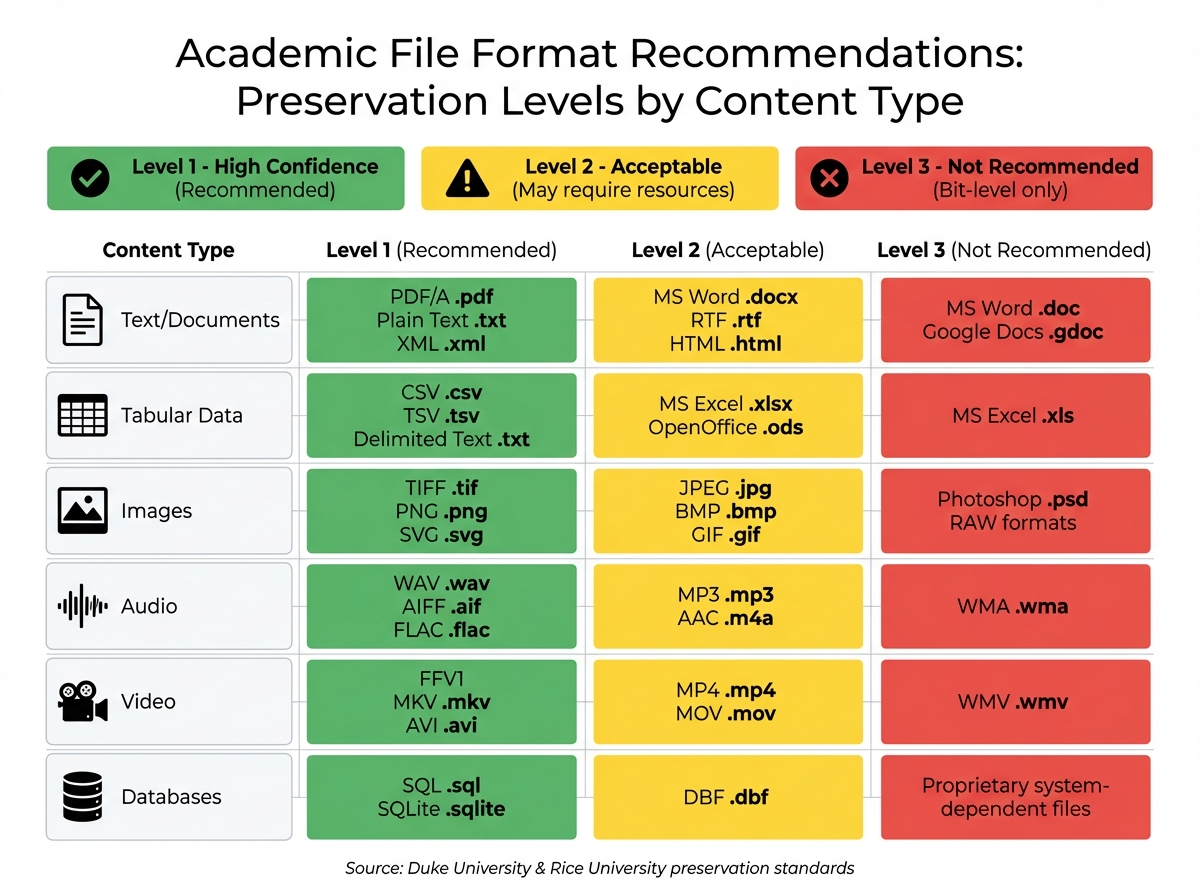
Academic File Format Recommendations by Content Type
File Format Comparison Table
Choosing the right file format means balancing immediate usability with long-term accessibility. This decision builds on key preservation criteria: openness, broad adoption, complete documentation, lossless compression, and self-containment. Formats that are self-contained and independent of external files or scripts are generally better for preservation.
Proprietary formats like .docx or .xlsx are excellent for everyday tasks, offering advanced features for editing and analysis. However, open and standard formats like PDF/A or CSV are better suited for long-term storage because they don’t rely on specific software. Converting files from proprietary formats to preservation-friendly ones ensures that future users can still access your data.
Many institutions, such as Duke University and Rice University, classify formats into three levels of preservation:
- Level 1: High confidence for long-term usability.
- Level 2: Likely to be preserved but may require additional resources.
- Level 3: Bit-level preservation only, with no guarantee of future usability.
Here’s a quick comparison of recommended formats by content type:
| Content Type | Recommended (Level 1) | Acceptable (Level 2) | Not Recommended (Level 3) |
|---|---|---|---|
| Text/Documents | PDF/A (.pdf), Plain Text (.txt), XML (.xml) | MS Word (.docx), RTF (.rtf), HTML (.html) | MS Word (.doc), Google Docs (.gdoc) |
| Tabular Data | CSV (.csv), TSV (.tsv), Delimited Text (.txt) | MS Excel (.xlsx), OpenOffice (.ods) | MS Excel (.xls) |
| Images | TIFF (.tif), PNG (.png), SVG (.svg) | JPEG (.jpg), BMP (.bmp), GIF (.gif) | Photoshop (.psd), RAW formats |
| Audio | WAV (.wav), AIFF (.aif), FLAC (.flac) | MP3 (.mp3), AAC (.m4a) | WMA (.wma) |
| Video | FFV1, MKV (.mkv), AVI (.avi) | MP4 (.mp4), MOV (.mov) | WMV (.wmv) |
| Databases | SQL (.sql), SQLite (.sqlite) | DBF (.dbf) | Proprietary system-dependent files |
This table highlights the importance of selecting formats that align with both your immediate needs and future accessibility goals.
Planning for Future Accessibility
To ensure your files remain accessible over time, it’s essential to plan for potential format obsolescence. This involves regularly reviewing and migrating files as technology changes. A good practice is to save one version in its original format for short-term use and another in a preservation-friendly format for long-term storage. For instance, you could keep an Excel file as .xlsx for active work and as .csv for archiving.
Avoid encrypting or password-protecting archival files - losing the key could render your data permanently inaccessible. For text-based files, use UTF-8 encoding to ensure that characters display correctly across different platforms and tools. To check whether a format is suitable for long-term preservation, consult the PRONOM file format registry maintained by the National Archives of the UK. This resource provides detailed information on recognized preservation standards.
Before depositing files in a repository, review their specific format requirements. Repositories like Dryad and ICPSR often provide lists of preferred formats that align with their preservation capabilities. Additionally, include metadata - such as data dictionaries, XML schemas, or technical specifications - to help future users understand and interpret your files accurately. For more research tips, visit the Sourcely Knowledge Base. Proper metadata ensures that your files remain meaningful, even as technology evolves.
Tools for Academic Research Management
How Sourcely Improves Research Workflows
Managing academic research isn’t just about gathering sources - it’s about keeping everything organized and ensuring it’s ready for both current use and future access. Sourcely simplifies this process by helping researchers locate credible sources and manage citations in formats designed for long-term preservation.
With Sourcely, you can paste your essay directly into the platform to identify missing citations and receive suggestions for reliable literature. This removes the tedious task of manually searching through databases or double-checking citation formats. Plus, it includes tools to convert proprietary files into open, preservation-friendly formats like TXT, PDF/A, and CSV, ensuring your work remains accessible over time. Using non-proprietary formats is key to maintaining both readability and longevity.
On top of these features, Sourcely’s export functionality ensures your references are saved in formats that meet archival standards, making it easier to preserve your research for future use.
Exporting References in Multiple Formats
Sourcely doesn’t stop at managing your research - it also provides flexible export options. The platform supports formats that meet "Highest Confidence" preservation criteria, such as PDF/A for textual documents and structured formats for metadata.
When exporting, Sourcely captures detailed metadata, including DOIs and creator information, to maintain the credibility of your references. This level of precision is crucial because preserving academic work isn’t just about saving files - it’s about documenting them in a way that future users can easily understand and interpret. Additionally, Sourcely uses UTF-8 encoding for text-based exports, aligning with established preservation standards.
Conclusion
Summary of Format Recommendations
Selecting the right file format is key to ensuring your research remains accessible and usable in the future. For textual documents, PDF/A and plain text files offer reliable long-term access, while XML and HTML are ideal for structured content. When dealing with tabular data, CSV is the universal choice for basic datasets, but Parquet stands out for large-scale analysis thanks to its better compression and faster query performance. For multimedia, stick with lossless formats like TIFF and PNG for images, and WAV or FLAC for audio to preserve original quality without data loss.
Whenever possible, opt for open, non-proprietary formats. As highlighted by Stanford University Libraries, the file formats you choose have a direct impact on long-term accessibility for both you and future researchers. Following these guidelines helps protect your data and supports its longevity.
The Importance of Proper Data Storage
Beyond format selection, proper storage practices play a critical role in keeping research accessible and credible over time. With technology evolving so quickly, choosing formats that resist obsolescence ensures your work doesn’t become unusable. It’s important to understand the difference between bit-level preservation (keeping the file exactly as it is) and functional preservation (ensuring the file remains usable), as both are essential for maintaining research integrity.
Standardized, lossless formats not only safeguard the quality of your data but also make it easier for future researchers to work with, without relying on proprietary software. A good practice is to maintain two copies of your data: one in its original software format for active use and another in an open format for long-term preservation. These small but deliberate steps protect your work and contribute to making academic research accessible for years to come.
FAQs
How do I choose between CSV, Parquet, and Arrow?
When deciding between CSV, Parquet, and Arrow, it all comes down to what you prioritize - whether that's ease of use, performance, or compatibility.
- CSV: This format is straightforward and works almost everywhere. However, it doesn't include metadata and doesn't enforce data types, which can lead to inconsistencies.
- Parquet: Perfect for handling large datasets. It provides efficient storage and faster processing thanks to its columnar structure.
- Arrow: Best suited for high-performance, in-memory analytics and seamless data sharing across systems.
Choose the one that aligns with your workflow and the tools you're working with. Each has its strengths depending on the task at hand.
Should I keep both the original and archival file versions?
It's a good idea to keep both the original and archival versions of your files. This approach helps ensure long-term accessibility and preservation. For archival copies, opt for open, high-quality formats. These are often recommended by universities and libraries that specialize in data management practices.
What metadata should I save with my files?
Properly saving key metadata is crucial for effective file management, ensuring files are both accessible and reproducible. Key elements to include are:
- File format: Specify the type of file (e.g., PDF, DOCX, JPEG) to maintain compatibility and usability.
- File name: Use clear and descriptive names that reflect the content or purpose of the file.
- Creation date: Record the date the file was created for accurate tracking.
- Version history: Keep a log of updates or changes to avoid confusion and maintain clarity.
- Descriptive details: Add relevant information about the file's content or purpose to make it easier to understand and locate.
These details not only streamline organization but also help ensure files remain useful over time.