

Zotero Alternatives: 7 Reference Managers Compared for Students and Researchers
I’d keep Zotero unless another tool solves a specific problem in your workflow. Start with where you write: Paperpile fits Google Docs, EndNote suits Word-heavy projects, and JabRef works with LaTeX.
I compare seven alternatives on price, free access, platforms, writing tools, PDF features, storage, and sharing. You can also streamline research with Google Scholar to find sources before organizing them. Mendeley offers 2 GB of free cloud storage; RefWorks depends on campus access; Citavi focuses on research notes and tasks; and ReadCube Papers centers on PDF reading.
Quick Comparison
| Tool | Main reason to consider it | Cost or access | Main tradeoff |
|---|---|---|---|
| Mendeley | Word citations and PDF tools | Free with 2 GB of cloud storage | No current mobile apps |
| EndNote | Word-heavy manuscripts and citation controls | Paid; campus licenses may cover access | Takes more time to learn |
| Paperpile | Google Docs workflow | Paid after a 30-day trial | Sharing requires Expert |
| RefWorks | Browser-based citation management | Institutional access | Access may end after graduation |
| Citavi | Literature reviews, notes, and tasks | Free up to 100 references | Desktop app is Windows-only |
| ReadCube Papers | PDF reading and AI-assisted review | Paid after a 30-day trial | Team sharing requires Plus or above |
| JabRef | Native BibTeX/BibLaTeX files | Free and open-source | No hosted group library |
My advice: check campus licenses before paying, and <u>test a small library before switching</u>. Keep your original files and finish active drafts first - citations, attachments, and annotations may not transfer together.
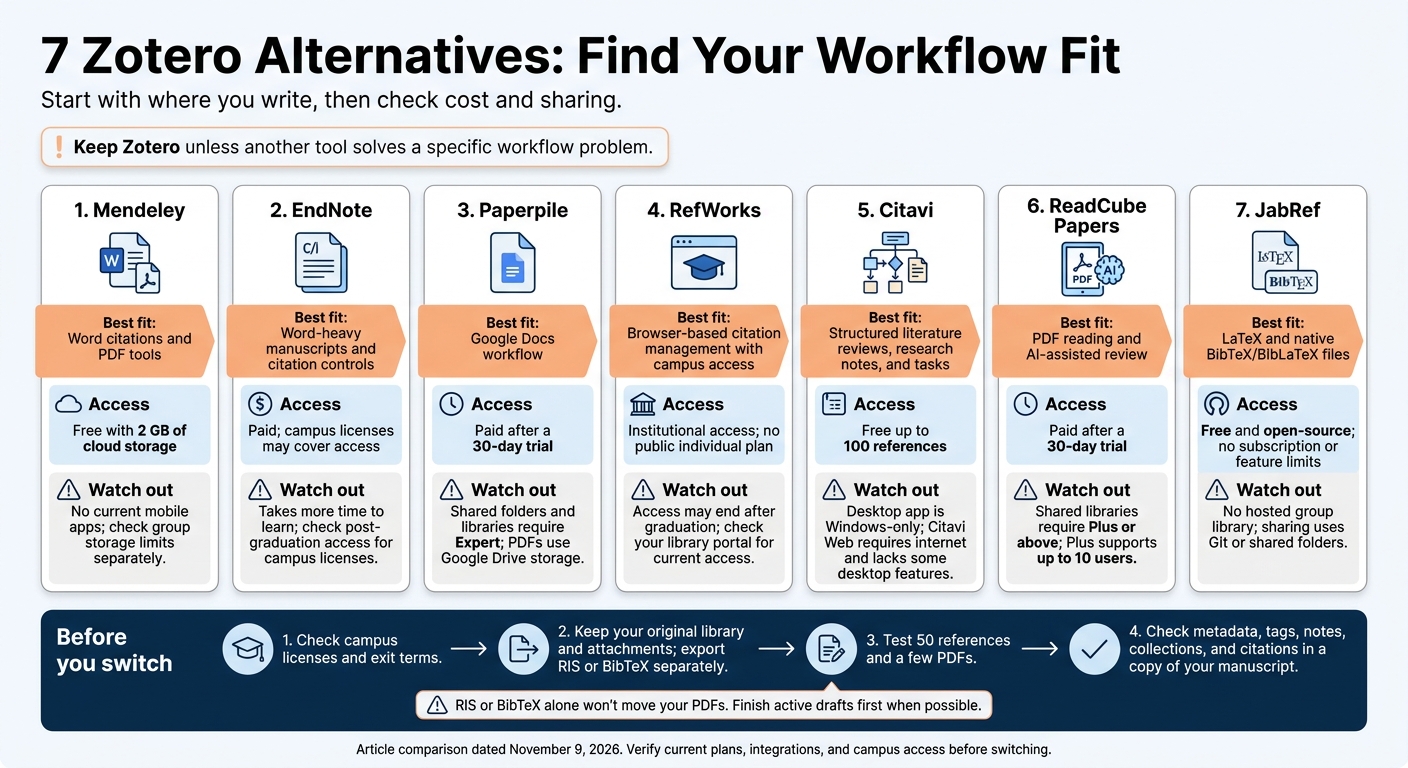
7 Zotero Alternatives: Find Your Workflow Fit
Choosing a Citation Manager: Zotero, Mendeley, and EndNote Basic
sbb-itb-f7d34da
1. Mendeley
Mendeley suits Word users who need basic PDF tools and cloud sync. Its main drawbacks are gaps in platform access and limited support for writing outside Word.
Pricing and platform access
Paid plans offer 5 GB, 10 GB, or unlimited storage. The 5 GB plan costs $4.99/month or $55/year; 10 GB costs $9.99/month or $110/year; and unlimited storage costs $14.99/month or $165/year.
Mendeley Reference Manager runs on Windows and macOS and includes a browser-based web library. There’s no native Linux client, and the mobile apps have been discontinued. Mendeley Desktop remains in maintenance mode, with no new features being added.
Citations and writing integrations
Mendeley Cite inserts citations and bibliographies into Microsoft Word, with thousands of citation styles to choose from. There’s no native integration with Google Docs or LibreOffice. You can export BibTeX files for LaTeX, but JabRef handles that workflow better.
PDF and library management
Add PDFs by dragging and dropping them or using monitored folders. Mendeley extracts metadata, lets you highlight text and add notes in its PDF reader, and supports full-text search. You can organize references into Collections.
Check imported records before citing them. PDFs you upload yourself may have missing details that you’ll need to enter manually.
Collaboration and synchronization
Private groups let researchers share references and PDFs. Cloud sync keeps the desktop app connected to the web library. Personal storage upgrades don’t add group space, so check your team’s limits before moving a shared library.
2. EndNote
EndNote is a better fit for large, Word-heavy projects when you need more control than a lighter reference manager offers.
Pricing and platform access
An individual perpetual license costs $249.95. Student pricing is about $150, while subscriptions run about $155/year. If your university provides a site license, check what access you’ll keep after graduation.
The desktop app runs on Windows and macOS, and the web app lets you work through a browser.
Citations and writing integrations
Cite While You Write in Word supports 7,000+ citation styles. You can also use EndNote’s style editor to adjust citation formatting.
EndNote 2025 adds Google Docs support. For Word collaboration, Traveling Libraries embed citation records in your files, so others can open them without your original library.
PDF and library management
Large-library management is where EndNote stands out. It handles 10,000+ references and includes duplicate detection and rule-based Smart Groups to help organize them.
The PDF reader supports annotations and notes. EndNote 2025 also adds an AI Research Assistant for summaries, follow-up questions, and translations. Expect a steeper learning curve in exchange for those tools and controls.
Collaboration and synchronization
Cloud sync connects the desktop, web, and iOS versions. You can share entire libraries or selected groups.
EndNote 2025 lists unlimited storage, but check the terms before moving a shared PDF library.
3. Paperpile
Pricing and platform access
Paperpile is best suited to Google Docs users who want to manage references in their browser. If you do most of your research writing in Google Docs rather than Word, its workflow may feel like a better fit.
You get a 30-day free trial with no credit card required, but there’s no permanent free plan. Academic users get 50% off. With annual billing, the academic plan costs $2.99–$4.15 per month, while Expert costs $5.75 per month.
Paperpile requires a Google account and stores and syncs PDFs through Google Drive. It works in a Chromebook’s browser, but there’s no native desktop app for offline-first work.
Citations and writing integrations
In Google Docs, citations and bibliographies update automatically from your library. Prefer Word? Paperpile also offers a Microsoft Word add-in for Windows and macOS.
PDF and library management
Use folders and labels to organize references, and open PDFs in the built-in reader. Expert adds full-text PDF search and annotations.
Your PDFs live in Google Drive, so available Drive storage still matters - even with a paid subscription. This shared storage setup is especially relevant for teams that need PDFs synced across devices.
Collaboration and synchronization
Shared folders and libraries require Expert. Google Drive handles PDF syncing, while the iOS and Android apps let you read and access your library on mobile. Test shared-library access with your collaborators, along with offline reading on Chromebooks.
4. RefWorks
RefWorks suits students and researchers who have a campus license and want browser-based citation management.
Pricing and platform access
RefWorks is sold through institutions, with no public individual plan. As of November 2026, Clarivate has folded RefWorks into the EndNote Fusion ecosystem. Check your library portal for current access.
Citations and writing integrations
RefWorks works with Microsoft Word and Google Docs to insert citations and generate bibliographies. It’s a good fit for quick bibliography work rather than deep document editing.
PDF and library management
You can import references from library databases and organize them with folders and tags. RefWorks also includes PDF storage, though its annotation and note-taking tools are limited. It’s better suited to bibliography work than heavy PDF review.
Collaboration and synchronization
Your library syncs through the cloud, so plan on needing an internet connection. Sharing depends on institutional permissions, and collaborators usually need campus access. Export your references as RIS or BibTeX before leaving the university.
5. Citavi
Citavi suits researchers who want more structure for literature reviews and thesis work.
Pricing and platform access
Citavi’s free plan limits projects to 100 references. Individual plans cost about $10 per month, but check whether your university covers access before paying.
The desktop app runs only on Windows. macOS and Linux users need Citavi Web, which requires an internet connection and lacks some desktop features.
Citations and writing integrations
The Windows Word add-in inserts citations, quotes, and notes as you write, then creates the bibliography automatically. Test the web writing tools before buying to make sure they meet your needs.
PDF and library management
Citavi organizes literature reviews with categories, quotes, and ideas. Its PDF viewer connects highlights and annotations to source records, while built-in tasks help track reading, verification, and deadlines. Expect a steeper learning curve than with simpler reference managers.
Collaboration and synchronization
Citavi syncs the Windows app with Citavi Web and lets teams assign tasks. If your team uses different operating systems, test sharing and check storage and licensing terms first.
For a lighter, PDF-first workflow, the next option is simpler.
6. ReadCube Papers
If Citavi feels too structured, ReadCube Papers offers a lighter, PDF-first approach. Its browser-and-app workflow fits heavy PDF reading, AI-assisted literature review, and teams working across devices.
Pricing and platform access
Essentials costs $10 per month or $95 per year, with a 30-day free trial but no permanent free plan. Students and academics get a 40% discount. ReadCube Papers runs on Windows, macOS, iOS, Android, and the web. The desktop app also supports offline reading and notes.
Citations and writing integrations
SmartCite works in Word and Google Docs, with support for 9,000+ citation styles. You can export BibTeX files for LaTeX workflows, though advanced users may find the export controls restrictive.
PDF and library management
Recommendations based on your library help you find related papers, while institutional proxy support retrieves licensed full text. ReadCube Papers automatically matches and corrects metadata for imported PDFs. Its enhanced PDFs include clickable references in the reader, plus reading and annotation tools.
Reading Assistant summarizes papers and answers questions during literature review. Essentials limits PDF chat to five uses per day. Plus lets you query up to 20 papers at once and adds advanced search.
Collaboration and synchronization
Plus supports shared libraries for up to 10 users, with shared folders, reading lists, and annotated PDFs. Libraries and annotations sync across desktop, web, and mobile.
Next: JabRef for BibTeX and LaTeX workflows.
7. JabRef
Pricing and platform access
JabRef is free and open-source on Windows, macOS, and Linux, with no subscription or feature limits. It works best for researchers who write and manage references in plain text.
Citations and writing integrations
JabRef uses BibTeX/BibLaTeX .bib files natively, so it fits LaTeX workflows well. You can sync your .bib file to Overleaf or store it in Git alongside your .tex files. JabRef also supports LibreOffice, but its limited Word and Google Docs integration makes it better suited to LaTeX-centered writing.
PDF and library management
JabRef keeps library management simple. Import metadata using a DOI, ISBN, PubMed, or arXiv ID, then organize references into groups manually, by keyword, or through saved searches. Duplicate detection helps clean up imports. PDFs stay linked as local files, and annotation tools are basic.
Collaboration and synchronization
Sharing relies on Git or a shared folder, not a hosted group library. Teams can version-control the text-based .bib file alongside their source files or sync it through Dropbox or Google Drive. Keep attachment paths consistent across computers and use relative file paths where possible to avoid broken links.
The next sections compare the seven tools on price, platform support, and PDF features.
Pricing, Free Plans, and Platform Support
The table below compares pricing, access, and platform support for the tools profiled above, as reported on November 9, 2026. All prices are in U.S. dollars.
| Tool | Free access and included cloud storage | Reported U.S. pricing and billing | Student/institutional access | Platform support |
|---|---|---|---|---|
| Zotero - baseline | Free software; unlimited bibliographic sync; 300 MB for attachments | Attachment storage: $20/year for 2 GB, $60/year for 6 GB, or $120/year for unlimited storage | Institutional storage plans available | Windows, macOS, Linux, web, iOS, Android |
| Mendeley | Free reference management with 2 GB | Paid storage: $55/year for 5 GB, $110/year for 10 GB, or $165/year for unlimited storage | Institutional benefits vary by agreement | Windows, macOS, web; no native Linux or mobile apps |
| EndNote | 30-day trial | Full license: approximately $220–$300; student license: approximately $100–$150 | Site-license access available | Windows, macOS, web, iOS; no native Linux or Android app |
| Paperpile | 30-day trial | Academic subscription: approximately $2.99–$4.15/month; business: approximately $9.99/month; billed annually | Discounted academic access available | Browser-first through Chrome/Edge; web, iOS, Android |
| RefWorks | Institution-based access; storage varies by contract | No public individual price; institutional access | Participating institution required; alumni access not guaranteed | Web-only; no native desktop or mobile apps |
| Citavi | Free for up to 100 references | Approximately $10/month; institutional pricing by quote | University site licenses may cover access | Windows app; Citavi Web on macOS and Linux; no mobile apps |
| ReadCube Papers | 30-day trial | Student discount and standard subscription available | Student verification required; institutional plans available | Windows, macOS, Linux, web, iOS, Android |
| JabRef | Free, open-source; no bundled hosted storage | $0 | No enrollment or institutional license required | Windows, macOS, Linux; no hosted web library or mobile apps |
A few details to check: If storage isn’t specified, that doesn’t mean there’s none - the source simply doesn’t confirm a usable allowance. And a monthly rate on an annual plan still means a full-year commitment.
Before relying on campus access, check the exit terms, including whether access ends after graduation. Institutional benefits can end when eligibility ends; an individually purchased perpetual EndNote license does not depend on that eligibility.
Next, compare how these tools handle citations, PDFs, and collaboration.
Citations, PDF Management, and Collaboration Compared
The profiles above cover each tool in detail. These tables show how citation editing, PDF handling, and collaboration fit into your day-to-day work.
Citation and Writing Tools
Start with where you write: Word, Google Docs, LibreOffice, or LaTeX. Check current add-in support before switching, since integrations can change between versions. For help with research workflows, visit our Sourcely Knowledge Base.
| Tool | Word | Google Docs | LibreOffice | LaTeX/BibTeX |
|---|---|---|---|---|
| Zotero | Native plugin | Native plugin | Native plugin | Strong support via Better BibTeX |
| Mendeley | Native plugin | No official integration | Native plugin | Basic export |
| EndNote | Cite While You Write | Native plugin | No direct support listed | Basic export |
| Paperpile | Word add-in; verify version | Direct integration | No direct support listed | Export only |
| RefWorks | Native plugin | Native plugin | No direct support listed | Basic export |
| Citavi | Native add-in | No native Google Docs support | No direct support listed | Basic export |
| ReadCube Papers | SmartCite | SmartCite | No direct support listed | Export only |
| JabRef | Formatted citation export | No direct integration | No direct support listed | Native BibTeX workflow |
PDF and Library Management
PDF tools differ in annotation, full-text search, and offline access. What you get depends on the product and plan.
| Tool | PDF reading and annotation | Search beyond metadata | Local access |
|---|---|---|---|
| Zotero | Built-in reader and annotation | Indexed PDF text | Desktop library and local files |
| Mendeley | Built-in reader and annotation | PDF text | Desktop library and downloaded files |
| EndNote | Integrated PDF annotation | PDF text | Desktop library and local files |
| Paperpile | Built-in annotation; check plan | Advanced full-text search on Expert | Limited browser-based access |
| RefWorks | Browser-based annotation | Primarily metadata | Web-only |
| Citavi | Built-in annotation and Knowledge Organizer | Metadata plus quotes | Windows desktop projects and local files |
| ReadCube Papers | Built-in reader and annotation | Advanced full-text search on Plus | Desktop and mobile access |
| JabRef | Linked PDFs; external reader workflow | Primarily metadata | Local .bib database and linked files |
Moving your library? Export the attached files and test a small batch first. RIS or BibTeX alone won't move your PDFs.
Collaboration and Synchronization
| Tool | Shared library | Accounts and permissions | Limits and conflict checks |
|---|---|---|---|
| Zotero | Hosted group libraries | Zotero accounts; admin, edit, and read permissions | Automatic sync does not prevent conflicting edits |
| Mendeley | Hosted groups | Mendeley/Elsevier accounts; group access | Check current group and attachment-sharing limits |
| EndNote | Shared libraries | EndNote accounts; read/write permissions | Confirm support in the installed version and license |
| Paperpile | Shared folders/libraries | Google accounts; view/edit access | Shared features are tied to the Expert tier |
| RefWorks | Shared projects/folders | Institution-linked accounts and sharing permissions | Institutional subscription governs access |
| Citavi | Cloud or DBServer team projects | Cloud accounts; role-based access | DBServer supports real-time collaboration |
| ReadCube Papers | Hosted shared libraries | Papers accounts; group access | Plus supports up to 10 users; larger teams require Enterprise |
| JabRef | Shared .bib files via Git or cloud sync |
No JabRef account; file/repository permissions | Concurrent edits may require manual merges |
With JabRef, agree on Git or sync rules before sharing files. For hosted tools, check edit rights, attachment access, and invitations.
Which Reference Manager Fits Your Workflow?
Match your reference manager to where you write, how you research, and what you can spend.
| Your priority | Recommended tool | Decision point |
|---|---|---|
| No-cost software | JabRef | No subscription or feature limits. |
| Free cloud storage | Mendeley | Cloud sync without a paid plan. |
| Google Docs | Paperpile | A browser-based option for writing in Docs. |
| LaTeX/BibLaTeX | JabRef | Native .bib files keep references within your manuscript workflow. |
| Word-heavy manuscripts | EndNote | Detailed citation-formatting control for demanding manuscripts. |
| Shared libraries | Paperpile (Expert) or ReadCube Papers (Plus) | Team sharing requires a paid tier. |
| PDF-heavy research | ReadCube Papers | AI-assisted summaries help with intensive reading. |
| Structured literature reviews and thesis work | Citavi | Links source notes to research planning. |
| Institutional access | EndNote or RefWorks | Check whether your access continues after graduation. |
Before switching, export your library. Keep your original library and attachments, along with a separate RIS or BibTeX export. When possible, finish active manuscripts in your current tool.
Test the move with 50 references and a few PDFs before transferring everything. Check metadata, tags, notes, collection structure, and citations in a copy of your manuscript.
Open exported, annotated PDFs outside the original manager. Keep the originals alongside any flattened copies: visible markup isn't the same as editable notes.
FAQs
Can I switch reference managers without breaking existing citations?
Switching reference managers can break existing citations. Titles and authors usually transfer cleanly through RIS or BibTeX exports. But live citation fields in Word or Google Docs typically stay linked to your original software - they don’t transfer automatically.
Finish active writing projects in your current tool before switching. If you need to move sooner, test a small library export and one draft first. Check that notes, tags, and annotations carry over before moving your entire collection.
How can I prevent conflicts in a shared reference library?
Use platforms with real-time sync and built-in version control to automatically handle updates from multiple team members. If your tool doesn’t offer hosted sync, store library files in a shared folder or repository and resolve merge conflicts manually.
Look for strong data security and cloud collaboration features. Check that the platform’s collaboration options fit your team’s size and workflow.
How do I verify AI-generated paper summaries?
Open the original cited source and check each AI claim against the text. Make sure the reference exists, its details match, and it supports every claim. Check methods, dates, and sample sizes for errors.
Don’t trust a claim you can’t trace to a specific passage or page. Before using an AI-generated quote, find it in the original source and verify it.


