

How to Find the DOI of an Article (and What to Do If It Has None)
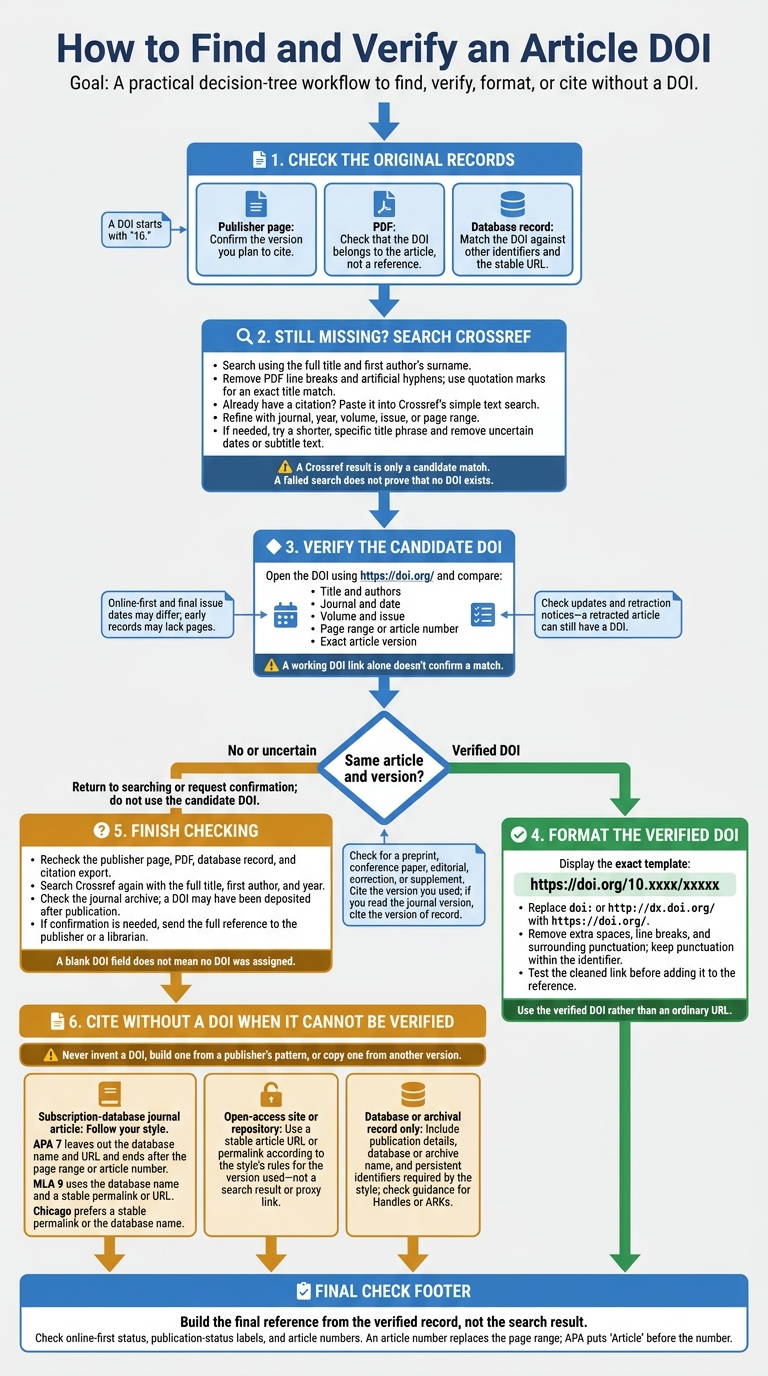
To find an article’s DOI, check the publisher’s page, PDF, and database record. If it’s still missing, search Crossref using the article’s title and first author’s surname. A DOI starts with 10. and is usually cited as https://doi.org/10.xxxx/xxxxx.
Before using it, confirm that the link leads to the same article and version - not a correction, preprint, or similarly titled paper. A working DOI link alone doesn’t confirm a match.
No DOI found? Don’t guess. Ask the publisher or a librarian if needed, then follow the citation style’s rules. That may mean using a stable URL or citing only the publication details. For example, APA 7 generally leaves out database URLs for journal articles from subscription databases.
How to Find and Verify an Article DOI
How To Find DOIs on CrossRef
sbb-itb-f7d34da
Search Crossref by Title and Author
If the publisher page, PDF, and database record still leave the DOI unclear, try Crossref next.
Search and Refine the Results
Start with the full title. Remove PDF line breaks and artificial hyphens, then search Crossref using the title and first author’s surname. Use quotation marks for an exact match. Already have a citation? Paste it into Crossref’s simple text search. Alternatively, you can find relevant papers and their metadata using AI-powered search tools.
To narrow the results, add the journal, year, volume, issue, or page range from the article record. If nothing matches, try a shorter, specific phrase from the title. Remove uncertain dates or subtitle text.
Check the details before using the DOI. Match the authors, journal, volume, issue, and page range before opening the DOI link. Then confirm that it leads to the exact article version - not a correction or another version.
Compare Places to Look for a DOI
Use Crossref to check the metadata you found elsewhere. Each source helps confirm a different part of the match.
| Source | What to verify |
|---|---|
| Publisher page | Confirm the version you plan to cite. |
| Check that the DOI belongs to the article, not a reference. | |
| Database record | Match the DOI against other identifiers and the stable URL. |
| Crossref | Check authors, journal, year, volume, issue, and pages. |
These checks help rule out similar titles and different versions.
Check: A Crossref result is only a candidate match. A failed search does not prove that no DOI exists.
Verify and Format the DOI
Before adding a DOI to your citation, check that it points to the article you used.
Match the DOI to the Article
Paste the DOI after https://doi.org/ and open the link. A working link confirms that the DOI exists - not that it matches your article. Compare the version, title, authors, journal, date, volume, issue, and pages or article number with your source.
Some differences need a closer look. Online-first dates may differ from final issue dates, and early records may not include page numbers. Publisher metadata can also contain errors in author initials, capitalization, or page ranges.
Check the Version and Format the Link
Check whether the page points to the article itself or to a preprint, conference paper, editorial, correction, or supplement. If a journal version exists and that’s what you read, cite the version of record. Otherwise, cite the version you used. Look for retraction notices and updates, too: a retracted article can still have a DOI.
Once you’ve verified the DOI, format it as https://doi.org/10.xxxx/xxxxx. Replace doi: or http://dx.doi.org/ with https://doi.org/. Remove extra spaces, line breaks, and surrounding punctuation, but keep any punctuation within the identifier. Test the cleaned link before adding it to your reference.
Check Whether a DOI Was Assigned
A blank DOI field doesn’t mean an article has no DOI. Exports and records often leave it out. Use these checks to find out whether one was ever assigned.
Finish Checking the Available Records
If you’re still unsure, take another look at the publisher page, PDF, database record, and citation export. Then search Crossref again using the full title, first author, and year.
Check the journal archive, too: a DOI may have been deposited after the article was published. If you still need confirmation, send the full reference to the publisher or a librarian and ask for help.
Understand Why an Article May Have No DOI
Some articles predate DOI registration. Others come from journals that never registered DOIs or belong to content types the publisher didn’t assign DOIs to.
Never invent a DOI, build one from a publisher’s pattern, or copy one from another version. If you can’t verify a DOI, leave it out.
Cite an Article Without a DOI
Follow Your Citation Style
If an article has no DOI, follow your citation style’s rules for the exact version you used.
Use a stable publisher URL or database permalink - not a search result or proxy link.
Choose Which Details to Include
Your lookup result determines what to include instead of a DOI. Use the row that matches your source and citation style.
| Lookup outcome | Identifier or details to include | Style check |
|---|---|---|
| Verified DOI | Full https://doi.org/ link |
Use the DOI rather than an ordinary URL. |
| No DOI in a subscription database | Author, year, title, journal, volume, issue, and page range or article number | For journal articles accessed through a subscription database, APA 7 ends the reference after the page range or article number. Leave out the database name and URL. MLA 9 uses the database name and a stable permalink or URL; Chicago prefers a stable permalink or the database name. |
| No DOI on an open-access site or repository | Stable article URL or permalink | Follow your style’s rules for the version you used. |
| Database or archival record only | Publication details, database or archive name, and any persistent identifier your style requires | Check your style and instructor guidance for Handles or ARKs. |
Review the Final Reference
Check online-first status, article numbers, and publication-status labels before submitting. An article number replaces the page range; APA puts Article before the number. Online-first articles may also need a publication-status label, depending on your style.
Make sure your checks of the publisher, PDF, database, and Crossref support the reference. Confirm that each identifier matches the correct article and version. Build the final reference from the verified record, not the search result.
FAQs
What should I do if a verified DOI link stops working?
Check the DOI for typos, trailing periods, spaces, or extra characters. Make sure it uses the full HTTPS link format: https://doi.org/.... If the link still doesn’t work, there may be a temporary issue or an error in the record.
Search for the article by title and author in a library database or on the publisher’s website. If you can’t verify the DOI, follow your citation style’s guidelines for articles without a DOI.
Which DOI should I use if an article has two?
Use the DOI for the exact version of the article you read. Related content, such as corrections, news briefs, or reprints, may have a separate DOI.
Check the publisher’s website to make sure the DOI matches the article’s title, author list, journal name, and publication date. If you find multiple records, rely on the publisher’s official page as the most authoritative source.
Does having no DOI make an article less credible?
No. An article without a Digital Object Identifier (DOI) isn’t less trustworthy just because it lacks one. A DOI is a permanent identifier that points to a specific scholarly work and helps readers find and link to it - not a measure of research quality. Many older articles, books, reports, and print-only publications were never assigned a DOI.


